Introduction
Ensuring robust security is a paramount concern in cloud computing, and AWS offers powerful tools for managing and controlling access to resources. In this blog post, we will delve into a Python script designed to identify AWS security groups that permit all traffic within a specified region. By identifying and addressing such security configurations, you can bolster the overall security posture of your AWS infrastructure.
Prerequisites
Before delving into the script, make sure you have the following in place:
- AWS account credentials configured on your machine.
- Python installed (preferably version 3.x).
- Boto3 library installed (install using
pip install boto3).

The Python Script
import json
import boto3
import sys

def inspect_security_groups(region):
# Initialize EC2 client with the specified region
client = boto3.client('ec2', region_name=region)

# Retrieve security group information
response = client.describe_security_groups()

# List to store results
results = []

# Iterate through security groups and their ingress rules
for security_group in response['SecurityGroups']:
for ingress_rule in security_group['IpPermissions']:
for ip_range in ingress_rule.get('IpRanges', []):
# Check if an ingress rule allows all traffic
if ip_range.get('CidrIp') == '0.0.0.0/0':
# Create a result object
result = {
'SecurityGroupId': security_group['GroupId'],
'SecurityGroupName': security_group['GroupName'],
'Type': ingress_rule['IpProtocol'],
'FromPort': ingress_rule.get('FromPort', 'N/A'),
'ToPort': ingress_rule.get('ToPort', 'N/A'),
'Description': security_group.get('Description', 'N/A')
}

# Append result to the list
results.append(result)
print(result)

# Check if the rule allows all ports (0-65535)
if ingress_rule.get('FromPort') == 0 and ingress_rule.get('ToPort') == 65535:
print(f"Open Port Detected in {security_group['GroupName']} ({security_group['GroupId']}): {ingress_rule['IpProtocol']} (All Ports)")

# Check if specific port ranges are open
elif 'FromPort' in ingress_rule and 'ToPort' in ingress_rule:
for port in range(ingress_rule['FromPort'], ingress_rule['ToPort'] + 1):
print(f"Open Port Detected in {security_group['GroupName']} ({security_group['GroupId']}): {ingress_rule['IpProtocol']}:{port}")

if __name__ == "__main__":
# Check if a region is provided as a command-line argument
if len(sys.argv) != 2:
print("Usage: python script_name.py <region>")
sys.exit(1)

# Get the region from the command-line argument
provided_region = sys.argv[1]
How to Use the Script
- Save the script as a Python file (e.g., security-grp-with-all-traffic-allowed.py).
- Open a terminal and navigate to the directory where the script is saved.
- Run the script by providing the AWS region as a command-line argument:
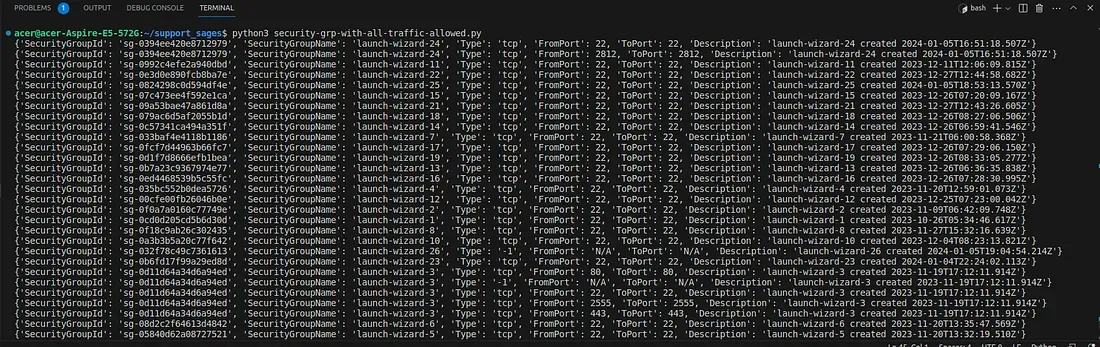
python3 security-grp-with-all-traffic-allowed.py.py <region>Replace <region> with the desired AWS region (e.g., us-east-1).

Conclusion
This Python script streamlines the process of identifying AWS security groups that permit all traffic within a specific region. Regularly incorporating this script into your security practices ensures that your security groups align with the principle of least privilege, contributing to a secure AWS environment.
Improve your cloud security! This Python script identifies security groups in your AWS environment allowing unrestricted traffic. Regularly running this script helps you maintain the least privilege and bolster your cloud defenses. Take charge of your security