Amazon Elastic Container Registry (ECR) is a fully managed container registry that makes it easy for developers to store, manage, and deploy Docker container images. As you use ECR to store your container images, it’s essential to implement effective lifecycle policies to manage your image repository efficiently. In this blog post, we’ll explore how to use AWS Lambda and Boto3 to automate the process of adding a lifecycle policy to expire images in an ECR repository.
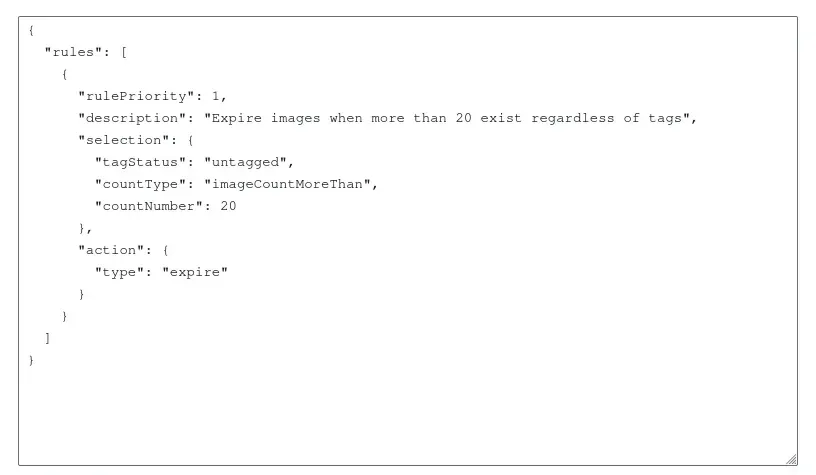
let’s understand the scenario we’re addressing. Imagine you have multiple container images stored in your ECR repository, and you want to implement a policy that automatically expires images when more than 20 images exist in the repository, regardless of their tags. This cleanup process ensures that you only keep a manageable number of images, preventing unnecessary storage costs.
Lambda Function
We’ll use AWS Lambda, a serverless compute service, to run our image cleanup script. Here’s a Python script that utilizes the Boto3 library to interact with ECR and add the desired lifecycle policy:
import boto3
import json

def lambda_handler(event, context):
# Initialize ECR client
ecr_client = boto3.client('ecr')

# Get a list of repository names
response = ecr_client.describe_repositories()
repository_names = [repository['repositoryName'] for repository in response['repositories']]

# Iterate through each repository and add/update the lifecycle policy
for repository_name in repository_names:
# Define the new lifecycle policy rule
new_lifecycle_policy_rule = {
'rulePriority': 1,
'description': 'Expire images when more than 20 exist regardless of tags',
'selection': {
'tagStatus': 'any',
'countType': 'imageCountMoreThan',
'countNumber': 20,
},
'action': {
'type': 'expire'
}
}

# Construct the new lifecycle policy
new_lifecycle_policy = {
'rules': [new_lifecycle_policy_rule]
}

try:
# Try to update the existing lifecycle policy
ecr_client.put_lifecycle_policy(
repositoryName=repository_name,
lifecyclePolicyText=json.dumps(new_lifecycle_policy)
)
print('Updated lifecycle policy for repository: {}'.format(repository_name))

except ecr_client.exceptions.LifecyclePolicyNotFoundException:
# If the repository doesn't have a policy, create a new one
ecr_client.put_lifecycle_policy(
repositoryName=repository_name,
lifecyclePolicyText=json.dumps(new_lifecycle_policy)
)
print('Created lifecycle policy for repository: {}'.format(repository_name))
Let’s break down the key components of the code:
- We use the
boto3library to create an ECR client. - The
describe_repositoriesmethod retrieves information about the ECR repositories in the account. - We iterate through each repository and define a new lifecycle policy rule to expire images when more than 20 exist, regardless of tags.
- The
put_lifecycle_policymethod is used to add or update the lifecycle policy for each repository.

Deploying the Lambda Function
To deploy this Lambda function, follow these steps:
- Open the AWS Lambda console.
- Create a new Lambda function.
- Choose the “Author from scratch” option.
- Configure the function with an appropriate name, runtime (Python 3.10), and role.
- Paste the provided code into the inline code editor.
- Set up an Amazon CloudWatch Events trigger to schedule the Lambda function’s execution.
With these steps completed, your Lambda function will automatically add or update the lifecycle policy for your ECR repositories.
Press enter or click to view image in full size
Conclusion
In this blog post, we explored how to automate the process of adding a lifecycle policy to expire images in an Amazon ECR repository using AWS Lambda and Boto3. Implementing such automated cleanup processes is crucial for maintaining a well-organized and cost-effective container image storage strategy. Feel free to customize the script to fit your specific requirements and integrate it into your existing AWS infrastructure.
Streamline your Amazon ECR image repository management effortlessly! Utilize our AWS Lambda script with Boto3 to automate lifecycle policies. Enhance efficiency, cut unnecessary storage costs, and maintain a well-organized container image storage strategy. Take control of your AWS infrastructure — deploy the solution now for a cost-effective ECR experience!