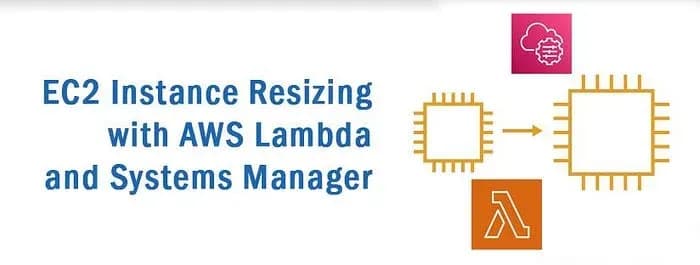
In many AWS environments, the workload demands on EC2 instances can vary throughout the day. To optimize costs and performance, it’s often beneficial to dynamically adjust the instance type based on the workload. In this blog post, we’ll explore how to automate EC2 instance resizing using AWS Lambda and Systems Manager.
Prerequisites
Before we dive into the solution, make sure you have the following set up:
- AWS Account: Make sure you have an AWS account with the necessary permissions to create Lambda functions, EC2 instances, and Systems Manager documents.
- EC2 Instances with Tags: Identify the EC2 instances that you want to resize and ensure they are tagged appropriately. For example, tags like
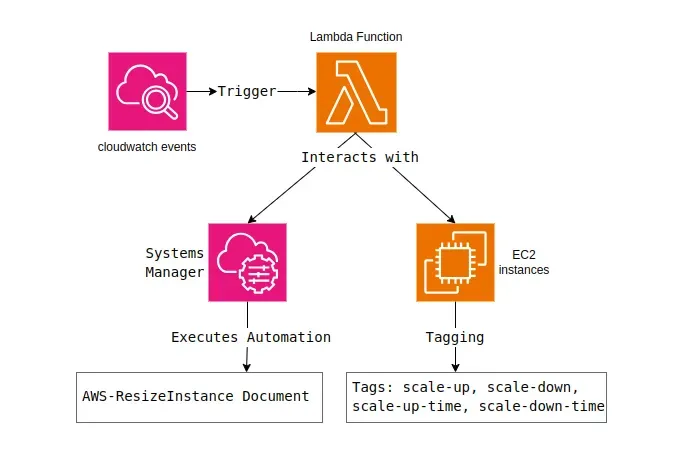
scale-up,scale-down,scale-up-time, andscale-down-timecan be used. Note that the time values in thescale-up-timeandscale-down-timetags must be in 24-hour format, and each time should be separated with '/'.
Architecture Overview
The solution uses AWS Lambda to trigger instance resizing based on the specified time. The Lambda function checks the current instance type and compares it with the scheduled scale-up and scale-down times. If a resize operation is required, it uses AWS Systems Manager (SSM) to start an automation document, which performs the instance resizing.
Implementation Steps:
1. Lambda Function Setup
Create a new Lambda function in the AWS Management Console with the following configuration:
- Runtime: Python 3.10
- Role: Create a new role with permissions for EC2 and SSM.
- Triggers: Set up a CloudWatch Events trigger to schedule the Lambda function execution.

2. Lambda Function Code
Copy and paste the provided Python code into your Lambda function. This code uses the Boto3 library to interact with AWS services, including EC2 and SSM. It incorporates the AWS Systems Manager document with the name “AWS-ResizeInstance” to orchestrate the resizing process.
import boto3
from datetime import datetime, timedelta

ssm = boto3.client('ssm')
ec2 = boto3.client('ec2')

def get_instance_type(instance_id):
response = ec2.describe_instances(InstanceIds=[instance_id])
return response['Reservations'][0]['Instances'][0]['InstanceType'] if response['Reservations'] else None
def get_tags(response):
for reservation in response['Reservations']:
for instance in reservation['Instances']:
tags = {tag['Key']: tag['Value'] for tag in instance.get('Tags', [])}
return tags.get('scale-down'), tags.get('scale-up'), tags.get('scale-down-time'), tags.get('scale-up-time')
def resize_instance(instance_id, new_instance_type):
try:
ssm.start_automation_execution(
DocumentName="AWS-ResizeInstance",
Parameters={'InstanceId': [instance_id], 'InstanceType': [new_instance_type]}
)
return f"Resizing {instance_id} to {new_instance_type} started."
except Exception as e:
return f"Error resizing instance: {str(e)}"

def find_times_within_30_minutes(time_list):
current_time = datetime.now()

for time_str in time_list:
time = datetime.strptime(time_str, "%H:%M")
thirty_minutes_ago = current_time - timedelta(minutes=30)

if thirty_minutes_ago.time() <= time.time() <= current_time.time():
return time.strftime("%H:%M")
return None

# Lambda handler function
def lambda_handler(event, context):
ec2 = boto3.client('ec2')
instance_ids = [instance['InstanceId'] for reservation in ec2.describe_instances()['Reservations'] for instance in reservation['Instances']]

for instance_id in instance_ids:
current_instance_type = get_instance_type(instance_id)
scale_down, scale_up, scale_down_time, scale_up_time = get_tags(ec2.describe_instances(InstanceIds=[instance_id]))

if current_instance_type == scale_up and find_times_within_30_minutes(scale_down_time.split('/')):
return resize_instance(instance_id, scale_down)

elif current_instance_type == scale_down and find_times_within_30_minutes(scale_up_time.split('/')):
3. EC2 Instance Tagging
Tag your EC2 instances with the following key-value pairs:
scale-up: The target instance type for scale-up.scale-down: The target instance type for scale-down.scale-up-time: The time window for scale-up operations (e.g.,17:51/01:10).scale-down-time: The time window for scale-down operations (e.g.,17:00/02:30).
4. Testing
Test the Lambda function by manually triggering it and observing the logs. Ensure that the function correctly identifies the current instance type and performs the resizing operation within the specified time.
5. Scheduling
Set up a recurring CloudWatch Events rule to trigger the Lambda function at the desired intervals. For example, you might schedule it to run every hour. Configure the rule to trigger at regular intervals using a cron expression (e.g., cron(0 0 * * ? *) for daily execution).
AWS Systems Manager Document
The AWS Systems Manager document named “AWS-ResizeInstance” plays a crucial role in this solution. It orchestrates the resizing process by taking parameters InstanceId and InstanceType and executing the necessary steps to resize the specified EC2 instance.
Optimize your EC2 sizes effortlessly with this robust DevOps approach! Discover the simple Lambda + Systems Manager combo to auto-resize based on workload. Save costs, and boost performance. Read the guide & conquer operational complexity with ease!