Amazon Web Services (AWS) provides a vast array of services for cloud computing, including Elastic Compute Cloud (EC2) for scalable virtual servers. Managing resources such as EC2 volumes is crucial for effective cloud infrastructure management. In this tutorial, we’ll explore how to list available volumes using AWS Lambda, a serverless compute service, and Boto3, the AWS SDK for Python.
Prerequisites
Before diving into the implementation, ensure you have the following prerequisites:
- An AWS account with appropriate permissions to create and manage Lambda functions.
- Python installed on your local machine.
- Basic knowledge of AWS Lambda and Python programming.
Setting Up the Lambda Function
We’ll start by creating a Lambda function in the AWS Management Console. Follow these steps:
- Navigate to Lambda: Go to the AWS Management Console, and select the Lambda service from the list of available services.
- Create Function: Click on the “Create function” button.
- Configure Function: Choose the “Author from scratch” option. Provide a name for your function, select a Python runtime environment, and choose an existing role with appropriate permissions or create a new one.
- Code: In the function code editor, paste the following Python code:
import json
import boto3
from datetime import datetime

def lambda_handler(event, context):
# Initialize the EC2 client
ec2_client = boto3.client('ec2')

# Retrieve all volumes
response = ec2_client.describe_volumes()
volumes = response['Volumes']

# Filter volumes based on their attachment status
in_use_volumes = []
not_in_use_volumes = []

for volume in volumes:
if volume['Attachments']:
# Volume is in-use
in_use_volumes.append(volume)
else:
# Volume is not in-use
not_in_use_volumes.append(volume)

# Convert datetime objects to strings
for volume in in_use_volumes + not_in_use_volumes:
if 'CreateTime' in volume:
volume['CreateTime'] = volume['CreateTime'].strftime("%Y-%m-%d %H:%M:%S")

# Prepare the response body with only Volume IDs
in_use_volume_ids = [volume['VolumeId'] for volume in in_use_volumes]
not_in_use_volume_ids = [volume['VolumeId'] for volume in not_in_use_volumes]
response_body = {
'in_use_volumes': in_use_volume_ids,
'not_in_use_volumes': not_in_use_volume_ids
}

print(response_body)
# Convert response to JSON
response_json = json.dumps(response_body, default=str)

# Return the response
return {
'statusCode': 200,
'body': response_json
}
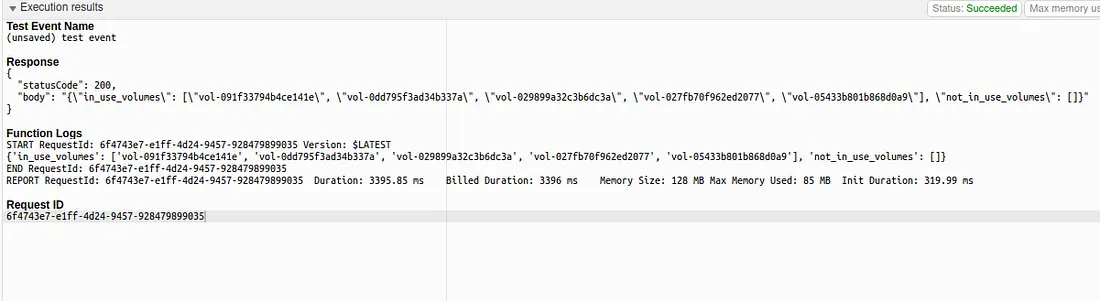
This code initializes a boto3 client for EC2 and retrieves information about available volumes using the describe_volumes method. It then prints the Volume ID of the in use volumes and not in use volumes.
Save and Deploy: Once you’ve finished writing the code, click on the “Deploy” button to save and deploy your Lambda function.
Testing the Lambda Function
After deploying the Lambda function, you can test it using the Lambda console or programmatically using the AWS SDK or CLI. Here’s how you can test it using the Lambda console:
- Invoke Function: In the Lambda console, click on the “Test” button to manually invoke the function.
- Review Results: Once the function execution is complete, review the results in the console output. You should see the Volume ID of the available volume printed in the output.

Conclusion
In this tutorial, we explored how to list available volumes using AWS Lambda and Boto3. Lambda provides a convenient way to automate tasks in AWS without managing server infrastructure. By leveraging Boto3, we can interact with various AWS services programmatically, enabling seamless integration and automation within our cloud environment.
Experiment with different functionalities of the boto3 library and explore the possibilities of serverless computing with AWS Lambda to optimize your cloud workflows.
Optimize your EC2 volume management with AWS Lambda and Boto3? Delve into our comprehensive tutorial on efficiently listing available volumes. Simplify your cloud infrastructure management and automate tasks seamlessly. Dive in now to revolutionize your AWS workflow!