
• DevOps
    Case Study

    How we built a resilient multi-account, multi-cloud solution for a Health Tech service provider!

    READ CASESTUDY
    icon

    24/7 DevOps as a Service

    Round-the-clock DevOps for uninterrupted efficiency.

    icon

    Infrastructure as a Code

    Crafting infrastructure with ingenious code.

    icon

    CI/CD Pipeline

    Automated CI/CD pipeline for seamless deployments.

    icon

    DevSecOps

    Integrated security in continuous DevOps practices.

    icon

    Hire DevOps Engineers

    Level up your team with DevOps visionaries.

    icon

    Consulting Services

    Navigate success with expert DevOps consulting.

  • TechOps
    Case Study

    How we built a scalable Odoo solution for a Travel Tech service provider!

    READ CASESTUDY

    WEB HOSTING SUPPORT

    icon

    HelpDesk Support

    Highly skilled 24/7 HelpDesk Support

    icon

    Product Support

    Boost your product support with our expertise.

    MANAGED SERVICES

    icon

    Server Management

    Don’t let server issues slow you down. Let us manage them for you.

    icon

    Server Monitoring

    Safeguard your server health with our comprehensive monitoring solutions.

    STAFF AUGMENTATION

    icon

    Hire an Admin

    Transform your business operations with our expert administrative support.

    icon

    Hire a Team

    Augment your workforce with highly skilled professionals from our diverse talent pool.

  • CloudOps
    Case Study

    How we helped a Private Deemed University in India, save US $3500/m on hosting charges!

    READ CASESTUDY
    icon

    AWS Well Architected Review

    Round-the-clock for uninterrupted efficiency

    icon

    Optimize

    Efficient CloudOps mastery for seamless cloud management

    icon

    Manage

    Automated CI/CD pipeline for seamless deployments

    icon

    Migrate

    Upgrade the journey, Migrate & Modernize seamlessly

    icon

    Modernize

    Simplify compliance complexities with our dedicated services

    icon

    FinOps as a Service

    FinOps as a Service

  • SecOps
    Case Study

    How we built a scalable Odoo solution for TravelTech service provider!

    READ CASESTUDY
    icon

    VAPT

    Vulnerability Assessment and Penetration Testing

    icon

    Source Code Review

    Ensuring source code security ans safe practices to reduce risks

    icon

    Security Consultation

    On demand services for improving server security

    icon

    System Hardening

    Reduced vulnerability and proactive protection

    icon

    Managed SoC

    Monitors and maintains system security. Quick response on incidents.

    icon

    Compliance as a Service

    Regulatory compliance, reduced risk

  • Insights
    Case Study

    How we helped a Private Deemed University in India, save US $3,500/m on hosting charges!

    READ CASESTUDY
    icon

    Blog

    Explore our latest articles and insights

    icon

    Case Studies

    Read about our client success stories

    icon

    Flipbook

    Explore our latest Flipbook

    icon

    Events

    Join us at upcoming events and conferences

    icon

    Webinars

    Watch our educational webinar series

  • Our Story
  • Contact Us

Interested to collaborate?

Get in touch with us!

Ready to elevate your business with certified cloud expertise? Contact us today to learn how our team can help you leverage cloud technology to drive growth, streamline operations, and enhance security.

  • AWSAWS
  • Azure CloudAzure Cloud
  • Google CloudGoogle Cloud
  • Akamai CloudAkamai Cloud
  • OVHOVH
  • Digital OceanDigital Ocean
  • HetznerHetzner
  • Kubernetes Consultancy Services
  • K8s & Cloud native Solutions
  • 24/7 Infrastructure Monitoring
  • DevOps as a Service
  • Cloud CI/CD Solutions
  • White Labeled MSP Support
  • Our story
  • Life@SupportSages
  • Insights
  • Careers
  • Events
  • Contact Us

Connect with us!


LinkedInFacebookXInstagramYouTube

aws partneraws advanced partner
SupportSages

Copyright © 2008 – 2026 SupportSages Pvt Ltd. All Rights Reserved.
Privacy PolicyLegal TermsData ProtectionCookie Policy
Load : an overview

Load : an overview

George K.

  • 5 min read
Load : an overview

Generating audio, please wait...

Server load monitoring is important for better and stable performance of a server, let us see what is meant by Load and how it can be measured,

Load

It is the most useful parameter to identify a server resource bottle necks. Let us look into the ways to identify and interpret it. Load output gives the no. of processes/jobs which waiting to be processed. It can be checked using different tools and the most commonly used in server load monitoring are w, uptime and top

The outputs are shown below

# w

01:30:06 up 87 days, 23 min, 2 users, load average: 13.54, 13.06, 13.48
#top

top - 01:30:44 up 87 days, 24 min, 2 users, load average: 14.18, 13.30, 13.54

Tasks: 707 total, 3 running, 697 sleeping, 0 stopped, 7 zombie

Cpu(s): 31.9%us, 5.7%sy, 0.2%ni, 51.9%id, 10.1%wa, 0.0%hi, 0.2%si, 0.0%st

Mem: 24625092k total, 23494124k used, 1130968k free, 421464k buffers

Swap: 2096440k total, 39756k used, 2056684k free, 11002424k cached
# uptime 01:34:48 up 87 days, 28 min, 2 users, load average: 13.37, 14.22, 13.91

What is load?

Load averages are the three numbers shown in the highlighted values in the above examples.  The three load-average values in the first line of top output are the 1-minute, 5-minute and 15-minute average.  That means, while on server load monitoring, reading from left to right, one can examine the aging trend and/or duration of the particular system state. Each number represents the average number of processes in the system run queue( process waiting for cpu cycles) in the past 1, 5, and 15 minutes, respectively. 

Single Core/CPU system

If a single process sat in the run queue for 5 minutes, the 5 minute load average would be 1. If a single process was in the run queue for 2.5 minutes, the 5 minute load average would be 0.5 , meaning that on average over the past 5 minutes the queue was empty 50% of the time. Whenever a process needs to have instructions executed, it gets sent to the system run queue. The CPU then executes the those processes one at a time; every process in the run queue must wait it’s turn for the CPU.  If your system has a large amount of processes all begging for CPU, and your CPU cannot keep up, your system run queue is probably going to become populated.  A populated run queue can tell you that your CPU can’t handle all the processes coming at it immediately.

The three values help us to analyze the system performance trends and is quite effective to curb attacks.

Multi core/CPU system

Your system only has one run queue, and every CPU will execute processes in that queue. If you have a system with four CPUs, then up to four processes can be executed in the run queue simultaneously.  On multi-processor system, the load is relative to the number of processor cores available. The “100% utilization” mark is 1.00 on a single-core system, 2.00, on a dual-core, 4.00 on a quad-core, etc.  For this reason, you have to interpret your load average slightly differently on a system with multiple CPUs. If you have 15-minute load average of 3 and your system has 8 CPUs, an average of 5 CPUs were idle during those 15 minutes.

Identification of CPU cores and Server stability

In server load monitoring it is important to find number of core in the CPU. CPU cores handle the processes. Consider a single core CPU where only 2 process can be handled by a core. When a 3rd process comes it goes to queue. It has to wait until one process is finished. If more cores are available, the processes in the server queue will be shrink and will add more stability to the server.

Let us consider a scenario where the server load is reported as : 6.30, 5.90, 5.27 .

To perform the evaluation, the number of CPU cores  can be identified using top command. First give “top” command and then press the “1” button in your keyboard, you can see the all the available cores with there stability parameters.
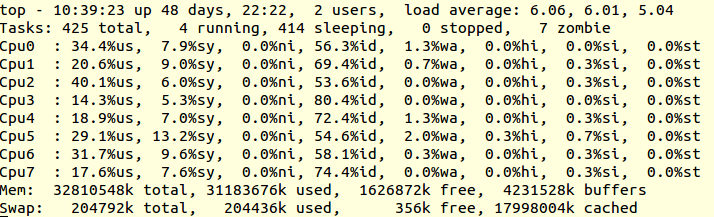
top_screen

You can also know the number of cpu cores from /proc/cpuinfo.
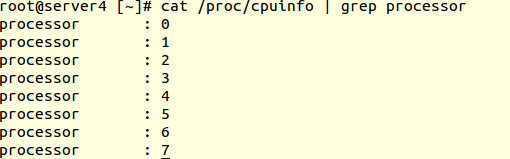
cpuinfo

For easy estimation of the server stability with load you can use the  following command

cat /proc/cpuinfo | grep processor | wc -l

The current load on the server is load average: 6.30, 5.90, 5.27. While considering the fact that the server has 8 CPU cores, the current value is not an alarming one.



  • Linux
  • Troubleshooting

.htaccess based mod_rewrite not working with Godaddy ?

.htaccess based mod_rewrite not working with Godaddy ?
  • Apache
  • General
  • Howtos
  • Linux
logo

/proc explained

/proc explained
  • Linux
logo

A story of Ubuntu – I am what I am because of who we all are :)

A story of Ubuntu – I am what I am because of who we all are :)
  • General
  • Training
logo

Account Creation: Sorry, a mysql user with the name x already exists.

Account Creation:  Sorry, a mysql user with the name x already exists.
  • MySQL
  • Troubleshooting
logo

Posts by George K.

George started his career in web hosting and Linux technical support in the year 2004 and is with SupportSages since 2009. He has keen interest in server optimizations, custom security solutions, hacked server recovery, cyber forensic and high availability fail over system design and implementation. George loves long drives and is passionate about art and literature.