What is Domain Name Resolution Process? When we type in a domain name to the browser the ‘Resolver’ program (the client-side of the DNS is called a DNS Resolver) is responsible for initiating and sequencing the queries that ultimately lead to a full resolution (translation) of the resource sought, i.e. translation of a domain name into an IP address) it will consult a NS for the IP. For the resolver to consult, it’s IP(NS’s IP) will be provided in /etc/resolv.conf file in linux machines.
Consider that we want to resolve www.abc.com. Let it be the web server of the domain abc.com (a separate host machine) and a website hosted on it. Also consider that it has ftp.abc.com as its ftp server and many others. When the resolver query reaches our NS there are 3 possibilities to consider :
(i) the information about the particular domain is already cached
Consider that another machine using the same NS as ours had queried for www.abc.com and resolved successfully to an IP. Since ours is caching NS it will cache (store) the IP of both the domain & NS which contained the ‘A’ record for www.abc.com (this is called the Authoritative NS for the domain abc.com). So next time when any other machine queries this NS for www.abc.com , it will directly take the IP from the cache and display the website. So caching helps to reduce the load on other DNS servers to high extent since DNS queries do not go beyond the caching NS.
(ii) no ‘A’ record information in the cache
If the caching server does not find the answer to a query in its cache, it has to find another DNS server that does have the answer. In our example it will look for a server that has answers for all names that end in ‘abc.com’. In DNS terminology such a server is said to be “Authoritative” for the “domain” ‘abc.com'(as I have mentioned earlier).
In many cases our caching server already knows the address of the authoritative server for ‘abc.com’. If someone using the same caching server has recently surfed to ‘ftp.abc.com’, the caching server needed to find the authoritative server for ‘abc.com’ at that time and, being a caching server, naturally it cached the address of the Authoritative server. So it will directly contact this NS and get the A record (IP) for ww.abc.com
(iii) the NS cache is completely empty
This is the situation when the NS has just been set up and the cache is completely empty, Consequently it neither knows the answer to your query nor does it know where the authoritative servers for ‘abc.com’ are. However it does know that it is possible to ask questions for ‘abc.com’ to an authoritative server for ‘com’. As per the DNS protocol : “In case authoritative servers for a name are not known, strip off the leftmost part of the name including the first dot and send the original query to an authoritative server for that name”.
One main point to note: In our example an authoritative server for ‘com’ does not know the answer to a query about ‘www.abc.com’, because the ‘abc.com’ servers hold that information, but it does know which servers are authoritative for ‘abc.com’ queries. So instead of an answer to the query, the ‘com’ server will answer with the list of authoritative servers for ‘abc.com’, a referral in DNS terminology. Then the authoritative servers for ‘abc.com’ will give the IP for ‘www.abc.com’ or ‘ftp.abc.com’. In addition, being a caching server, it will cache both the answer and the list of authoritative servers for ‘abc.com’ for further use.
But hold on, we assumed the cache was empty in the first place, so how does our caching server know where the authoritative servers for ‘com’ are? In other words what happens once we have stripped off all parts of a domain name and still do not know where to go for an answer?
For this case there is a special set of authoritative servers, the DNS root servers or simply ‘Root Servers’. They know the addresses of all authoritative servers for names that do not have a dot in them, the Top Level Domains (TLDs) such as ‘org’, ‘com’, ‘ch’, ‘uk’.
Root servers are the only DNS servers that have to be found without any other information being cached. To solve this all servers in the Internet’s name space acting as a NS will have a pre-configured list of numeric addresses for all root servers. This list is embedded with the NS software (BIND etc.). When starting up, a caching server will send queries for the current list of root servers to each of these addresses in turn until it obtains an answer. Once it has obtained the current list, it knows where to send queries for names without dots.
So here is what happens:
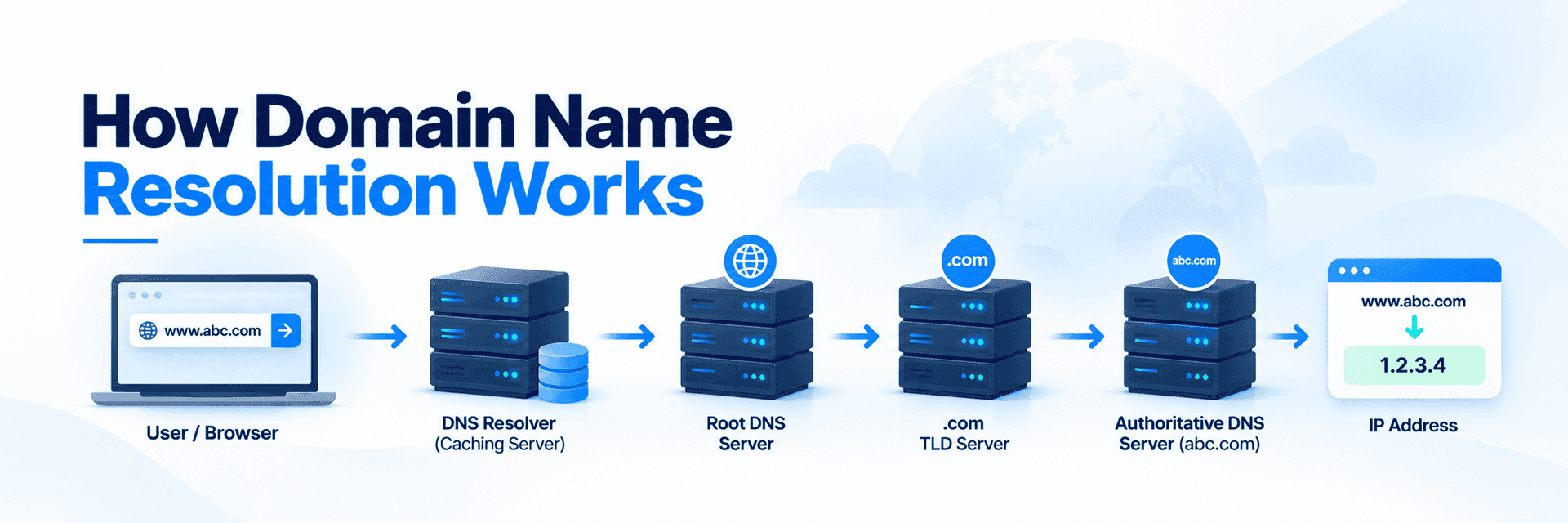
When a caching server that just started receives a query for the address of ‘www.abc.com’. After it started, the server obtained a list of root servers and their addresses. When the query arrives it will not find the answer for ‘www.abc.com’ in the cache, nor will it find the address of an authoritative server for ‘abc.com’, neither the address of an authoritative server for ‘com’. Having no other choice it will then ask a root server for the address of ‘www.abc.com’. The root server are authoritative for TLDs i.e. they have the answers for the list of Authoritative NS of the TLDs. So when our query for ‘www.abc.com’ reaches the root servers it will strip off the part for which it is not authoritative. So ‘www.abc’ will be stripped off. The remaining part of the name is ‘.com’ and it is authoritative for that. So it will answer with a referral containing the list of all authoritative servers for ‘.com’ TLD. This list of NS for ‘.com’ domain will have the list of NS for all the SLDs under ‘.com’. Our caching server will then send its query for ‘www.abc.com'(please note: always it sends a FQDN) to one of them and they will strip off ‘www’ and we will get another referral with the list of all authoritative servers for ‘abc.com’. When sending the query to one of them it will get the answer (IP of www.abc.com). All this typically happens in less than a second.
From here on the caching server can answer the same query again and again from the cache without asking another server. It can also send any query for ‘ftp.abc.com’ or ‘something.abc.com’ directly to an ‘abc.com’ server and send any question for another name ending in ‘.com’ directly to a servers authoritative for ‘.com’. Only when the next query ends in something different from ‘.com’ does it have to ask a root server again. Quickly the cache will contain lists of authoritative servers for all popular domains, especially for all popular TLDs; usually our caching server will not have to query for this information again for several days. This design ensures that only a tiny fraction of all queries will have to be processed by the root servers or by authoritative servers for TLDs.
Below is a pictorial representation of the domain name resolution process:

So this is the domain name resolution process. I hope you have gained a basic understanding.
Note: Please note that when a query goes to any NS including the root servers, the FQDN-Fully Qualified Domain Name is sent, i.e we query the root servers for the Authoritative NS for ‘com’ TLD. For that, the resolver does not particularly send ‘com’ in it’s query. It sends the complete domain name for which it needs the IP. www.abc.com is a FQDN but abc.com is not. A FQDN is the complete name containing the hostname, domain name and TLD. It is then the duty of the particular NS to strip off the part of the domain name for which it is not authoritative and then provide the answer to the query for the part for which it is authoritative.