• DevOps
    Case Study

    How we built a resilient multi-account, multi-cloud solution for a Health Tech service provider!

    READ CASESTUDY
    icon

    24/7 DevOps as a Service

    Round-the-clock DevOps for uninterrupted efficiency.

    icon

    Infrastructure as a Code

    Crafting infrastructure with ingenious code.

    icon

    CI/CD Pipeline

    Automated CI/CD pipeline for seamless deployments.

    icon

    DevSecOps

    Integrated security in continuous DevOps practices.

    icon

    Hire DevOps Engineers

    Level up your team with DevOps visionaries.

    icon

    Consulting Services

    Navigate success with expert DevOps consulting.

  • TechOps
    Case Study

    How we built a scalable Odoo solution for a Travel Tech service provider!

    READ CASESTUDY

    WEB HOSTING SUPPORT

    icon

    HelpDesk Support

    Highly skilled 24/7 HelpDesk Support

    icon

    Product Support

    Boost your product support with our expertise.

    MANAGED SERVICES

    icon

    Server Management

    Don’t let server issues slow you down. Let us manage them for you.

    icon

    Server Monitoring

    Safeguard your server health with our comprehensive monitoring solutions.

    STAFF AUGMENTATION

    icon

    Hire an Admin

    Transform your business operations with our expert administrative support.

    icon

    Hire a Team

    Augment your workforce with highly skilled professionals from our diverse talent pool.

  • CloudOps
    Case Study

    How we helped a Private Deemed University in India, save US $3500/m on hosting charges!

    READ CASESTUDY
    icon

    AWS Well Architected Review

    Round-the-clock for uninterrupted efficiency

    icon

    Optimize

    Efficient CloudOps mastery for seamless cloud management

    icon

    Manage

    Automated CI/CD pipeline for seamless deployments

    icon

    Migrate

    Upgrade the journey, Migrate & Modernize seamlessly

    icon

    Modernize

    Simplify compliance complexities with our dedicated services

    icon

    FinOps as a Service

    FinOps as a Service

  • SecOps
    Case Study

    How we built a scalable Odoo solution for TravelTech service provider!

    READ CASESTUDY
    icon

    VAPT

    Vulnerability Assessment and Penetration Testing

    icon

    Source Code Review

    Ensuring source code security ans safe practices to reduce risks

    icon

    Security Consultation

    On demand services for improving server security

    icon

    System Hardening

    Reduced vulnerability and proactive protection

    icon

    Managed SoC

    Monitors and maintains system security. Quick response on incidents.

    icon

    Compliance as a Service

    Regulatory compliance, reduced risk

  • Insights
    Case Study

    How we helped a Private Deemed University in India, save US $3,500/m on hosting charges!

    READ CASESTUDY
    icon

    Blog

    Explore our latest articles and insights

    icon

    Case Studies

    Read about our client success stories

    icon

    Flipbook

    Explore our latest Flipbook

    icon

    Events

    Join us at upcoming events and conferences

    icon

    Webinars

    Watch our educational webinar series

  • Our Story
  • Contact Us

Interested to collaborate?

Get in touch with us!

Ready to elevate your business with certified cloud expertise? Contact us today to learn how our team can help you leverage cloud technology to drive growth, streamline operations, and enhance security.

  • AWSAWS
  • Azure CloudAzure Cloud
  • Google CloudGoogle Cloud
  • Akamai CloudAkamai Cloud
  • OVHOVH
  • Digital OceanDigital Ocean
  • HetznerHetzner
  • Kubernetes Consultancy Services
  • K8s & Cloud native Solutions
  • 24/7 Infrastructure Monitoring
  • DevOps as a Service
  • Cloud CI/CD Solutions
  • White Labeled MSP Support
  • Our story
  • Life@SupportSages
  • Insights
  • Careers
  • Events
  • Contact Us

Connect with us!


LinkedInFacebookXInstagramYouTube

aws partneraws advanced partner
SupportSages

Copyright © 2008 – 2026 SupportSages Pvt Ltd. All Rights Reserved.
Privacy PolicyLegal TermsData ProtectionCookie Policy

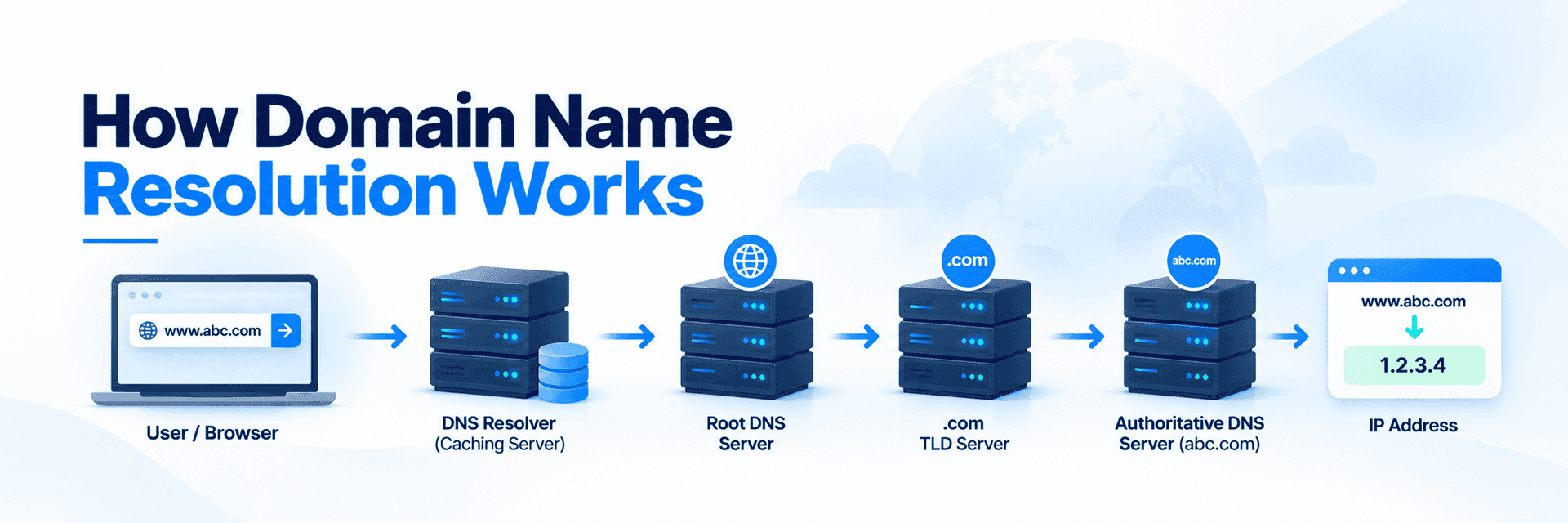
The domain name to IP resolution process – Part IV/IV – INTO THE ROOT SERVERS

Abhilash Padmanabhan

  • 4 min read
SupportSages Logo

Generating audio, please wait...

As I have mentioned in the PART III of this article, all the NS in the Internet will be aware of the IP of root servers. This information is provided in a file which comes along with the name server software package. The file is named.root or named.ca (it varies). This file is called the Root Hint file. It holds the name of the root servers and the corresponding IP at which it should be contacted. The root hint file is usually located in /var/named as named.ca or named.root (if the NS package is BIND). I have attached below a screen shot of a part of the file.
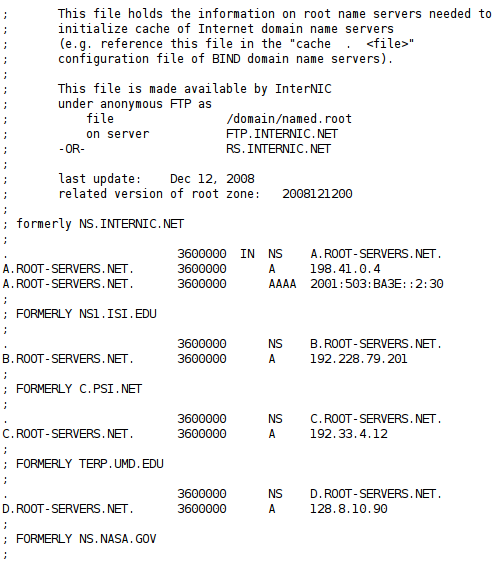
Here you may see the name of the root server to the left hand side and its IP to it’s right. The list I have put here has the severs up to D only. This list continues till M ( M.ROOT-SERVERS.NET.) .

The IP of these root servers do not change frequently but it does, once in while. Thus no one cares to update this file. So it is advisable to update this file for anyone running a busy NS. You can easily fetch root hint file with a dig utility:

dig @a.root-servers.net . ns > root.hints

or

dig @a.root-servers.net . ns > named.ca

You can easily set-up a crontab entry to perform file update once in month.

What makes Root Servers so special than other servers?

The key file that makes root servers so special is ‘root.zone’. This is contained in all the root severs from A – M. You can download this file too and view it ! Just note the screen shot in the above page. Two ftp servers are mentioned in the top : FTP.INTERNIC.NET & RS.INTERNIC.NET . Just do an ‘anonymous’ ftp to the above server and get the file by navigating to the specified directory. I have attached a screen shot of a part of it below.
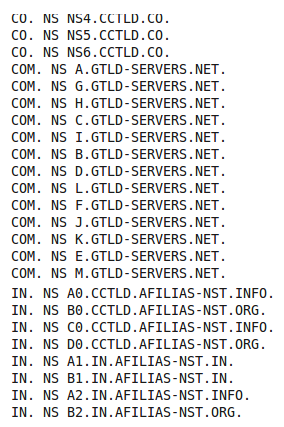
In the two screen shots, we can observe the name of the Authoritative NS for the gTLD ‘.com’ and ccTLD ‘.in’ . These Authoritative NS for ‘.com’ and ‘.in’ will have the IP of Authoritative NS for the domains ( second level or third level ) under it. Similarly all the existing ccTLDs and gTLDs have an entry for their NS in this file.

Now you might wonder: Only the names of the authoritative servers are mentioned here and where to get the IP of these? You need not worry. The IPs are mentioned in the same file after listing NS for all the TLDs. To make things clear I have put a screen print below:

The above is an entry in the same file ( root.zone). A.GTLD-SERVERS.NET. is an Authoritative NS for .com TLD. It’s IPv4 and Ipv6 addresses are mentioned. Similarly, there will be an IP entry for all the all the authoritative name servers for all the TLDs.

Please Note: I recommend the reader to compare the above informations with PART III of this article. It will help in clear understanding.

Okay. Then who updates this root.zone file?

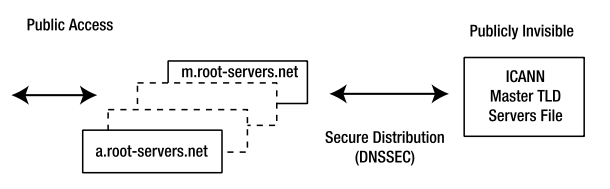
In 2004, ICANN took over responsibility for the maintenance of the root- servers TLD master file—the file that lists the authoritative servers for each TLD. Distribution of this file to each of the operational root-servers is carried out using secure transactions. To further increase the security, the server providing the root updates is only accessible from the operational root-servers. It is not a publicly visible server.

  • Linux
  • Training
The domain name to IP resolution process – Part IV/IV – INTO THE ROOT SERVERS

500 Internal Server due to low RLimitMem value

SupportSages Logo
  • Apache
  • cPanel
  • General
  • Linux
logo

Change all user account passwords in a cPanel server

Change all user account passwords in a cPanel server
  • cPanel
  • Linux
  • Snippets
logo

cPanel, postgresql and a default database issue with 8.4.x versions of postgres

SupportSages Logo
  • cPanel
  • PostgreSQL
  • Troubleshooting
logo

CRITICAL : Serious kernel bug!!! Root privilege escalation

SupportSages Logo
  • Linux
  • VPS
logo

Posts by Abhilash Padmanabhan

Technology always fascinated me and continues to do so. I started my career back in 2004 as a Junior System Admin and worked in various capacities both in technical and managerial roles. I love to experiment and try out new OSS projects and in free time, go for cycling to the interiors of God's own country, Kerala!