Overview:
SSL certificate or Secure Sockets Layer (Notice the last s in sockets) is used to secure the communication over the internet. This technique was introduced by Netscape. It uses the RSA public key cryptography for encryption/decryption.
In the protocol stack used in the internet. The SSL protocol runs above TCP/IP and below higher-level protocols such as HTTP or IMAP.
The SSL protocol includes two sub-protocols:
1) SSL record protocol
2) SSL handshake protocol
The SSL certificate record protocol defines the format used to transmit data. The SSL handshake protocol involves using the SSL record protocol to exchange a series of messages between an SSL-enabled server and an SSL-enabled client when they first establish an SSL connection.
Now SSL certificate for the layman
SSL certificate basically creates an encrypted communication channel between the two parties involved in the communication. For a third person involved in the middle of this communication channel, the data seems to be garbled.
Example:
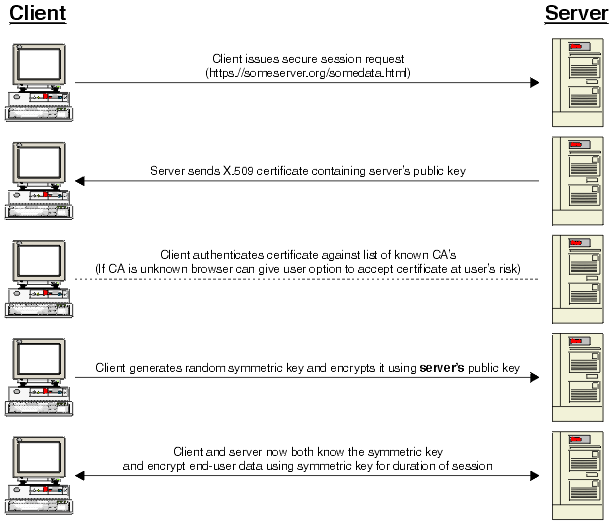
Suppose Alice (A, the browser) wishes to communicate with Bob (B, the server) then the exact steps that takes place inorder to begin the encrypted communication are:
1) A -> B hello
Alice contacts Bob and requests for a private communication (request for an https link at port 443)
2) B -> A Hi, I’m Bob, bobs-certificate
Bob send back to Alice his certificate. A certificate authenticates that it is Bob who is actually communicating with Alice. It is like a unique ID card displayed.
3) A -> B prove it
Alice requests Bob to prove his identity.
4) B -> A Alice, This Is bob { digest[Alice, This Is Bob] } bobs-private-key
Bob sends back a message and its digest encrypted with his private key. This step can also be like sending a document with a digital signature (when you have Alice’s public key).
5) A -> B ok bob, here is a secret {secret} bobs-public-key
Alice sends back to Bob some secret. Usually a session key encrypted using Bob’s public key obtained from his certificate
6) B -> A {some message,MAC}secret-key
Next Bob generates a secret key from Alice’s secret (earlier step) and sends back to Alice the real message and its MAC encrypted with this secret key. This is actually the encrypted website.
 Terminologies
Certificate:
This is actually bobs public key containing document which is digitally signed by a certificate issuer’s private key (like Verisign). In this process Verisign gets all the necessary documents to verify that Bob’s identity is correct and it gets Bob’s public key (and some other data like certificate expiry period, Bobs identity) and encrypts it with its own private key. Now Verisign’s public key comes built-in along with every browser (so that the browser can get bobs public key from within it).
Digest:
Digest or more appropriately Message Digest is like a summary of the actual message or a portion of the message. The digest of a message is is unique for every unique message, it is a one way function such that obtaining the digest, it is never possible to recover the original message (This does not involve using any key in the process). Message Digest always appears with the original message. Upon reception of this Message and its digest at the receiver’s end, the receiver can once again calculate the digest from the original message and verify the integrity of the message.
Digital signature:
Let Bob send a document to Alice which is digitally signed. For this Bob must have Alice’s public key and Alice must have Bob’s public key.Bob takes the document, encrypts it first with Alice’s public key and next with its own private key(Bob’s)
B -> A [{message}alices-public-key ]bobs-public-key
Session Key:
The only secret which is communicated using public key encryption is a session key. Now the session key is chosen from the ‘secret’ that the parties accept. the session key could be the secret itself or a portion of the secret or the result when the secret is passed through a previously agreed algorithm. The SSL encrypted communication does’t necessary have to be created using a public key encryption technique (This uses a lot of overhead, i.e. processing and time), it may be simple symmetric cypher(less overhead) using this session key once agreed upon. There are a variety of cypher suites available (IDEA Blow-fish RSA DES MD5 KEA) and both the parties may choose some encryption technique based on the protocol used (SSL1.0 SSL2.0 TLS etc)
MAC:
MAC or Message Authentication Code is similar to the Message Digest we have discussed. It is used to verify the integrity of the Message.
MAC := Digest[ some message, secret ]
Files associated with SSL
CSR
CSR or Certificate Signing Request is a string of text generated by the server. This file is sent to the SSL certificate vendor while purchasing an SSL. In the process of generating your CSR, you provide a number of details regarding the domain being registered. Excerpts of text from all these are taken to generate your private key. This private key is present only within the server and nowhere else. The content of the CSR basically contains the public key along with all the details you have used. You get this as domain.com.csr or domain_com.csr.
CA bundle
CA (Certificate Authority) bundle file is one which contains the public key of the Certificate Issuer (Like Verisign’s public key). Usually this is not required while installing the SSL certificate and most browsers will have this detail in advance to decrypt the SSL certificate (the CRT file) from the server. You get this as domain.com.cabundle or domain_com.ca-bundle.
CRT
This is the actuall SSL certificate as obtained from the SSL certificate vendor. It is a file (containing the public key of the domain secured with SSL and other details like the expiry date, owner information, address etc of the SSL) which is encrypted with the private key of the SSL vendor (Digitaly signed by the SSL vendor). You get this as domain.com.crt or domain_com.crt .
Key file
This is the file which holds your private key (strictly confidential material). The file will have the RSA private key as generated by your server software. You get this as customcardsplus.com.key or customcardsplus_com.key. This file is not usually send to your SSL vendor unlike the CSR. You get this as domain.com.key or domain_com.key .
SSL in a cPanel server
Any service can be secured in a communication channel which is encrypted with SSL. Each of this service on the encrypted channel will be on a different port. Some of them are as follows:
 service | normal | ssl |
| http | 80 | 443 |
| telnet | 23 | 992 |
| imap | 143/220 | 993 |
| pop | 109/110 | 995 |
| smtp | 25 | 465 |
A domain served as a secure webpage will require a dedicated IP (in a shared environment). SSL protocol is designed to use IP-based mapping. SSL does not support host headers. Therefore, you should have a unique IP address assigned to your secure site. These pages are served from the port 443. Let us examine the configuration of such a website in the apache’s config file /usr/local/apache/conf/httpd.conf.
Every website (in our example domain.com with username: doma) enabled with SSL has a unique set of directives in the VirtualHost section for the 443 port as:
<VirtualHost 266.11.208.293:443\> Dedicated IP of the domain ServerName domain.com #Domain name secured with SSL ServerAlias www.domain.com DocumentRoot /home/doma/public_html ServerAdmin [email protected] UseCanonicalName off CustomLog /usr/local/apache/domlogs/domain.com combined CustomLog /usr/local/apache/domlogs/domain.com-bytes_log "%{%s}t %I .\n%{%s}t %O ." ScriptAlias /cgi-bin/ /home/doma/public_html/cgi-bin/ SSLEngine on #This directive enables the SSL on this domain SSLCertificateFile /etc/ssl/certs/www.domain.com.crt #Location of CRT file SSLCertificateKeyFile /etc/ssl/private/www.doma.com.key #Location of Private key SSLCACertificateFile /etc/ssl/certs/www.domain.com.cabundle #Location of CAbundle file CustomLog /usr/local/apache/domlogs/domain.com-ssl_log combined #Log specific for the SSL served webpage SetEnvIf User-Agent ".*MSIE.*" nokeepalive ssl-unclean-shutdown <Directory "/home/doma/public_html/cgi-bin"> SSLOptions +StdEnvVars #This directive will pass mod_ssl environment variables to the server scripts. </Directory> </VirtualHost>
Some times the directive SSLCertificateChainFile is used in place of SSLCACertificateFile. The minimal addition you will have to make to enable SSL in your httpd.conf file is:
<VirtualHost 192.168.0.1:443> DocumentRoot /var/www/html ServerName www.yourdomain.com SSLEngine on SSLCertificateFile /path/to/your_domain_name.crt SSLCertificateKeyFile /path/to/your_private.key SSLCertificateChainFile /path/to/DigiCertCA.crt </VirtualHost>
There are two locations where you are likely to find the SSL related files in your cPanel server. Usually the crt, key and the ca bundle are present in the home directory of the user in /home/username/ssl/, if it was installed using the client’s cpanel. However if the WHM was used instead to install the same, you will find it in /etc/ssl/. In either of these locations you will find two directories: certs/ and private/. certs contain the crt and cabundle while the private contains the keys.
Now you know how ssl works in your server, Any more questions? just comment!