


• DevOps
    Case Study

    How we built a resilient multi-account, multi-cloud solution for a Health Tech service provider!

    READ CASESTUDY
    icon

    24/7 DevOps as a Service

    Round-the-clock DevOps for uninterrupted efficiency.

    icon

    Infrastructure as a Code

    Crafting infrastructure with ingenious code.

    icon

    CI/CD Pipeline

    Automated CI/CD pipeline for seamless deployments.

    icon

    DevSecOps

    Integrated security in continuous DevOps practices.

    icon

    Hire DevOps Engineers

    Level up your team with DevOps visionaries.

    icon

    Consulting Services

    Navigate success with expert DevOps consulting.

  • TechOps
    Case Study

    How we built a scalable Odoo solution for a Travel Tech service provider!

    READ CASESTUDY

    WEB HOSTING SUPPORT

    icon

    HelpDesk Support

    Highly skilled 24/7 HelpDesk Support

    icon

    Product Support

    Boost your product support with our expertise.

    MANAGED SERVICES

    icon

    Server Management

    Don’t let server issues slow you down. Let us manage them for you.

    icon

    Server Monitoring

    Safeguard your server health with our comprehensive monitoring solutions.

    STAFF AUGMENTATION

    icon

    Hire an Admin

    Transform your business operations with our expert administrative support.

    icon

    Hire a Team

    Augment your workforce with highly skilled professionals from our diverse talent pool.

  • CloudOps
    Case Study

    How we helped a Private Deemed University in India, save US $3500/m on hosting charges!

    READ CASESTUDY
    icon

    AWS Well Architected Review

    Round-the-clock for uninterrupted efficiency

    icon

    Optimize

    Efficient CloudOps mastery for seamless cloud management

    icon

    Manage

    Automated CI/CD pipeline for seamless deployments

    icon

    Migrate

    Upgrade the journey, Migrate & Modernize seamlessly

    icon

    Modernize

    Simplify compliance complexities with our dedicated services

    icon

    FinOps as a Service

    FinOps as a Service

  • SecOps
    Case Study

    How we built a scalable Odoo solution for TravelTech service provider!

    READ CASESTUDY
    icon

    VAPT

    Vulnerability Assessment and Penetration Testing

    icon

    Source Code Review

    Ensuring source code security ans safe practices to reduce risks

    icon

    Security Consultation

    On demand services for improving server security

    icon

    System Hardening

    Reduced vulnerability and proactive protection

    icon

    Managed SoC

    Monitors and maintains system security. Quick response on incidents.

    icon

    Compliance as a Service

    Regulatory compliance, reduced risk

  • Insights
    Case Study

    How we helped a Private Deemed University in India, save US $3,500/m on hosting charges!

    READ CASESTUDY
    icon

    Blog

    Explore our latest articles and insights

    icon

    Case Studies

    Read about our client success stories

    icon

    Flipbook

    Explore our latest Flipbook

    icon

    Events

    Join us at upcoming events and conferences

    icon

    Webinars

    Watch our educational webinar series

  • Our Story
  • Contact Us

Interested to collaborate?

Get in touch with us!

Ready to elevate your business with certified cloud expertise? Contact us today to learn how our team can help you leverage cloud technology to drive growth, streamline operations, and enhance security.

  • AWSAWS
  • Azure CloudAzure Cloud
  • Google CloudGoogle Cloud
  • Akamai CloudAkamai Cloud
  • OVHOVH
  • Digital OceanDigital Ocean
  • HetznerHetzner
  • Kubernetes Consultancy Services
  • K8s & Cloud native Solutions
  • 24/7 Infrastructure Monitoring
  • DevOps as a Service
  • Cloud CI/CD Solutions
  • White Labeled MSP Support
  • Our story
  • Life@SupportSages
  • Insights
  • Careers
  • Events
  • Contact Us

Connect with us!


LinkedInFacebookXInstagramYouTube

aws partneraws advanced partner
SupportSages

Copyright © 2008 – 2026 SupportSages Pvt Ltd. All Rights Reserved.
Privacy PolicyLegal TermsData ProtectionCookie Policy

Load Average and CPU usage in Linux!

Vijesh Vijayan

  • 3 min read
SupportSages Logo

Generating audio, please wait...

On Linux server monitoring, we might came across the terms server Load Average and CPU usage. Take a look at the brief explanation on both of them given below.

Load Average and CPU usage in Linux
====================================

The three common commands that give the load average details are:

* uptime
* w
* top

* tload graphical but in terminal
* xload graphical in the X display

It is the average sum of the number of processes waiting in the run-queue plus the processes currently executing over 1, 5, and 15 minute time periods.

It represents the average number of processes that are in the running (using the CPU) or runnable (waiting for the CPU) states. The notable exception in Linux is that it includes processes in uninterruptible sleep states like waiting for some I/O activity to complete. This can markedly increase the load average on Linux servers.

For a single processor machine a load average of 1 means that, on average, there is always a process in the running or runable state. Thus, the CPU is being utilized 100% of the time and is at capacity. If you tried to run another process, it would have to wait in the run queue before being executed. For multiprocessor systems, however, the system isn’t CPU bound until the load average equals the number of processors (or cores, for multi-core processors) in the machine. If a database server, for example, has two dual core processors(2×2 processors), the system isn’t fully utilized until the load average reaches 4.

As a general rule of thumb we dont have to panic until the load average is 3 (3 for single core 6 for dual core and so on ). This is strictly a general concept.

CPU percentage or CPU usage
===========================

Another term commonly appears in Linux server monitoring is CPU usage or CPU percentage. CPU percentage is the amount of a time interval that the system’s processes were found to be active on the CPU. If the system CPU usage (by using top command) is 45%, 45% of the samples taken by top found your process active on the CPU. The rest of the time the application was in a wait. (It is important to remember that a CPU is a discrete state machine. It really can be at only 100%, executing an instruction, or at 0%, waiting for something to do. There is no such thing as using 45% of a CPU. The CPU percentage is a function of time.)

To summarize CPU load is no. of processes waiting or running in the processor. CPU usages is time taken by any process in the CPU before complete execution.

  • General
  • Special Offers
Load Average and CPU usage in Linux!

AIDE to aid your server security needs

SupportSages Logo
  • Linux
  • Security
logo

All about SSL

All about SSL
  • cPanel
  • General
  • Howtos
  • Linux
  • Snippets
  • Training
  • Troubleshooting
  • VPS
logo

IFS

IFS
  • cPanel
  • Customer Care
  • General
  • Howtos
  • Linux
  • Offers
  • PostgreSQL
  • Security
  • Snippets
  • Special Offers
  • Training
  • Troubleshooting
logo

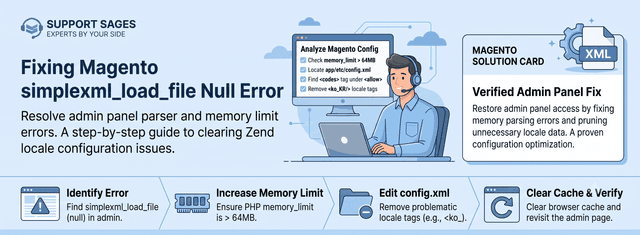
Magento Warning: simplexml_load_file() [function.simplexml-load-file]: (null)

SupportSages Logo
  • Linux
logo

Posts by Vijesh Vijayan

Vijesh is quite enthusiastic in learning new technologies and enjoys sharing it with others. He has great command over various scripting languages like bash, perl, python and is keen in developing scripts for better productivity. He is a gifted singer and amuses the team with his mimicry skills, when there is a leisure moment.