Overview:
Hello there. So many of us are familiar with the term FTP, but we hardly know how complex it is in its working. Lets take a look on FTP basics in this post.
In this post, I would rather explain the concepts less in words, but more with the aid of Pictures. A Picture is worth a thousand words, isn’t it ?!
File Transfer Protocol(FTP)
FTP is a Network protocol used to transfer files from one host to another over a network, such as the Internet. FTP is based on a client-server architecture. It has separate control and data connections between the client and server. FTP is TCP based. It is working in two ports.
FTP Ports
FTP relies on a pair of TCP Ports and hence it operates in two connection channels.
Port 20 – FTP Data Channel : This port is used for the data transfer between the client and the server. Any data from the server (such as the command ls would initiate direcotry listing from the server) will go over this port.
Port 21 – FTP Control Channel : The commands we use to send and the FTP Server responses will be going through this port.
But the ports are not always 20 and 21, it depends on the type of FTP connection.
Types of FTP
From a Networking perspective, there are two types of FTP :
(i) Active FTP
(ii) Passive FTP
From a User perspective, FTP can be classified into :
(i) Regular FTP
(ii) Anonymous FTP
Active FTP
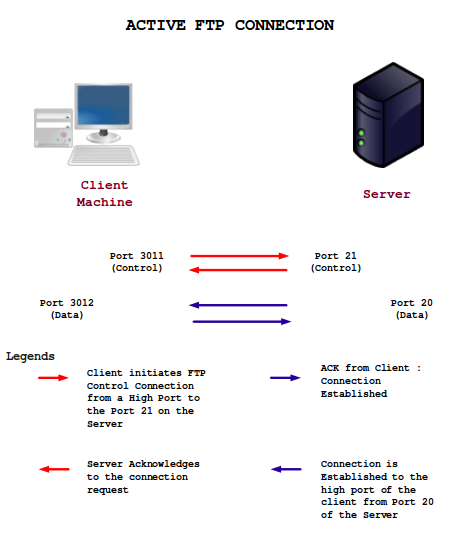
a) Client machine initiates and FTP Control connection from a high port (usually greater than 1024) to the Port 21 on the server. For example, when a command ‘ls’ is initiated, it is sent over here.
b) Server initiates the Data connection from Port 20 to the port specified by the client. The listing as a result of the ls command comes over here.
This is a secure mode for the server since, Port 20 is only open for Active FTP Connections. If the client is protected by a Firewall, then there is a probability that the connection gets blocked since the firewall might block the port, which should be opened in order to establish the connection. Active mode FTP operates on the client side. Here, the client doesn’t establish the actual connection with the server (data port), rather it simply tells the server what port it is listening and the server connects back to that specified port on the client. For the client’s firewall this appears to be an external system initiating the connection to an internal client and that is why the connection gets blocked usually.
Passive FTP
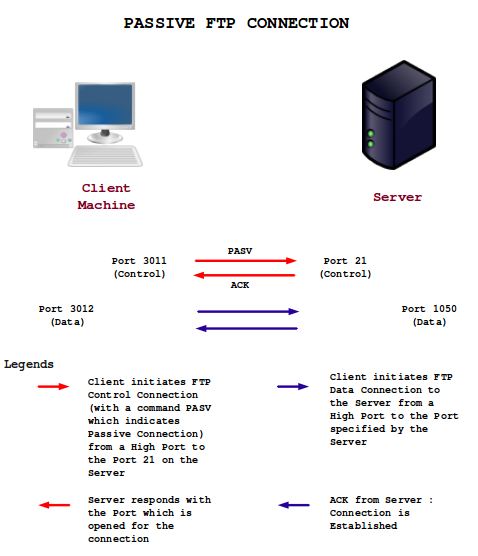
a) Client machine initiates FTP Control connection from a high port (usually greater than 1024) to the Port 21 on the server. Server responds with the port which is opened for the connection.
b) Client initiates the Data connection from the high port to a high port specified by the server.
This is the most widely used FTP connection nowadays. This is developed as an alternative method of Server initiating the connection for the client. This is not a secure way for the server since the connection is established between the high ports of client and server. Server don’t know which port should be kept opened exactly. So it needs to open a range of ports for establishing the connection. But most of the FTP daemons allows the administrator to specify which ports should be opened in the server for establishing the connection. Since client initiates the required connections, passive FTP works better for clients protected by a firewall.
Anonymous FTP
Anonymous FTP accounts come into play when a group of unknown users needs to interact with a Web server or Website frequently. Using anonymous FTP, users can exchange files with the website with a limited access to the server. The virtue of Anonymous FTP is that, a user can access the public files like Documents, Music and other stuff without being an official member of the server or website. Usually Anonymous FTP connections has the destination directory ‘public_ftp’. Anonymous users would not get access to anywhere else in the server. The username would be ‘anonymous’. The password would be your E-mail address. Some servers will let you in without providing the password.
Secure FTP
Secure FTP is an extension to FTP that adds support for the Transport Layer Security (TLS) and the Secure Sockets Layer (SSL) cryptographic protocols. SFTP performs all operations over an encrypted SSH transport.
A widely implemented security extension to the FTP protocol is the use of the SSL (Secure Sockets Layer) version 3.0 or TLS (Transport Layer Security) version 1.0 protocol. Since the SSL/TLS protocols lie above the TCP/IP (Transport) layer its relatively easy to implement Secure mode over Protocols such as HTTP and FTP.
Secure extensions provide strong authentication, integrity, and confidentiality on both the control and data channels.
There are two types of Secure FTP :
(i) Explicit Security
(ii) Implicit Security
Explicit Security
In Explicit Security, for establishing the SSL link, the FTP client should invoke a specific command to the FTP server after establishing the connection. The default FTP server port is used (Port 21)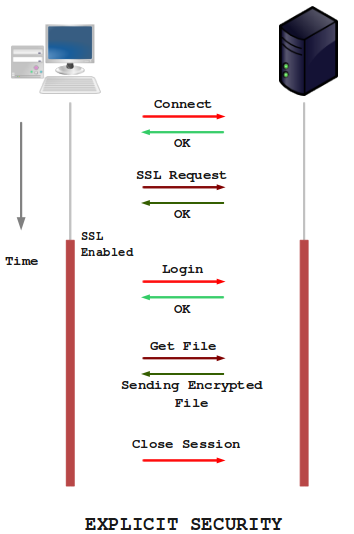
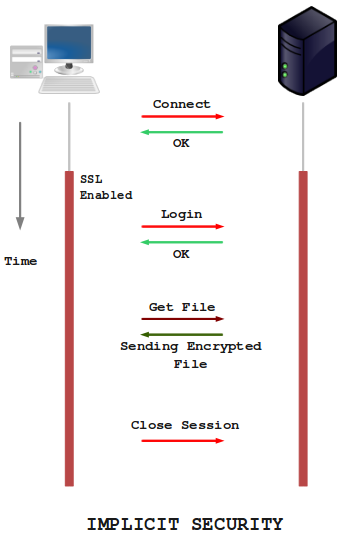
Implicit Security
In Implicit method, security automatically begins with an SSL connection immediately after the FTP client connects to the FTP server. Here, the FTP server defines a specific port for the client (Port 990) for secure connections.
References
http://www.isaserver.org/articles/How_the_FTP_protocol_Challenges_Firewall_Security.html
http://slacksite.com/other/ftp.html
http://www.enterprisedt.com/publications/FTP_Overview.html