
How many times have you been asked for providing a ‘traceroute’ output by your Hosting provider, or if you are an admin working with a hosting provider, how many times you’ve asked for the results of traceroute to your client ? The traceroute output explained here,
What is Traceroute ?
Traceroute is the program that shows you the route over the network between two systems, listing all the intermediate routers a connection must pass through to get to its destination. It can help you in analyzing why the connections from your end to a server is poor, and can often help you to spot what exactly is the problem. It always shows you how your machine is connected to ISP and ISP to the rest of the network, collectively the connection between your end and server.
When we initiate Traceroute, it sends a sequence of Internet Control Message Protocol (ICMP) packets addressed to a destination host. It passes through a series of intermediate routers, which involves a TTL (Time-to-Live) value. TTL refers to how many routers your packet can go through before its expires. Routers will discard a packet when the TTL has reached zero, returning an ICMP error message Code 11 (ICMP Time Exceeded) to the sender.
Executing traceroute
The only required parameter is the name or IP address of the destination host . The optional packet length is the total size of the probing packet (default 60 bytes for IPv4 and 80 for IPv6).
In Unix machines : traceroute server-name (traceroute supportsages.com)
In Windows machines : tracert server-name (tracert supportsages.com)
We will be discussing in detail about traceroute in IPv4, Unix environment
In general, traceroute can be found in /usr/sbin. So the traceroute command can be also run as
/usr/sbin/traceroute server-name
You can check where traceroute is located using the command :
root@server:~$ which traceroute /usr/sbin/traceroute
Traceroute main options
traceroute [-m] [-q] [-w]
-m : Specifies the maximum number of hops (max Time-To-Live value). The default is 30.
-q : Sets the number of UDP packets per hop. The default is 3
-w : Set the time (in seconds) to wait for a response to a probe. Default 5 seconds
Reading the Output
When a traceroute command is executed, generally it will go for a maximum of 30 hops. On the Internet, most data packets need to go through several routers before they reach their final destination. Each time the packet is forwarded to the next router, a Hop occurs. The more hops, the longer it takes for data to go from source to destination. So the fewer hops it takes to get your data, the faster your access will be. Such 30 hops are counted when executing a traceroute command.
Syntax of the result of a traceroute command
linx-1.init7.net (195.66.224.175) 252.199 ms 253.216 ms 253.359 ms
(Target Server) (IP address) (RTT 1) (RTT 2) (RTT 3)
Here is the full result of a traceroute command :
root@server:~$ traceroute supportsages.com traceroute to supportsages.com (188.40.112.243), 30 hops max, 60 byte packets 1 192.168.1.1 (192.168.1.1) 24.361 ms 24.371 ms 24.394 ms 2 ABTS-KK-dynamic-001.0.172.122.airtelbroadband.in (122.172.0.1) 38.161 ms 39.415 ms 40.911 ms 3 ABTS-KK-Static-093.32.166.122.airtelbroadband.in (122.166.32.93) 43.195 ms 43.587 ms 48.054 ms 4 ABTS-KK-Static-009.32.166.122.airtelbroadband.in (122.166.32.9) 48.304 ms 49.512 ms 51.947 ms 5 122.175.255.29 (122.175.255.29) 53.312 ms 55.444 ms 57.223 ms 6 59.145.36.230 (59.145.36.230) 235.823 ms 212.100 ms 212.298 ms 7 linx-1.init7.net (195.66.224.175) 252.199 ms 253.216 ms 253.359 ms 8 r1ams2.core.init7.net (77.109.128.34) 252.791 ms 253.008 ms 255.776 ms 9 r1ams1.core.init7.net (77.109.128.145) 255.973 ms 256.212 ms 256.592 ms 10 r1fra1.core.init7.net (77.109.128.153) 345.600 ms 345.906 ms 346.151 ms 11 gw-hetzner.init7.net (77.109.135.18) 358.110 ms 358.565 ms 358.808 ms 12 hos-bb1.juniper2.fs.hetzner.de (213.239.240.243) 359.089 ms hos-bb1.juniper1.fs.hetzner.de (213.239.240.242) 233.990 ms hos-bb1.juniper2.fs.hetzner.de (213.239.240.243) 233.347 ms 13 hos-tr4.ex3k10.rz10.hetzner.de (213.239.227.235) 235.315 ms hos-tr2.ex3k10.rz10.hetzner.de (213.239.227.171) 233.554 ms hos-tr4.ex3k10.rz10.hetzner.de (213.239.227.235) 242.239 ms 14 main.supportsages.com (188.40.112.203) 235.676 ms 241.867 ms 242.565 ms 15 * * * 16 * * * 17 * * * 18 * * * 19 * * * 20 * * * 21 * * * 22 * * * 23 * * * 24 * * * 25 * * * 26 * * * 27 * * * 28 * * * 29 * * * 30 * * *
traceroute output explained
The first line shows the target server, that server’s IP address, the maximum number of hops that will be allowed, and the size of the packets being sent. The following line for each system or router in the path between your machine and the target server. Each line shows the name of the server (as determined from DNS, if it cannot perform a Reverse DNS, only the IP address is shown), the system’s IP address, and three Round Trip Times (RTTs) in milliseconds. These RTTs shows the time it took a packet to get from your machine to the server and back again, called the latency between the two systems. By default, three packets are sent to each system along the route, so it shows three RTTs.
Understanding the issues
1) Some times the output may have one or two of the RTTs missing
linx-1.init7.net (195.66.224.175) 252.199 ms * *
In this case, the server is up and responding, but for some reason it did not respond to the second and third packets. This does not necessarily indicate a problem; in fact, it is usually normal, and just means that the system discarded the packet for some reason. These are most often computers, rather than dedicated routers. Systems running Solaris routinely show an asterisk instead of the second RTT.
It’s important to remember that timeouts are not necessarily an indication of packet loss.
2) Sometimes you will see an entry with just an IP address and no server name :
77.109.128.153 255.973 ms 256.212 ms 256.592 ms
This simply means that a reverse DNS lookup on the address failed, so the name of the server could not be determined.
3) If your traceroute ends in all timeouts, like this:
12 gw-hetzner.init7.net (77.109.135.18) 358.110 ms 358.565 ms 358.808 ms
13 * * *
14 * * *
15 * * *
This means that the target host could not be reached. Precisely, it means that the packets could not reach there and back. They may actually be reaching the target system but encountering problems on the return. This is possibly due to some kind of problem, but it may also be an intentional block due to a firewall or other security measures, and the block may affect traceroute but not real server connections.
After the trip time, some additional annotation can be printed
!H Host unreachable
!N Network unreachable
!P Protocol unreachable
!S Source route failed
!F Fragmentation needed
!X Communication administratively prohibited
!V Host precedence violation
!C Precedence cutoff in effect
!<num> ICMP unreachable code <num>.
If almost all the probes result in some kind of unreachable, traceroute will give up and exit.
How it Works
As mentioned earlier, Routers will discard a packet when the TTL has reached zero, returning an ICMP error message Type 11 (ICMP Time Exceeded) to the sender. This is the basic principle behind Traceroute command. This ICMP error message will give more information about each hop in the path.
root@server:~$ traceroute supportsages.com traceroute to supportsages.com (188.40.112.243), 30 hops max, 60 byte packets 1 192.168.1.1 (192.168.1.1) 24.361 ms 24.371 ms 24.394 ms 2 ABTS-KK-dynamic-001.0.172.122.airtelbroadband.in (122.172.0.1) 38.161 ms 39.415 ms 40.911 ms 3 ABTS-KK-Static-093.32.166.122.airtelbroadband.in (122.166.32.93) 43.195 ms 43.587 ms 48.054 ms 4 ABTS-KK-Static-009.32.166.122.airtelbroadband.in (122.166.32.9) 48.304 ms 49.512 ms 51.947 ms 5 122.175.255.29 (122.175.255.29) 53.312 ms 55.444 ms 57.223 ms 6 59.145.36.230 (59.145.36.230) 235.823 ms 212.100 ms 212.298 ms 7 linx-1.init7.net (195.66.224.175) 252.199 ms 253.216 ms 253.359 ms 8 r1ams2.core.init7.net (77.109.128.34) 252.791 ms 253.008 ms 255.776 ms 9 r1ams1.core.init7.net (77.109.128.145) 255.973 ms 256.212 ms 256.592 ms 10 r1fra1.core.init7.net (77.109.128.153) 345.600 ms 345.906 ms 346.151 ms 11 gw-hetzner.init7.net (77.109.135.18) 358.110 ms 358.565 ms 358.808 ms 12 hos-bb1.juniper2.fs.hetzner.de (213.239.240.243) 359.089 ms hos-bb1.juniper1.fs.hetzner.de (213.239.240.242) 233.990 ms hos-bb1.juniper2.fs.hetzner.de (213.239.240.243) 233.347 ms 13 hos-tr4.ex3k10.rz10.hetzner.de (213.239.227.235) 235.315 ms hos-tr2.ex3k10.rz10.hetzner.de (213.239.227.171) 233.554 ms hos-tr4.ex3k10.rz10.hetzner.de (213.239.227.235) 242.239 ms 14 main.supportsages.com (188.40.112.203) 235.676 ms 241.867 ms 242.565 ms 15 * * * 16 * * * 17 * * * 18 * * * 19 * * * 20 * * * 21 * * * 22 * * * 23 * * * 24 * * * 25 * * * 26 * * * 27 * * * 28 * * * 29 * * * 30 * * *
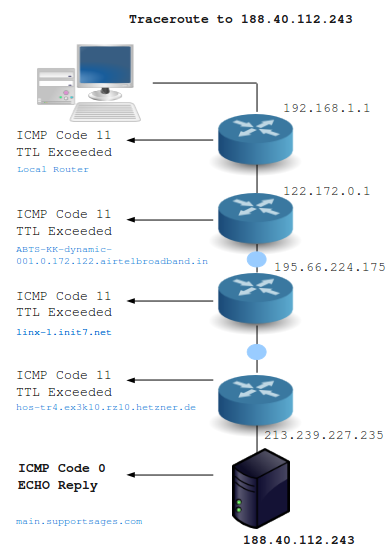
In the first step, an ICMP request was sent from the router (Here it is 192.168.1.1) to 188.40.112.243 with TTL 1. Since the server was not directly connected to the router, an ICMP Error message, Code 11 (TTL Exceeded) was returned along with it’s source address. It is clear that the very first hop to 188.40.112.243 is from our local router. Thus the router IP (192.168.1.1) is shown along with three RTTs.
Traceroute will always search for a Server Name, if possible. So the server name is displayed along with its IP address (if it cannot perform a Reverse DNS, the IP addres is only shown)
Traceroute will again send 3 more packets, with TTL 2. The same thing will happen, the next router will respond with its IP address and RTTs. This will go on until the target server or maximum hop count is reached. If the target server is reached, the ICMP Code 0, Echo Reply will be sent and thus Traceroute knows the job is finished. In this case the target server is reached well before the maximum hop counts. So what we saw is a successful traceroute attempt. No issues at all !
The image explains it all – A series of Routers are skipped for the sake of representation
References
http://www.mediacollege.com/internet/troubleshooter/traceroute.html
http://www.exit109.com/~jeremy/news/providers/traceroute.html
http://www.akmos.com/support/techsupport/traceroute.html
http://www.ehow.com/how_6468192_understand-traceroute-output.html