• DevOps
    Case Study

    How we built a resilient multi-account, multi-cloud solution for a Health Tech service provider!

    READ CASESTUDY
    icon

    24/7 DevOps as a Service

    Round-the-clock DevOps for uninterrupted efficiency.

    icon

    Infrastructure as a Code

    Crafting infrastructure with ingenious code.

    icon

    CI/CD Pipeline

    Automated CI/CD pipeline for seamless deployments.

    icon

    DevSecOps

    Integrated security in continuous DevOps practices.

    icon

    Hire DevOps Engineers

    Level up your team with DevOps visionaries.

    icon

    Consulting Services

    Navigate success with expert DevOps consulting.

  • TechOps
    Case Study

    How we built a scalable Odoo solution for a Travel Tech service provider!

    READ CASESTUDY

    WEB HOSTING SUPPORT

    icon

    HelpDesk Support

    Highly skilled 24/7 HelpDesk Support

    icon

    Product Support

    Boost your product support with our expertise.

    MANAGED SERVICES

    icon

    Server Management

    Don’t let server issues slow you down. Let us manage them for you.

    icon

    Server Monitoring

    Safeguard your server health with our comprehensive monitoring solutions.

    STAFF AUGMENTATION

    icon

    Hire an Admin

    Transform your business operations with our expert administrative support.

    icon

    Hire a Team

    Augment your workforce with highly skilled professionals from our diverse talent pool.

  • CloudOps
    Case Study

    How we helped a Private Deemed University in India, save US $3500/m on hosting charges!

    READ CASESTUDY
    icon

    AWS Well Architected Review

    Round-the-clock for uninterrupted efficiency

    icon

    Optimize

    Efficient CloudOps mastery for seamless cloud management

    icon

    Manage

    Automated CI/CD pipeline for seamless deployments

    icon

    Migrate

    Upgrade the journey, Migrate & Modernize seamlessly

    icon

    Modernize

    Simplify compliance complexities with our dedicated services

    icon

    FinOps as a Service

    FinOps as a Service

  • SecOps
    Case Study

    How we built a scalable Odoo solution for TravelTech service provider!

    READ CASESTUDY
    icon

    VAPT

    Vulnerability Assessment and Penetration Testing

    icon

    Source Code Review

    Ensuring source code security ans safe practices to reduce risks

    icon

    Security Consultation

    On demand services for improving server security

    icon

    System Hardening

    Reduced vulnerability and proactive protection

    icon

    Managed SoC

    Monitors and maintains system security. Quick response on incidents.

    icon

    Compliance as a Service

    Regulatory compliance, reduced risk

  • Insights
    Case Study

    How we helped a Private Deemed University in India, save US $3,500/m on hosting charges!

    READ CASESTUDY
    icon

    Blog

    Explore our latest articles and insights

    icon

    Case Studies

    Read about our client success stories

    icon

    Flipbook

    Explore our latest Flipbook

    icon

    Events

    Join us at upcoming events and conferences

    icon

    Webinars

    Watch our educational webinar series

  • Our Story
  • Contact Us

Interested to collaborate?

Get in touch with us!

Ready to elevate your business with certified cloud expertise? Contact us today to learn how our team can help you leverage cloud technology to drive growth, streamline operations, and enhance security.

  • AWSAWS
  • Azure CloudAzure Cloud
  • Google CloudGoogle Cloud
  • Akamai CloudAkamai Cloud
  • OVHOVH
  • Digital OceanDigital Ocean
  • HetznerHetzner
  • Kubernetes Consultancy Services
  • K8s & Cloud native Solutions
  • 24/7 Infrastructure Monitoring
  • DevOps as a Service
  • Cloud CI/CD Solutions
  • White Labeled MSP Support
  • Our story
  • Life@SupportSages
  • Insights
  • Careers
  • Events
  • Contact Us

Connect with us!


LinkedInFacebookXInstagramYouTube

aws partneraws advanced partner
SupportSages

Copyright © 2008 – 2026 SupportSages Pvt Ltd. All Rights Reserved.
Privacy PolicyLegal TermsData ProtectionCookie Policy

APC Cache Activation and disable XCache

Vipin R.N

  • 5 min read
APC Cache Activation and disable XCache

Generating audio, please wait...

Scenario
A Client asked me to install APC Cache in his server and to disable XCache.

OS Cent OS
Control Panel cPanel/WHM
WebServer Apache 2
PHP version 5.x


Before we get into the details, lets take a look at some basics. XCache and APC Cache belong to the family of PHP Accelerators.

PHP Accelerator
A PHP accelerator is a PHP extension designed to improve the performance of software applications written in the PHP programming language.

Most PHP accelerators work by caching the compiled bytecode of PHP scripts to avoid the overhead of parsing and compiling source code on each request (some or even most of which may never be executed). To further improve performance, the cached code is stored in shared memory and directly executed from there, minimizing the amount of slow disk reads and memory copying at runtime.

PHP accelerators can substantially increase the speed of PHP applications. The effect on application performance of opcode caching varies widely, depending on factors such as the inherent execution time of the PHP application and the percentage of source code actually executed on a given request, and whether additional optimization steps are performed. While a code optimizer may even slow down overall performance when used in isolation, it can provide an additional performance boost when coupled with a bytecode cache, as the optimization effort is performed just once.

CMS Applications which involves complex PHP coding such as WordPress, Joomla etc make effective use of PHP Accelerators. The most popular PHP Accelerators are XCache and APC Cache.

Install APC Cache

(a) The Easy way aka WHM

Well, WHM is there. You can almost do anything with it 

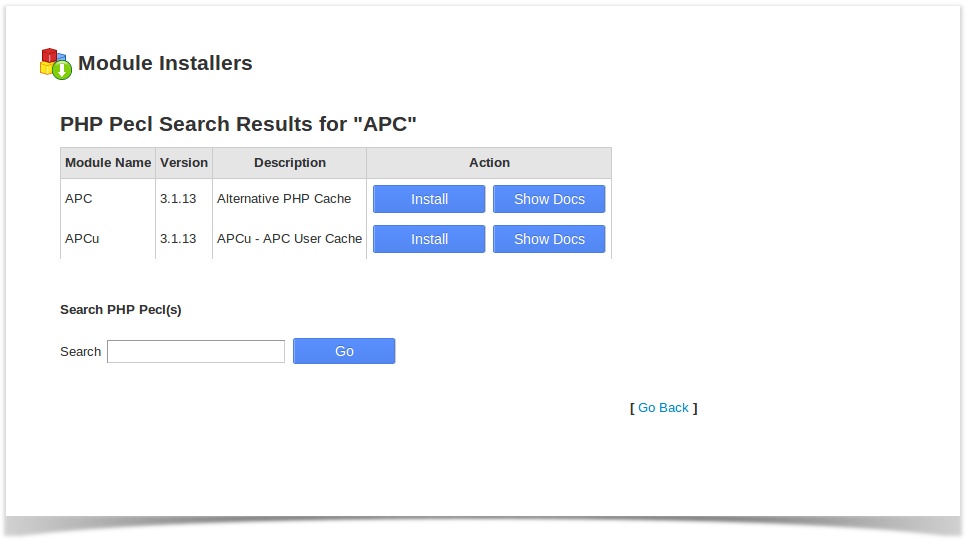
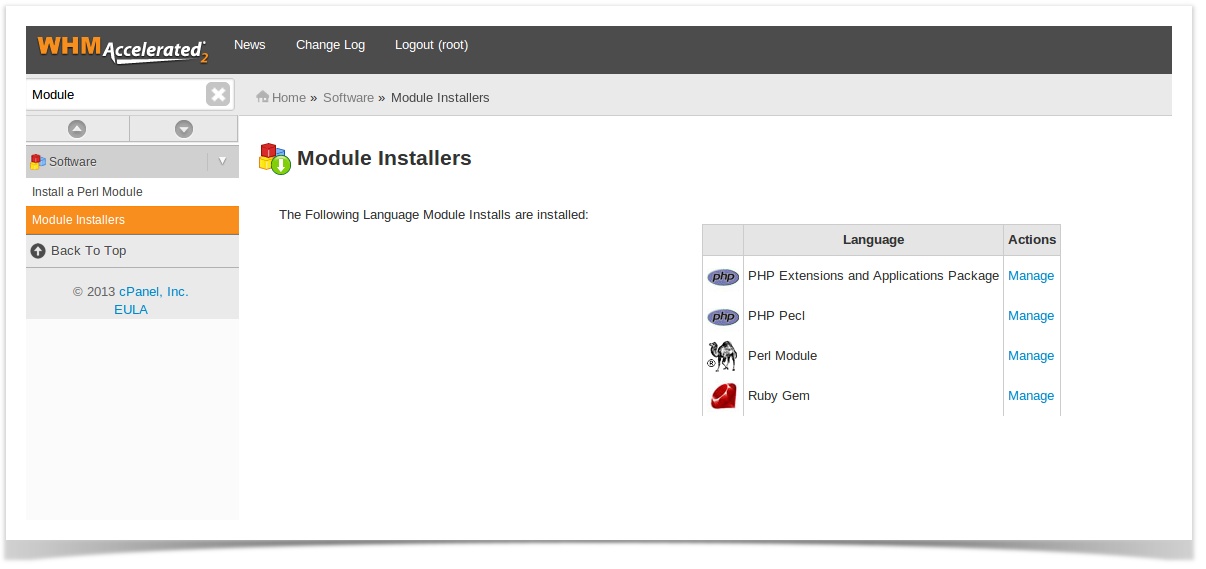
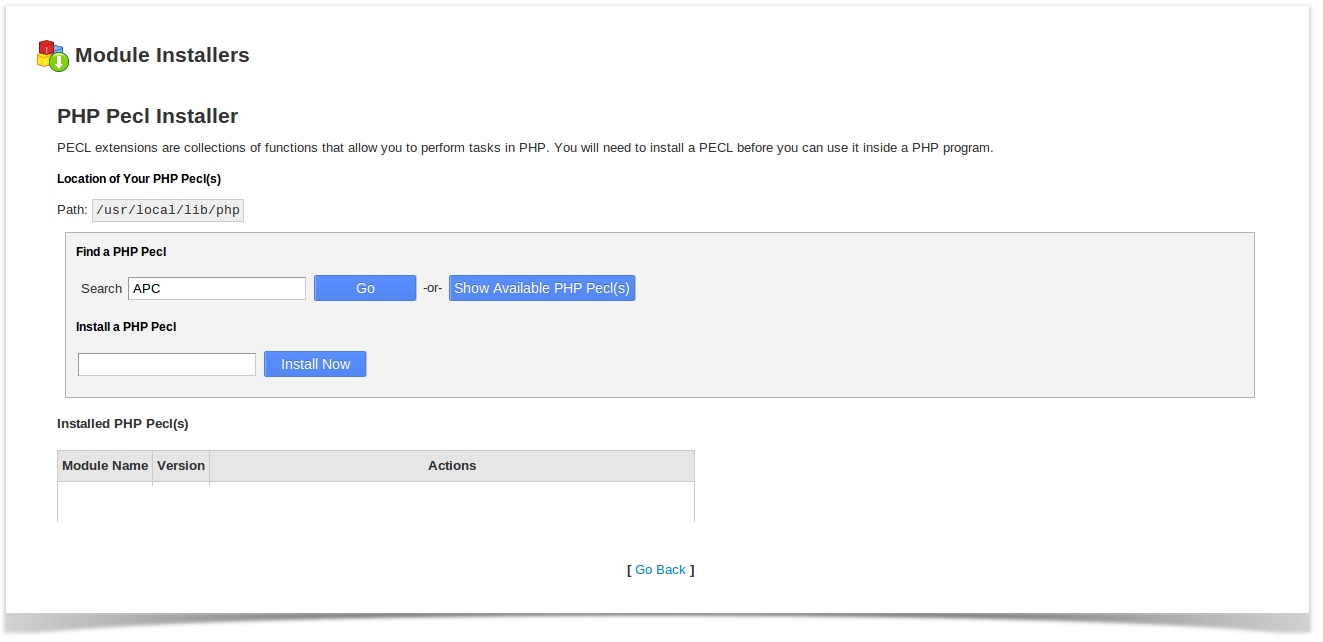
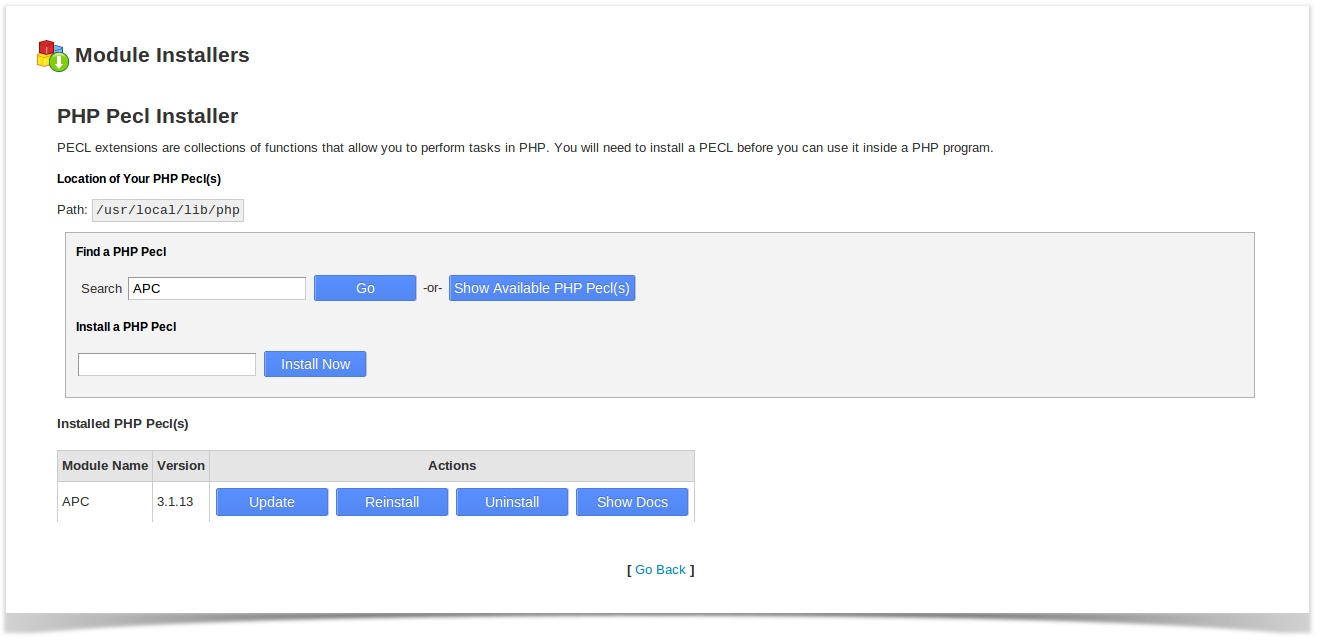
After logging into WHM, navigate to Software » Module Installers then click on Manage against PHP Pecl. Search for “APC” in Find a PHP Pecl and then choose to “Install” in the APC result that will come up. Screenshots following :
pecl1

pecl2_1

pecl3

After installing it, you should see the Module listed :
pecl2

b) Via Shell

Lets go !

Before install APC cache, you’ve to ensure eAccelerator is enabled on the server .

Checking eAccelerator


# php -m | grep eAccelerator

eAccelerator

Go ahead now, the commands are self-explanatory


# cd /usr/local/src

# wget http://pecl.php.net/get/APC-3.0.19.tgz

# tar -xzf APC-3.0.19.tgz && cd APC-3.0.19
# phpize && ./configure –enable-apc –enable-apc-mmap –with-apxs=/usr/local/apache/bin/apxs –with-php-config=/usr/local/bin/php-config && make && make install

phpize: The phpize command is used to prepare the build environment for a PHP extension.

This should now configure APC and install it in your extension directory (can change from server to server). You can locate it from the PHP configuration file /usr/local/lib/php.ini at this line :

; Directory in which the loadable extensions (modules) reside.

extension_dir = "/usr/local/lib/php/extensions/no-debug-non-zts-20090626"

Now descend to the folder

[~]# cd /usr/local/lib/php/extensions/no-debug-non-zts-20060613

You can locate a file named apc.so in that directory.

You can now locate an entry for apc.so in the PHP configuration file /usr/local/lib/php.ini. Uncomment it if it was commented, finally the line should look like :

extension=”apc.so”

Disabling XCache is extremely easy, just comment the line to make it look like :

;extension="xcache.so"

Finally, restart the Webserver

/etc/init.d/httpd restart

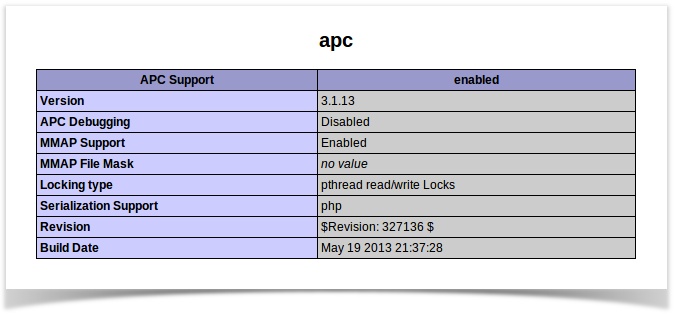
Make a phpinfo page in any user accounts and confirm this. You should not see anything about XCache there, only APC. Just like this :

apc

  • Apache
  • cPanel
  • Linux
APC Cache Activation and disable XCache

“Suspended Page ” defaced in cPanel Server

“Suspended Page ” defaced in cPanel Server
  • cPanel
  • Linux
  • Troubleshooting
logo

Blacklisted ? Switch your Mail Server IP

Blacklisted ? Switch your Mail Server IP
  • cPanel
  • Linux
  • Webmail
logo

Chapter 12 All about a process running in linux

Chapter 12 All about a process running in linux
  • General
  • Howtos
  • Linux
  • Special Offers
  • Training
  • Troubleshooting
logo

Configuraing local php variables in Php -FCGI set up

Configuraing local php variables in Php -FCGI  set up
  • Howtos
  • Troubleshooting
logo

Posts by Vipin R.N

Vipin is a no-nonsense, disciplined guy who ensures that everything is carried out with the highest level of perfection. Apart from his great coding skills, he is quite interested in advanced server administration, issue analysis, documentation and training. In-depth knowledge in international politics, ammunition and automobiles makes this hard core Manchester United fan, one of the most referenced personalities in the entire team.