Our Leadership team is attending CloudFest 2026, from Mar 22 - April 8. Schedule a Connect

Our Leadership team is attending CloudFest 2026, from Mar 22 - April 8.

Discuss MSP growth, DevOps excellence, and Cloud Transformation. Available for 1:1 meetings, Schedule a Connect

  • DevOps
    Case Study

    How we built a resilient multi-account, multi-cloud solution for a Health Tech service provider!

    READ CASESTUDY
    icon

    24/7 DevOps as a Service

    Round-the-clock DevOps for uninterrupted efficiency.

    icon

    Infrastructure as a Code

    Crafting infrastructure with ingenious code.

    icon

    CI/CD Pipeline

    Automated CI/CD pipeline for seamless deployments.

    icon

    DevSecOps

    Integrated security in continuous DevOps practices.

    icon

    Hire DevOps Engineers

    Level up your team with DevOps visionaries.

    icon

    Consulting Services

    Navigate success with expert DevOps consulting.

  • TechOps
    Case Study

    How we built a scalable Odoo solution for a Travel Tech service provider!

    READ CASESTUDY

    WEB HOSTING SUPPORT

    icon

    HelpDesk Support

    Highly skilled 24/7 HelpDesk Support

    icon

    Product Support

    Boost your product support with our expertise.

    MANAGED SERVICES

    icon

    Server Management

    Don’t let server issues slow you down. Let us manage them for you.

    icon

    Server Monitoring

    Safeguard your server health with our comprehensive monitoring solutions.

    STAFF AUGMENTATION

    icon

    Hire an Admin

    Transform your business operations with our expert administrative support.

    icon

    Hire a Team

    Augment your workforce with highly skilled professionals from our diverse talent pool.

  • CloudOps
    Case Study

    How we helped a Private Deemed University in India, save US $3500/m on hosting charges!

    READ CASESTUDY
    icon

    AWS Well Architected Review

    Round-the-clock for uninterrupted efficiency

    icon

    Optimize

    Efficient CloudOps mastery for seamless cloud management

    icon

    Manage

    Automated CI/CD pipeline for seamless deployments

    icon

    Migrate

    Upgrade the journey, Migrate & Modernize seamlessly

    icon

    Modernize

    Simplify compliance complexities with our dedicated services

    icon

    FinOps as a Service

    FinOps as a Service

  • SecOps
    Case Study

    How we built a scalable Odoo solution for TravelTech service provider!

    READ CASESTUDY
    icon

    VAPT

    Vulnerability Assessment and Penetration Testing

    icon

    Source Code Review

    Ensuring source code security ans safe practices to reduce risks

    icon

    Security Consultation

    On demand services for improving server security

    icon

    System Hardening

    Reduced vulnerability and proactive protection

    icon

    Managed SoC

    Monitors and maintains system security. Quick response on incidents.

    icon

    Compliance as a Service

    Regulatory compliance, reduced risk

  • Insights
    Case Study

    How we helped a Private Deemed University in India, save US $3,500/m on hosting charges!

    READ CASESTUDY
    icon

    Blog

    Explore our latest articles and insights

    icon

    Case Studies

    Read about our client success stories

    icon

    Flipbook

    Explore our latest Flipbook

    icon

    Events

    Join us at upcoming events and conferences

    icon

    Webinars

    Watch our educational webinar series

  • Our Story
  • Contact Us

Interested to collaborate?

Get in touch with us!

Ready to elevate your business with certified cloud expertise? Contact us today to learn how our team can help you leverage cloud technology to drive growth, streamline operations, and enhance security.

  • AWSAWS
  • Azure CloudAzure Cloud
  • Google CloudGoogle Cloud
  • Akamai CloudAkamai Cloud
  • OVHOVH
  • Digital OceanDigital Ocean
  • HetznerHetzner
  • Managed Services Overview
  • Kubernetes Consulting
  • DevOps as a Service
  • Infrastructure Monitoring
  • Kubernetes Consultancy Services
  • K8s & Cloud native Solutions
  • 24/7 Infrastructure Monitoring
  • DevOps as a Service
  • Cloud CI/CD Solutions
  • White Labeled MSP Support
  • Our story
  • Life@SupportSages
  • Insights
  • Careers
  • Events
  • Contact Us

aws partneraws advanced partner
LinkedInFacebookXInstagramYouTube
SupportSages

Copyright © 2008 – 2026 SupportSages Pvt Ltd. All Rights Reserved.
Privacy PolicyLegal TermsData ProtectionCookie Policy

How is a Linux Container different from a Virtual Machine?

Galvin Sam

  • 5 min read
How is a Linux Container different from a Virtual Machine?

Generating audio, please wait...

Consider a scenario in which you are a developer and you are developing an application on your local machine and you are working on an environment with a specific configuration. Meanwhile, the production server on which the application is to be deployed is running on an environment with a different configuration. This creates a conflict between the development and the operations team.

Linux containers help reduce conflicts between your development and operations teams by separating areas of responsibility. Developers can focus on their apps and operations can focus on the infrastructure. And, because Linux containers are based on open source technology, you get the latest and greatest advancement as soon as they’re available.

Linux Container is a set of one or more processes that are isolated from the rest of the host system. All the files that are necessary to run a Linux Container are provided from distinct images which makes a Linux Container portable and consistent as they move from different phases in a production environment such as development, testing and finally to production.

Linux container not only reduces the conflict between different application running environment. Linux containers have also sparked an interest in microservice architecture. Microservice architecture is a design pattern for developing applications in which complex applications are broken down into smaller, composable pieces which work together. Each component is developed separately, and the application is then simply the sum of its constituent components. Each piece, or service, can live inside of a container and can be scaled independently of the rest of the application as the need arises.
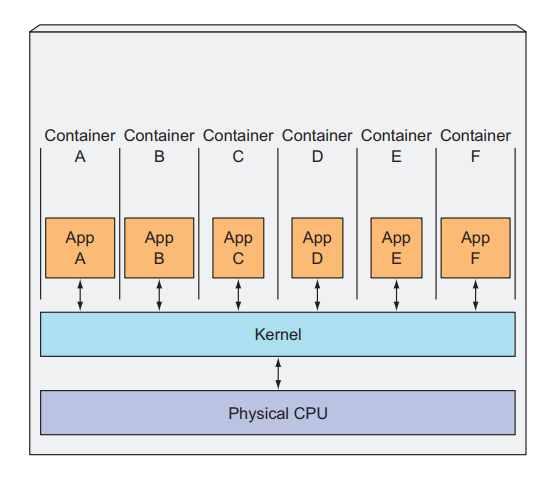
                       Applications running in isolated Linux Containers.

Why Linux container?

A question may arise, why choose Linux container over a Virtual Machine?

Yes, for reducing the conflict between the application running environment, definitely Virtual Machine is a good option. When an application is composed of only smaller numbers of large components, it’s completely acceptable to give a dedicated Virtual Machine (VM) to each component and isolate their environments by providing each of them with their own operating system instance. But when these components start getting smaller and their numbers start to grow, you can’t give each of them their own VM if you don’t want to waste hardware resources and keep your hardware costs down. But it’s not only about wasting hardware resources. Because each VM usually needs to be configured and managed individually, rising numbers of VMs also lead to wasting human resources, because they increase the system administrators’ workload considerably.

How is a Linux Container different from a Virtual Machine?

Comparing containers to virtual machines, containers are much more lightweight than virtual machine as the virtual machines need to run their own set of system processes which requires additional computing resources in addition to those consumed by the component’s own process. A container, on the other hand, is nothing more than a single isolated process running in the host OS, consuming only the resources that the app consumes and without the overhead of any additional processes.

Because of the overhead of VMs, you often end up grouping multiple applications into each VM because you don’t have enough resources to dedicate a whole VM to each app. When using containers, you can (and should) have one container for each application. The end result is that you can fit many more applications on the same bare-metal machine.
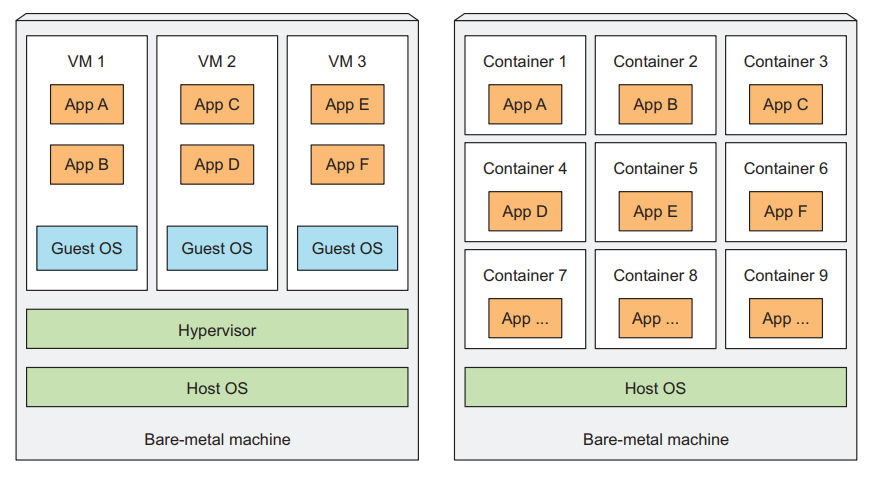
 Using VMs to isolate groups of applications vs. isolating individual apps with containers

When you run three VMs on a host, you have three completely separate operating systems running on and sharing the same bare-metal hardware. Underneath those VMs is the host’s OS and a hypervisor, which divides the physical hardware resources into smaller sets of virtual resources that can be used by the operating system inside each VM. Applications running inside those VMs perform system calls to the guest OS kernel in the VM, and the kernel then performs on the host’s physical CPU through the hypervisor.
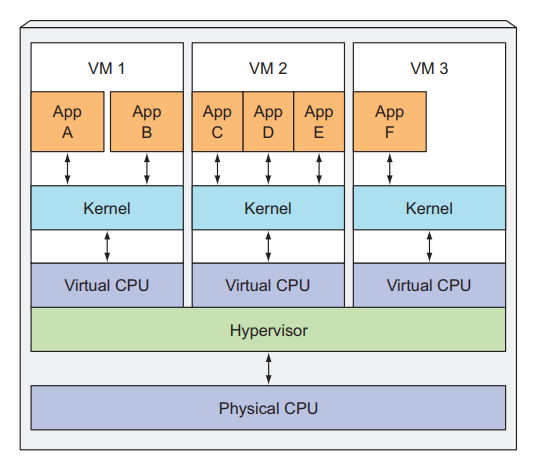
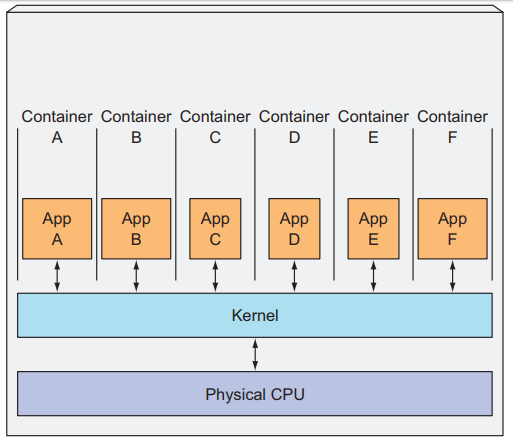
 

The difference between how apps in VMs use the CPU vs. how they use them in containers.       

Containers, on the other hand, all perform system calls on the exact same kernel running in the host OS. The CPU doesn’t need to do any kind of virtualization the way it does with VMs (see above figure).

The main benefit of VM is the full isolation they provide, because each VM runs its own Linux kernel and their own set of system services, while containers call out to the kernel of the parent machine or the node on which the container is created. Compared to VM, containers are exceptionally lightweight, megabytes in size and will take only seconds to start versus gigabytes and minutes for a VM. If you have a greater number of processes to be isolated on the same host machine, containers are a much better choice because of their low overhead.

Server Management

  • Linux
How is a Linux Container different from a Virtual Machine?

Deep dive into Docker

Deep dive into Docker
  • Docker
logo

Magento 2 – Troubleshooting Litemage Crawler

Magento 2 – Troubleshooting Litemage Crawler
  • magento
logo

Posts by Galvin Sam

Galvin Sam