



Introduction
Source Network Address Translation (SNAT) on a Proxmox host allows selected virtual machines to keep their private IP addresses while sending outbound internet traffic through a specific public IP. This guide is useful for anyone working with Proxmox environments where a private VM needs a dedicated outbound IP without assigning that public address directly to the VM. It explains when SNAT is useful, what to check before configuring it, how to add the public IP and create the SNAT rule, how to make the configuration persistent, and how to verify that the VM is using the expected public IP.
What Is Proxmox?
Proxmox VE is an open-source server virtualization platform used to manage virtual machines and containers from a single host. It provides networking features such as Linux bridges, routing, firewalling, and NAT, which allow administrators to control how virtual machines communicate with private and public networks.
What This Setup Does
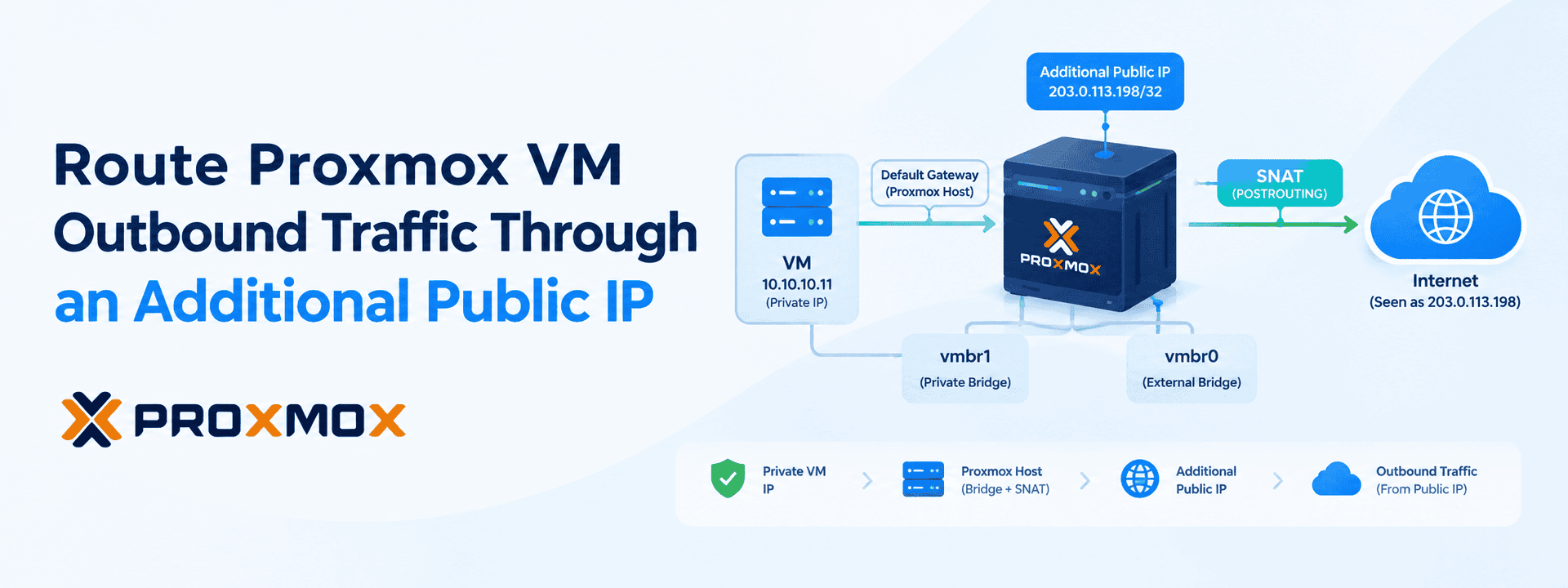
A common Proxmox design places VMs on a private bridge such as vmbr1. The VM keeps its private address and uses the Proxmox host as its gateway. SNAT changes the source address of matching outbound connections as they leave the host, so external services see the selected public address instead of the VM's private address.
With this setup:
- The VM keeps its private IP address.
- The VM uses the Proxmox host as its gateway.
- The additional public IP is configured on the Proxmox host.
- SNAT changes the source address for matching outbound traffic.
- The VM does not need the additional public IP assigned directly to it.
For example, a VM at 10.10.10.11 can send traffic through the host and appear on the internet as 203.0.113.198.
When This Approach Makes Sense
Consider this approach when:
- An external service requires IP allowlisting.
- A VM needs a predictable outbound IP.
- Different workloads need different outbound public IPs.
- You want to keep the VM on a private network while giving it a specific public egress address.
This is intended for outbound traffic. It does not by itself publish the private VM for inbound internet connections.
Before You Configure Proxmox SNAT
Check the following before making any changes:
- The additional public IP is assigned or routed to the Proxmox host.
- The VM is connected to the intended private bridge.
- The VM's default gateway points to the Proxmox host's private bridge IP.
- Existing NAT rules have been reviewed.
- IPv4 forwarding is enabled.
- The current network/NAT configuration has been recorded for rollback.
Check IPv4 forwarding:
sysctl net.ipv4.ip_forward If the value is 1, IPv4 forwarding is enabled. If it is 0, enable it before proceeding:
sysctl -w net.ipv4.ip_forward=1 For a persistent configuration, ensure net.ipv4.ip_forward=1 is present in /etc/sysctl.conf or /etc/sysctl.d/ and apply it with sysctl -p.
Proxmox SNAT Configuration
Step 1: Add the Additional Public IP
On the Proxmox host, add the additional public address to the external bridge according to the IP routing method provided by your hosting provider. The example below uses 203.0.113.198 as a documentation address; replace it with the actual address allocated to your server.
ip addr add 203.0.113.198/32 dev vmbr0 Verify the address is present:
ip addr show vmbr0 Step 2: Create the Source NAT Rule
Assume the selected VM uses the private address 10.10.10.11. Add a POSTROUTING rule that changes its source address to the additional public IP when traffic leaves through vmbr0.
iptables -t nat -I POSTROUTING 1 -s 10.10.10.11 -o vmbr0 -j SNAT --to-source 203.0.113.198 Check the NAT table and packet counters:
iptables -t nat -L POSTROUTING -n -v --line-numbers Step 3: Make the Rule Persistent
Rules entered directly with iptables are runtime configuration. If the host is rebooted, they may need to be restored. One method in the source material is to install iptables-persistent and save the current ruleset.
apt update && apt install -y iptables-persistent

iptables-save > /etc/iptables/rules.v4
Alternative: Persist It in /etc/network/interfaces
If you prefer to keep the address and NAT rule with the host's network configuration, add post-up and post-down directives to the vmbr0 definition. This keeps the address assignment and translation rule tied to the interface lifecycle.
# Assign the additional address and NAT rule when the interface comes up
post-up ip addr add 203.0.113.198/32 dev vmbr0 post-up iptables -t
nat -I POSTROUTING 1 -s 10.10.10.11 -o vmbr0 -j SNAT --to-source 203.0.113.198

# Remove them when the interface goes down post-down
iptables -t nat -D POSTROUTING -s 10.10.10.11 -o vmbr0 -j SNAT
--to-source 203.0.113.198 post-down ip addr del 203.0.113.198/32 dev vmbr0
After making the network configuration change, reload the interfaces:
ifreload -a 
What Changes Inside the VM?
No change is required to the VM's existing private network configuration in this setup. The guest can continue using its private address and default gateway. The translation happens on the Proxmox host as the traffic leaves the private network.
How to Verify the Public Address
From the VM, check the public address observed by an external service. On a Windows VM, for example, you can run:
curl ifconfig.me The result should be the configured egress address if the VM's traffic matches the rule. You can also check the NAT rule counters on the Proxmox host; the packet and byte counters should increase when the VM generates outbound traffic.
Verify the Traffic on the Proxmox Host
To observe packets using the selected source address on vmbr0, run:
tcpdump -ni vmbr0 src 203.0.113.198
This provides another way to confirm that the translated traffic is leaving through the expected address.
How to Roll Back the Change
If the configuration needs to be removed, first identify the relevant rule number:
iptables -t nat -L POSTROUTING -n -v --line-numbers Then delete the specific rule:
iptables -t nat -D POSTROUTING <rule_number> Finally, remove the additional address from the bridge if it is no longer required:
ip addr del 203.0.113.198/32 dev vmbr0 Frequently Asked Questions
Can several VMs share one public egress address?
Yes. A separate source rule can be created for each private VM that should use the same public address.
Does SNAT expose the VM directly to the internet?
No. The VM can remain on the private network while its outbound traffic is translated to the additional public IP. SNAT provides outbound source translation; it does not by itself publish the VM for inbound connections.
Does the VM need a public IP?
No. In this design, the VM keeps its private address and the Proxmox host performs source translation for matching outbound traffic.
Will this change the VM's private IP?
No. The VM continues to use its existing private address and gateway.
What should I check before configuring SNAT?
Confirm the additional public IP is assigned or routed to the Proxmox host, verify the VM's private IP and bridge, check its default gateway, confirm IPv4 forwarding is enabled, and review the existing NAT rules before making changes.
Will the SNAT configuration survive a reboot?
Only if it is made persistent. You can save the iptables rules with iptables-persistent or define the address and SNAT rules through /etc/network/interfaces so they are restored when the interface is brought up.
Conclusion
Using source NAT on the Proxmox host allows selected private VMs to reach the internet through a specific public address without assigning that address directly to the guests. The core workflow is to add the address to the external bridge, create a source-specific POSTROUTING rule, persist the configuration, and verify the result from both the VM and the host. This keeps the VM on the private network while giving its outbound traffic a predictable public identity.
Managing Proxmox networking for your infrastructure?
At SupportSages, our CloudOps engineers can help with Proxmox networking, SNAT configuration, public IP routing, VM networking, and ongoing infrastructure management.
[email protected] | +91 77363 81410 | www.supportsages.com