Netstat is a command-line network utility useful for network troubleshooting and performance measurement. netstat (network statistics) is available in most versions of Windows, Linux, UNIX, and other operating systems. The command provides various network related information such as current TCP/IP connections, routing tables, interface statistics, etc. It is the basic tool which helps us to find the ports that are open and to find programs that are listening on ports.
The output of the netstat command is described below :
-
Proto : The protocol (tcp, udp, raw) used by the socket.
-
Recv-Q : The count of bytes not copied by the user program connected to this socket.
-
Send-Q : The count of bytes not acknowledged by the remote host.
-
Local Address : The address and port number of the local end of the socket.
-
Foreign Address : The address and port number of the remote end of the socket.
-
State : The state of the socket.
-
-
ESTABLISHED : The socket has an established connection.
-
SYN_SENT : The socket is actively attempting to establish a connection.
-
SYN_RECV : A connection request has been received from the network.
-
FIN_WAIT1 : The socket is closed, and the connection is shutting down.
-
FIN_WAIT2 : Connection is closed, and the socket is waiting for a shutdown from the remote end.
-
TIME_WAIT : The socket is waiting after close to handle packets still in the network.
-
CLOSE : The socket is not being used.
-
CLOSE_WAIT : The remote end has shut down, waiting for the socket to close.
-
LAST_ACK : The remote end has shut down, and the socket is closed. Waiting for acknowledgment.
-
LISTEN : The socket is listening for incoming connections.
-
CLOSING : Both sockets are shut down but we still don’t have all our data sent.
-
UNKNOWN : The state of the socket is unknown.
-
Netstat Command Practical Examples :
1. To list all the LISTENING Ports of TCP and UDP connections
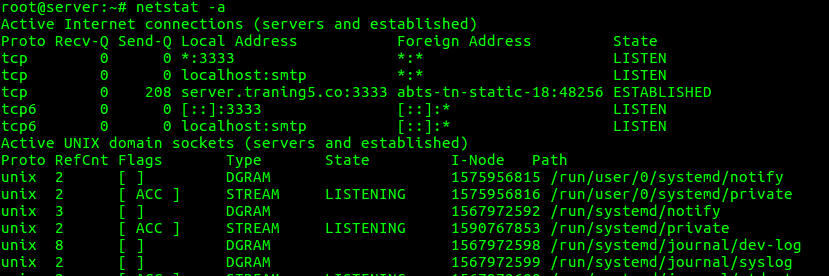
“netstat -a” option can be used to list all TCP and UDP ports.
root@server:~# netstat -a
2. To list all the TCP Ports connections
“netstat -at” option can be used to list only TCP (Transmission Control Protocol) port connections.
root@server:~# netstat -at

3. To list all the UDP Ports connections
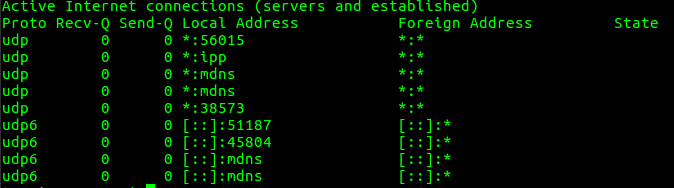
“netstat -au” option can be used to list only UDP (User Datagram Protocol) port connections.
root@server:~# netstat -au
4. To list all listening port connections
“netstat -l” option can be used to list all active listening ports connections.
root@server:~# netstat -l

5. To list all TCP listening Ports
“netstat -lt” option can be used to list all TCP Listening Ports connections.

root@server:~# netstat -lt

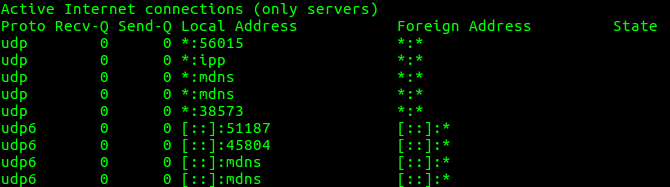
6. To list all UDP listening Ports
“netstat -lu” can be used to list all the UDP listening Ports connections.
root@server:~# netstat -lu
7. To list all UNIX Listening Ports
“netstat -lx” option can be used to list all UNIX Listening Ports connections.
root@server:~# netstat -lx

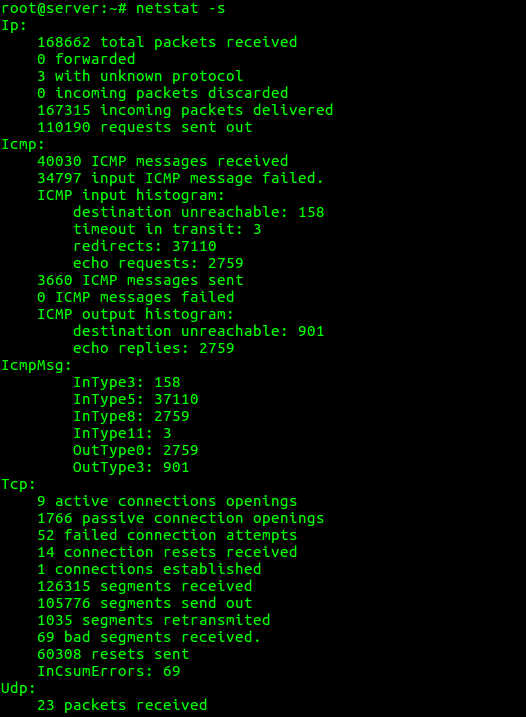
8. To list the statistics for all ports
“netstat -s” option can be used to list the statistics for all ports.
root@server:~# netstat -s
9. To list the statistics for TCP (or) UDP ports
“netstat -st” option can be used to list the statistics for TCP ports.
root@server:~# netstat -st

“netstat -su” option can be used to list the statistics for UDP ports.
root@server:~# netstat -su

10. To display service name with PID
“netstat -tp” option can be used to display the service name with their PID number.
root@server:~# netstat -tp

11. To display the kernel routing information
“netstat -r” option can be used to display the kernel routing information.
root@server:~# netstat -r

12. To find listening ports
“netstat -ap” option can be used to find the port on which a program is running.
root@server:~# netstat -ap | grep ssh

13. To list of network interfaces
“netstat -i” option can be used to list the network interfaces.
root@server:~# netstat -i

“netstat -ie” option can be used to display extended information on the interfaces.
root@server:~# netstat -ie

14. To show which process is using a particular port
netstat -anlp | grep $portnumber
An example of the same is given below.
root@server:~# netstat -anlp | grep 80
When dealing with the traffic on the server, it’s important to be informed about the inbound and outbound connections and port to which they are connected. Netstat command is well suited for this purpose. For more options and information about netstat command, you can use “man netstat” command or refer netstat manual docs.