IAM user is an easy way of giving access to our colleagues or someone in our organization to get into our AWS account with limited or full privileges. We are all following the same IAM user method in many of our organizations and it is easy to maintain and add or revoke permissions with the help of AWS.
But there comes a scenario where the members relieved from the company get access to our AWS accounts right in their pocket. In order to solve this issue we need to conduct an IAM review over a frequent interval.
Let me say reviewing and Auditing for such things are pretty boring and time-consuming when it comes to AWS accounts with more users. This includes creating a list of users who haven't accessed the console for more than a particular amount of days and that should include details like whether they have console access or not, do they have active access keys, and if yes when they last accessed it, etc.
In order to overcome this time-consuming and boring process of creating an audit document for IAM I made a Python script that will do the job for us.
The script will do the following things.

- Communicate with AWS using Boto3.
- List all the IAM users.
- Check for their last accessed date based on the user input(minimum age of users).
- Check whether the user has console access or not.
- If they have console access the script will tell us that they last accessed the console N number of days before.
- Check whether they have active IAM Access keys.
- If they have active Access keys the script will tell us that they accessed the Access keys N number of days before.
- The script finally generates a document namely “IAM-Audit-Report.txt”.
The output of the script which looks for a minimum age of users above 100 will look like this
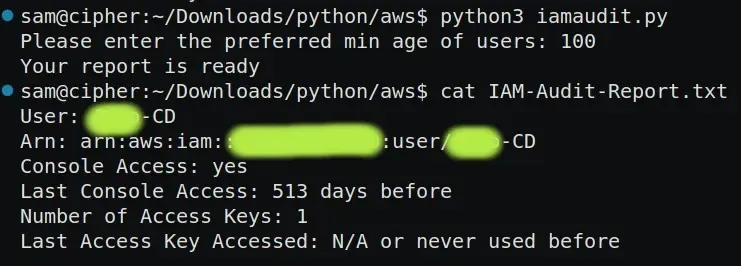
The script is given below.
import boto3
from datetime import datetime

now = datetime.utcnow()

iam = boto3.client('iam')

list_of_users = iam.list_users()

day_threshold = int(input("Please enter the preferred min age of users: "))

file_name = open("IAM-Audit-Report.txt" , "w")
def consoleaccess(name):
if 'PasswordLastUsed' in name:
ConsoleAccess = True
C1 = "yes"
last_used = (now - (name['PasswordLastUsed']).replace(tzinfo=None)).days
else:
ConsoleAccess = False
C1 = "no"
last_used = 0 # Set to 0 if no console access

return C1, last_used

def accesskey(access_keys, user_name):
num_keys = len(access_keys)
if num_keys == 0:
num_keys_str = "0"
last_key_accessed = "N/A"
else:
num_keys_str = str(num_keys)
last_key_accessed = "N/A"
for a_key in access_keys:
access_key_id = a_key['AccessKeyId']
if a_key['Status'] == 'Active':
last_access_key_used = iam.get_access_key_last_used(AccessKeyId=access_key_id)
if 'LastUsedDate' in last_access_key_used['AccessKeyLastUsed']:
date_of_access = (last_access_key_used['AccessKeyLastUsed']['LastUsedDate']).replace(tzinfo=None)
days_of_access = (now - date_of_access).days
if last_key_accessed == "N/A" or days_of_access < last_key_accessed:
last_key_accessed = days_of_access
if last_key_accessed == "N/A":
last_key_accessed = "N/A"
else:
last_key_accessed = str(last_key_accessed)

return num_keys_str, last_key_accessed

for name in list_of_users['Users']:
user_name = name['UserName']
arn = name['Arn']
access_keys = iam.list_access_keys(UserName=user_name)['AccessKeyMetadata']
C1, last_used = consoleaccess(name)
num_keys_str, last_key_accessed = accesskey(access_keys, user_name)

if last_used > day_threshold:
file_name.write(f"User: {user_name}\nArn: {arn}\nConsole Access: {C1}\nLast Console Access: {last_used} days before\nNumber of Access Keys: {num_keys_str}\nLast Access Key Accessed: {last_key_accessed} or never used before\n\n")
print("Your report is ready")
file_name.close()
That’s all Thank you ❤
Discover streamlined AWS IAM auditing! Simplify the user access review process with our Python script, generating comprehensive reports effortlessly. Explore SupportSages for expert insights on enhancing AWS account security.