In the realm of Kubernetes continuous delivery, Argo CD is a popular choice, providing a declarative and GitOps-based approach for managing your applications. However, securing access to Argo CD is a paramount concern for many organizations. In this article, we’ll guide you through the process of creating secure Argo CD user account with read only access
A read-only user in a system, like Argo CD or any other application, has limited permissions that allow them to view data and configurations but not make changes. The primary uses of a read-only user are:
- Monitoring and Observability: Read-only users can access the system to monitor and observe the state of applications and resources. They can check the status, configuration, and history of deployments, pods, services, and other resources without the ability to modify them.
- Auditing and Compliance: Read-only access is valuable for auditing and compliance purposes. These users can review configurations and logs to ensure that the system is operating correctly and in compliance with security and regulatory requirements.
- Troubleshooting and Debugging: When issues or errors arise, read-only users can investigate and troubleshoot problems by examining the system’s current state and configurations. They can gather information to help resolve issues without making changes that might further complicate the situation.
- Training and Onboarding: Read-only access is useful for training new team members or onboarding users who are not yet familiar with the system. It allows them to explore the system’s features and configurations without the risk of unintentional changes.
- Security: Read-only users can be used in security roles to analyze and detect anomalies or potential security threats within the system without having the ability to modify the environment. They can act as security analysts or auditors.
- Sharing Information: Read-only users can access the system to share information with others. For example, a team lead might use a read-only account to show project progress and application status to stakeholders or team members.
- Read-Only Dashboards: Read-only users can be used to create read-only dashboards or reports that display real-time information from the system, providing insights to different stakeholders without the risk of accidental changes.
Overall, read-only users are valuable for providing visibility and transparency into a system, without the potential for unintended or unauthorized changes. They play a crucial role in maintaining system integrity, ensuring accountability, and facilitating collaboration while mitigating risks associated with unrestricted access.
Following are the sequence of activities for creating a new account for Argo CD with API key and RBAC permissions.
- Add account to argocd via configmap
- Add RBAC admin permission to user via configmap
- Create password for new Argo CD account
Add account to Argo CD via configmap
- Get the configmap argocd-cm of Argo CD by executing the below command.
kubectl get configmap argocd-cm -n argocd -o yaml > argocd-cm.yml 2. Edit the configmap file argocd-cm.yml and add the below line under "data" with new account login enabled
apiVersion: v1
data:
accounts.devuser: login
kind: ConfigMap
metadata:
annotations:
kubectl.kubernetes.io/last-applied-configuration: |
3. Apply the configmap by executing the below command . This will add a new account and allow that account to login via the Command Line Interface and Graphical User Interface.
kubectl apply -f argocd-cm.yml -n argocd
Add RBAC admin permission to user via configmap
- Get the configmap argocd-rbac-cm of Argo CD by executing the below command.
kubectl get configmap argocd-rbac-cm -n argocd -o yaml > argocd-rbac-cm.yml2 . In this case we are using the default policy as readonly cause we are creating only one user with readonly access for logging purposes. Argo CD does have a default user that is created when you install and set up the Argo CD application. The default username for this user is admin. This user is typically assigned full administrative privileges, allowing them to manage applications, sync with Git repositories, create and update configurations, and perform other administrative tasks within Argo CD.
Edit the configmap file argocd-rbac-cm.yml and add the below section under “data” for the readonly user “devuser”
apiVersion: v1
data:
policy.csv: ""
policy.default: role:readonly
kind: ConfigMap
metadata:
annotations:
kubectl.kubernetes.io/last-applied-configuration: |
3 . Apply the configmap by executing the below command. This will add readonly permission to user devuser
kubectl apply -f argocd-rbac-cm.yml -n argocdCreate password for new Argo CD account
- Login into Argo CD as an admin account via Argo CLI by executing the below command.
argocd login SERVERIP or HOSTNAME2. Create password to the new account by executing the below command. Password should contain at least one UPPERCASE.
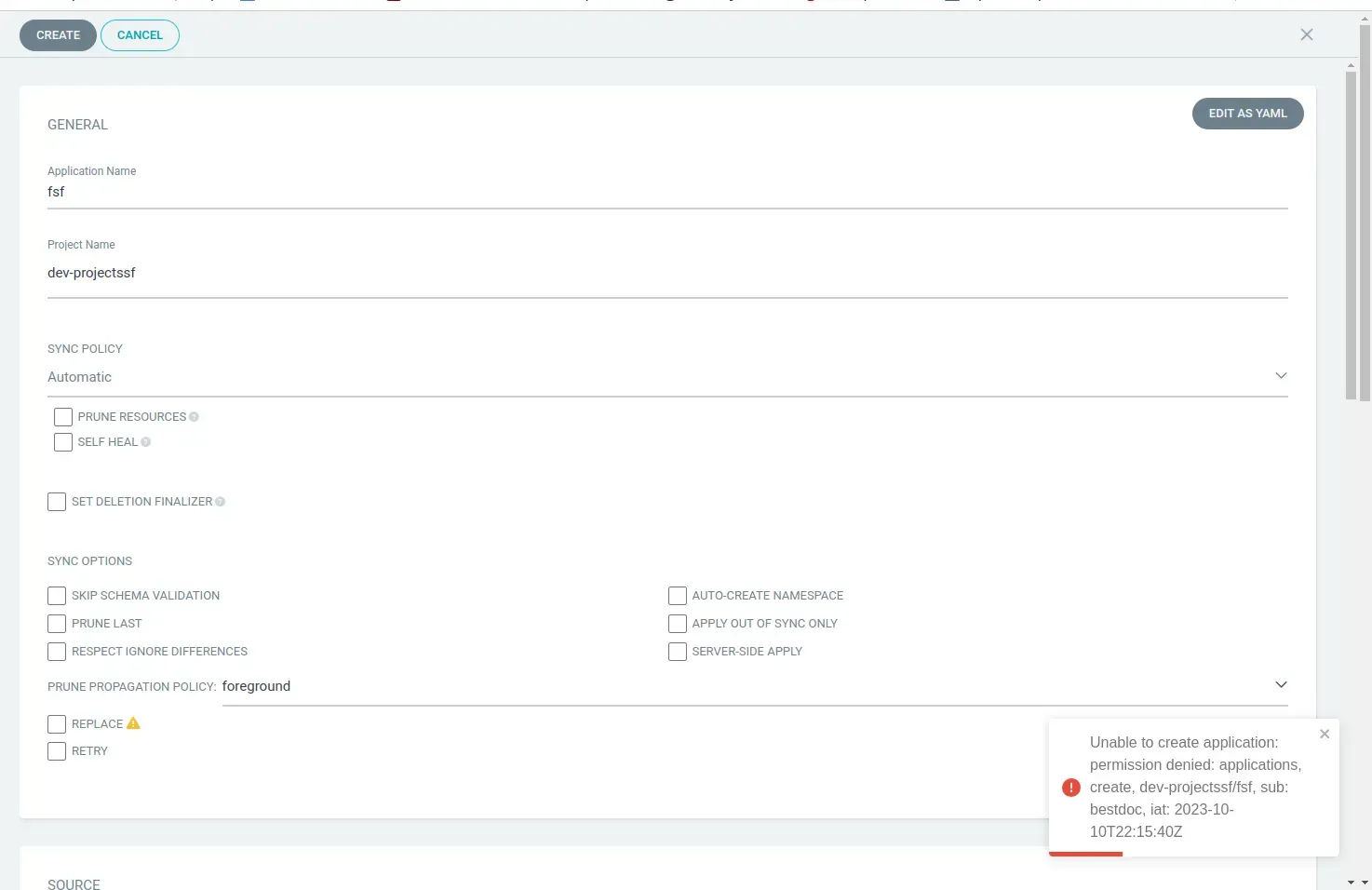
argocd account update-password --account john --new-password Argo486- Login as devuser ,he can’t create or edit any resources except view them
Conclusion
The ability to offer read-only access is a fundamental practice in ensuring security, collaboration, and transparency within your Kubernetes environments. Whether you’re enabling your team to monitor and audit applications or extending access to external stakeholders, Argo CD’s RBAC capabilities allow you to strike that crucial balance between visibility and control.
By following the steps outlined here, you’ve gained the knowledge to create a read-only account tailored to your specific needs. This feature not only enhances security but also encourages collaboration, as users can safely explore and interact with the system without the risk of unintended changes.
As your Kubernetes and Argo CD journey progresses, remember the importance of fine-tuning user roles to meet the unique requirements of your projects. Whether you’re empowering your team, streamlining audits, or simply granting read-only access to interested parties, the flexibility and control provided by Argo CD’s RBAC system are invaluable assets.
So, go ahead, empower your team, engage stakeholders, and enhance your Kubernetes management practices with Argo CD’s read-only access. With this newfound knowledge, you’re ready to take your Kubernetes deployments to the next level. Happy coding and deploying!”
Uncover the power of secure, read-only access in Argo CD! Explore steps to create controlled user roles, fostering heightened security and collaborative transparency in Kubernetes. Discover more at SupportSages and empower your DevOps journey. Elevate Kubernetes management practices and foster collaboration while maintaining system integrity.