


• DevOps
    Case Study

    How we helped a development company rebuild DevOps for efficiency and scale.

    READ CASESTUDY
    icon

    24/7 DevOps as a Service

    Round-the-clock DevOps for uninterrupted efficiency.

    icon

    Infrastructure as a Code

    Crafting infrastructure with ingenious code.

    icon

    CI/CD Pipeline

    Automated CI/CD pipeline for seamless deployments.

    icon

    DevSecOps

    Integrated security in continuous DevOps practices.

    icon

    Hire DevOps Engineers

    Level up your team with DevOps visionaries.

    icon

    Consulting Services

    Navigate success with expert DevOps consulting.

  • TechOps
    Case Study

    How a US hosting leader scaled with us!

    READ CASESTUDY

    WEB HOSTING SUPPORT

    icon

    HelpDesk Support

    Highly skilled 24/7 HelpDesk Support

    icon

    Product Support

    Boost your product support with our expertise.

    MANAGED SERVICES

    icon

    Server Management

    Don’t let server issues slow you down. Let us manage them for you.

    icon

    Server Monitoring

    Safeguard your server health with our comprehensive monitoring solutions.

    STAFF AUGMENTATION

    icon

    Hire an Admin

    Transform your business operations with our expert administrative support.

    icon

    Hire a Team

    Augment your workforce with highly skilled professionals from our diverse talent pool.

  • CloudOps
    Case Study

    How we helped a Private Deemed University in India, save US $3500/m on hosting charges!

    READ CASESTUDY
    icon

    AWS Well Architected Review

    Round-the-clock for uninterrupted efficiency

    icon

    Optimize

    Efficient CloudOps mastery for seamless cloud management

    icon

    Manage

    Automated CI/CD pipeline for seamless deployments

    icon

    Migrate

    Upgrade the journey, Migrate & Modernize seamlessly

    icon

    Modernize

    Simplify compliance complexities with our dedicated services

    icon

    FinOps as a Service

    FinOps as a Service

  • SecOps
    Case Study

    Enabling financial grade platforms through strategic cloud modernisation.

    READ CASESTUDY
    icon

    VAPT

    Vulnerability Assessment and Penetration Testing

    icon

    Source Code Review

    Ensuring source code security ans safe practices to reduce risks

    icon

    Security Consultation

    On demand services for improving server security

    icon

    System Hardening

    Reduced vulnerability and proactive protection

    icon

    Managed SoC

    Monitors and maintains system security. Quick response on incidents.

    icon

    Compliance as a Service

    Regulatory compliance, reduced risk

  • K8s
  • Insights
    Case Study

    How we helped a Private Deemed University in India, save US $3,500/m on hosting charges!

    READ CASESTUDY
    icon

    Blog

    Explore our latest articles and insights

    icon

    Case Studies

    Read about our client success stories

    icon

    Flipbook

    Explore our latest Flipbook

    icon

    Events

    Join us at upcoming events and conferences

    icon

    Webinars

    Watch our educational webinar series

  • Contact Us

Interested to collaborate?

Get in touch with us!

Contact us today to learn how our team can help you leverage our managed cloud and DevOps services so you can focus on growing your business.

  • White Label Managed IT Services for MSPs
  • White Label MSP Support Services
  • Managed HelpDesk Services
  • White Label WordPress Maintenance Services
  • Outsourced WebHosting Support
  • Hosting HelpDesk Support Services
  • cPanel Server Management
  • Plesk Server Management
  • DevOps Automation Services
  • DevOps Containerization Services
  • DevOps Engineering Services Experts
  • DevOps Maturity Assessment
  • DevOps Testing Services & Automation
  • DevOps Implementation Services
  • DevOps Transformation Services
  • White Label Kubernetes IT Services
  • Cloud Automation Services
  • Cloud Modernization Services
  • Database Migration Services
  • DevOps Outsourcing Services

AWS

  • AWS DevOps Services for Scalable Cloud
  • AWS Well-Architected Review
  • AWS Migration Services

Azure

  • Azure DevOps Services & Automation
  • Azure Migration Services

Google Cloud

  • Google Cloud Managed Services
  • Google Cloud Migration Services
  • Google Cloud Platform Services
  • AWSAWS
  • Azure CloudAzure Cloud
  • Google CloudGoogle Cloud
  • Akamai CloudAkamai Cloud
  • OVHOVH
  • Digital OceanDigital Ocean
  • HetznerHetzner
  • Managed DigitalOcean Cloud
  • Managed OVH Cloud
  • Managed Hetzner Cloud
  • Managed Akamai Cloud
  • Oracle Managed Services
  • Our story
  • Life@SupportSages
  • Insights
  • Careers
  • Events
  • Contact Us
  • Sitemap

aws partneraws advanced partner
LinkedInFacebookXInstagramYouTube
SupportSages

Copyright © 2008 - 2026 SupportSages Pvt Ltd. All Rights Reserved.
Privacy PolicyLegal TermsData ProtectionCookie Policy

cPanel Login Failures: Diagnosing and Fixing System-Wide Outages

Author Profile
Muhammed Sahil
  • 6 min read
cPanel Login Failures: Diagnosing and Fixing System-Wide Outages

Generating audio, please wait...

What This Incident Looks Like

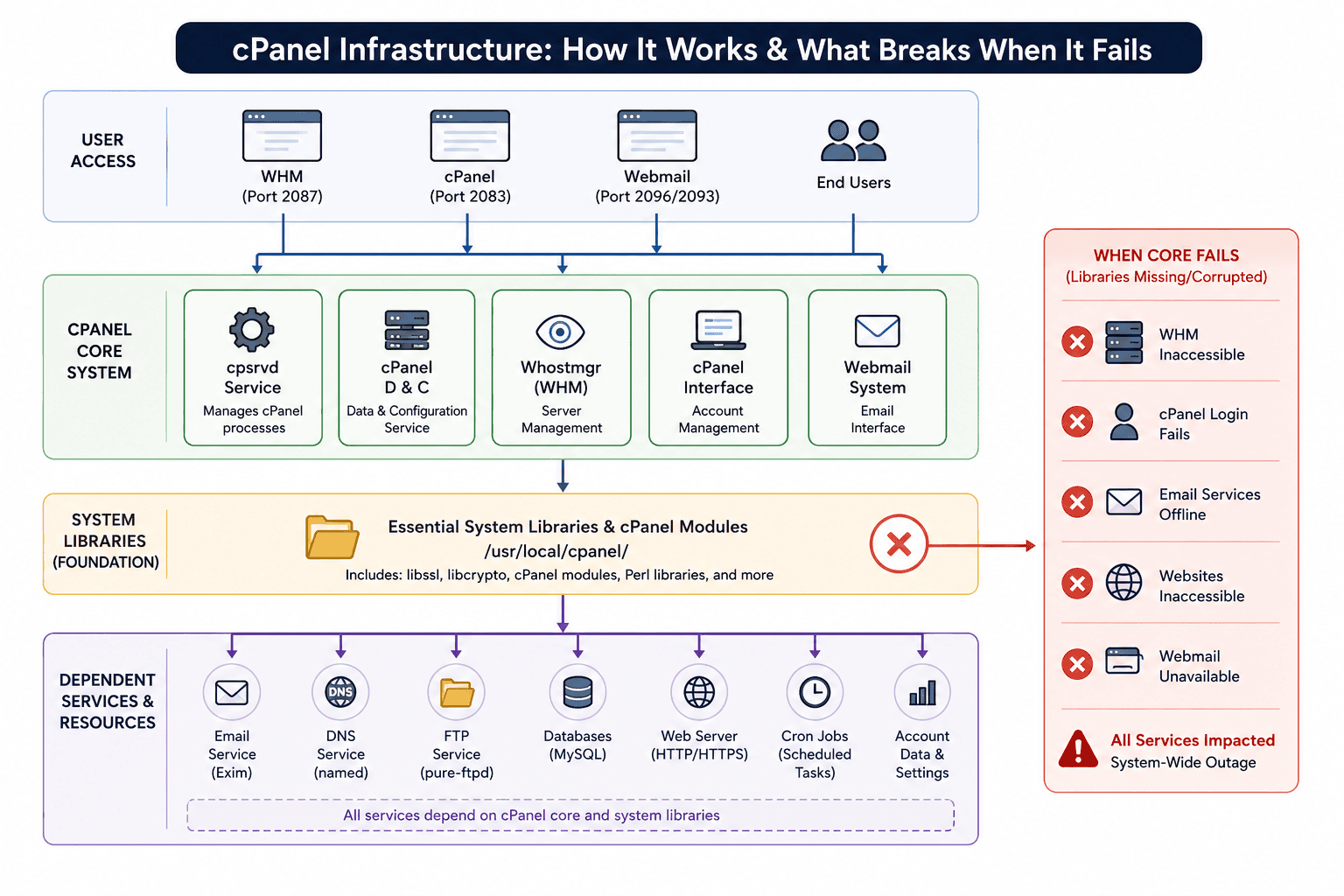
Multiple clients report login failures simultaneously. Email service goes down. Websites stop loading. You try accessing WHM and cPanel yourself both are inaccessible. This pattern indicates a system-level infrastructure failure, not individual account issues.

 In this incident, missing cPanel system libraries prevented WHM and cPanel from starting. Without these foundational components, all dependent services failed. The fix required identifying the root cause and running cPanel's repair tool.
cpanelblog.png

Symptoms and Root Cause

What clients reported:

  • Unable to log into cPanel
  • Email services offline
  • Websites inaccessible
  • Cannot access webmail

What we confirmed:

  • WHM won't start (connection refused)
  • cPanel services show "inactive (dead)"
  • Error logs report missing libraries (libssl, libcrypto, cPanel modules)

Root cause: Missing or corrupted system libraries in /usr/local/cpanel/. These libraries are foundational. Without them, WHM, cPanel, webmail, DNS services, and other components cannot initialize.

Diagnostic Process

Step 1: Test local access

SSH into your server and test:

curl -vk https://localhost:2087/
https://your-server-ip:2083/

If both fail, the control panels themselves are broken, not individual accounts.

Step 2: Check service status

systemctl status cpanel 
systemctl status cpsrvd 
systemctl status tailwatchd 
 

Look for "active (running)" or "inactive (dead)."

Step 3: Review error logs

cd /var/log/cpanel/ 
tail -f error_log
journalctl -xe 
 

Document error messages. Common indicators:

Cannot find required library: libssl.so.1.0.0 Missing critical module in /usr/local/cpanel/ Library /usr/lib64/libcrypto.so not found

Step 4: Check system health

df -h                                    # Disk space 
ls -la /usr/local/cpanel/                # Missing directories 
rpm -Va --nofiles --nodigest 2>/dev/null | grep cpanel
dmesg | grep -iE "ext4|xfs|i/o|disk|filesystem"

This diagnostic process should take 10-15 minutes. Document all findings.

Resolution:

Run the repair script:

df -h   
/usr/local/cpanel/scripts/check_cpanel_pkgs --fix 
 

This script:

  • Scans cPanel packages for missing or corrupted files
  • Compares installation against cPanel's verified manifest
  • Reinstalls damaged components
  • Reconfigures services to start correctly

Let it run completely (5-15 minutes). This is cPanel's official recovery tool. 

Verify access:

  • Log into WHM (https://your-server-ip:2087/) with root credentials
  • Log into cPanel (https://your-server-ip:2083/) with a test account
  • Access webmail (https://your-server-ip:2093)
  • Send test email from external account and verify delivery within 5 minutes
  • Access hosted website and confirm normal performance

If any test fails, check error logs again and run additional repairs if needed.

TimeEventAction
14:32First login failure reportedSupport ticket logged
14:45Multiple reports: login, email, websites failingEscalated to technical team
14:50WHM/cPanel locally inaccessibleConfirmed system-level issue
14:55Error logs reviewedRoot cause identified
15:02Repair script launchedAutomated recovery started
15:18Repair completeServices restarted
15:22WHM and cPanel accessibleControl panels online
15:30All services verifiedFull restoration confirmed
Real Incident Timeline


In this specific incident, the downtime was approximately 13 minutes. With automated monitoring, this could have triggered self-repair before client impact.

Root Causes

This happens through:

  • Incomplete cPanel updates (update interrupted mid-process)
  • Accidental package deletion (cleanup scripts removing too much)
  • Low disk space (partial file deletion)
  • Hardware failure (RAM corruption, disk I/O errors)
  • Migration issues (incomplete file copying during server moves)

FAQ

Q: Does the repair script affect client data? 

No. It only touches cPanel system files in /usr/local/cpanel/. Client websites, emails, and databases remain untouched.

Q: How long does repair take? 

Typically, 5-15 minutes depending on how many packages need repair. Monitor the output for progress.

Q: Can I run repairs while clients are online? 

The repair script can run while users are connected, but service restarts afterward may temporarily disconnect active sessions.

Summary

When multiple services fail simultaneously across your server, check whether you can access WHM locally. If not, run the diagnostic process (check status, review logs, and verify hardware). In most cases, cPanel's repair script fixes the underlying issue.

The methodology is simple: diagnose the root cause, run the repair tool, restart services, and verify access. Most incidents resolve within 30 minutes.

If issues persist after running the repair script, for hands-on assistance, contact our support team. We've handled hundreds of these incidents and can guide you quickly to resolution.

  • TechOps
  • cPanel

Continue Your Journey With…

Product Support

Product Support

In a high-speed world, dependable support fuels business. Imagine disruptions vanished, replaced by proactive solutions and empowered teams.

How to Fix MX Records When Emails Disappear in cPanel

How to Fix MX Records When Emails Disappear in cPanel
  • cPanel
logo

Posts by Muhammed Sahil