


• DevOps
    Case Study

    How we built a resilient multi-account, multi-cloud solution for a Health Tech service provider!

    READ CASESTUDY
    icon

    24/7 DevOps as a Service

    Round-the-clock DevOps for uninterrupted efficiency.

    icon

    Infrastructure as a Code

    Crafting infrastructure with ingenious code.

    icon

    CI/CD Pipeline

    Automated CI/CD pipeline for seamless deployments.

    icon

    DevSecOps

    Integrated security in continuous DevOps practices.

    icon

    Hire DevOps Engineers

    Level up your team with DevOps visionaries.

    icon

    Consulting Services

    Navigate success with expert DevOps consulting.

  • TechOps
    Case Study

    How we built a scalable Odoo solution for a Travel Tech service provider!

    READ CASESTUDY

    WEB HOSTING SUPPORT

    icon

    HelpDesk Support

    Highly skilled 24/7 HelpDesk Support

    icon

    Product Support

    Boost your product support with our expertise.

    MANAGED SERVICES

    icon

    Server Management

    Don’t let server issues slow you down. Let us manage them for you.

    icon

    Server Monitoring

    Safeguard your server health with our comprehensive monitoring solutions.

    STAFF AUGMENTATION

    icon

    Hire an Admin

    Transform your business operations with our expert administrative support.

    icon

    Hire a Team

    Augment your workforce with highly skilled professionals from our diverse talent pool.

  • CloudOps
    Case Study

    How we helped a Private Deemed University in India, save US $3500/m on hosting charges!

    READ CASESTUDY
    icon

    AWS Well Architected Review

    Round-the-clock for uninterrupted efficiency

    icon

    Optimize

    Efficient CloudOps mastery for seamless cloud management

    icon

    Manage

    Automated CI/CD pipeline for seamless deployments

    icon

    Migrate

    Upgrade the journey, Migrate & Modernize seamlessly

    icon

    Modernize

    Simplify compliance complexities with our dedicated services

    icon

    FinOps as a Service

    FinOps as a Service

  • SecOps
    Case Study

    How we built a scalable Odoo solution for TravelTech service provider!

    READ CASESTUDY
    icon

    VAPT

    Vulnerability Assessment and Penetration Testing

    icon

    Source Code Review

    Ensuring source code security ans safe practices to reduce risks

    icon

    Security Consultation

    On demand services for improving server security

    icon

    System Hardening

    Reduced vulnerability and proactive protection

    icon

    Managed SoC

    Monitors and maintains system security. Quick response on incidents.

    icon

    Compliance as a Service

    Regulatory compliance, reduced risk

  • Insights
    Case Study

    How we helped a Private Deemed University in India, save US $3,500/m on hosting charges!

    READ CASESTUDY
    icon

    Blog

    Explore our latest articles and insights

    icon

    Case Studies

    Read about our client success stories

    icon

    Flipbook

    Explore our latest Flipbook

    icon

    Events

    Join us at upcoming events and conferences

    icon

    Webinars

    Watch our educational webinar series

  • Our Story
  • Contact Us

Interested to collaborate?

Get in touch with us!

Ready to elevate your business with certified cloud expertise? Contact us today to learn how our team can help you leverage cloud technology to drive growth, streamline operations, and enhance security.

  • AWSAWS
  • Azure CloudAzure Cloud
  • Google CloudGoogle Cloud
  • Akamai CloudAkamai Cloud
  • OVHOVH
  • Digital OceanDigital Ocean
  • HetznerHetzner
  • Kubernetes Consultancy Services
  • K8s & Cloud native Solutions
  • 24/7 Infrastructure Monitoring
  • DevOps as a Service
  • Cloud CI/CD Solutions
  • White Labeled MSP Support
  • Our story
  • Life@SupportSages
  • Insights
  • Careers
  • Events
  • Contact Us

Connect with us!


LinkedInFacebookXInstagramYouTube

aws partneraws advanced partner
SupportSages

Copyright © 2008 – 2026 SupportSages Pvt Ltd. All Rights Reserved.
Privacy PolicyLegal TermsData ProtectionCookie Policy
Chapter 8 File types in Linux.

Chapter 8 File types in Linux.

Faheem P.

  • 3 min read
SupportSages Logo

Generating audio, please wait...

” On a UNIX system, everything is a file, if something is not a file, it is a process. “Most of the files in linux , say regular files have normal data, eg some text files, executable files/programs, input and output to or from a program and so on. Here are the list of Linux file types

Linux File Types:-

Ordinary -> text, ./binary, .images, html and conf files
Directory -> Also known as folders
Special/Device File ->
Hardware Devices –> /dev/lp0 , /dev/hda1, /dev/sda1, /dev/fd0
Logical Devices –> /dev/null , /dev/zero
Links –  Hardlinks and SoftLinks + Difference of Hardlinks & SoftLinks
Sockets – A socket refers to a special file with which communication between locally running processes happens
FIFOs Or Named Pipes – act more or less like sockets and form a way for processes to communicate with each other, without using network socket semantics

FIFO is a one way communication pipe, while Unix domain sockets (otherwise called as IPC Sockets) are two way communication pipes

# ls -l  /dev/console
crw——- 1 root root 5, 1 2008-03-30 17:45 /dev/console

–    Regular file
d    Directory
l    Link
c    Special file
s    Socket
p    Named pipe

The maximum number of characters for a file name is 255
Use backslash for special characters
CaseSensiTivty for files : The Files in linux are case sensitive. File a and file A are two different files.

Color codes:-

blue    directories
red    compressed archives
white    text files
pink    images
cyan    links
yellow    devices
green    executables
flashing red    broken links
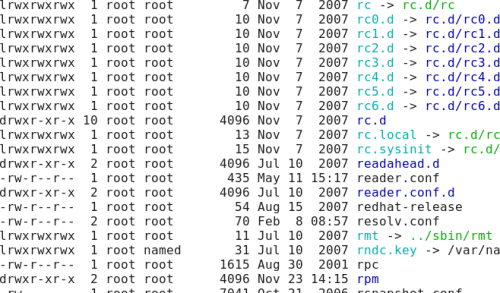
linux-file-permissions-ls-color

Suffix Schemes:-

nothing    regular file
/    directory
*    executable file
@    link
=    socket
|    named pipe

PathNames:-

Relative Path :- The relative path is the path to the destination file/directory from the current location (pwd). eg : cd ../var/www

Absolute path :- The relative path is the full path to the destination file/directory from the ‘/’. eg : vi /home/indisages/files
The maximum length of PathNames including slashes is  4096

Permissions:- The behavior of a file/directory to a particular user totally depends on the permission assigned to it.

rwx and octal/numerical representations
chmod
chgrp
umask for directories and files

Special Modes in Permission:-

Sticky bit – t, eg –> ls -ld /tmp
Set UID – When this mode is set on an executable file, it will run with the user and group permissions on the file instead of with those of the user issuing the command, thus giving access to system resources. eg : /usr/bin/passwd and /etc/passwd
Set GID – Same as SUID, but applies to group. eg : ls -l /usr/bin/write /usr/bin/bsd-write /dev/pts/1

  • General
  • Howtos
  • Linux
  • Training

‘scp’ permission issue : simple fix!

SupportSages Logo
  • Linux
logo

Buggy wget again causing issues with Fantastico – Tells you installed, but fools you

SupportSages Logo
  • cPanel
  • Linux
logo

Chapter 10 Editing files in Linux.

SupportSages Logo
  • Howtos
  • Linux
  • Training
logo

Chapter 11 Basic Shell Scripting in Linux!

SupportSages Logo
  • Linux
logo

Posts by Faheem P.

Faheem enjoys learning new technologies and loves to implement cutting edge solutions. He is one of the most active member in various technical forums and is a familiar face in various brain storming sessions. He takes great pride in being an explorer and the best thing you can be sure about in his room is the backpack!!