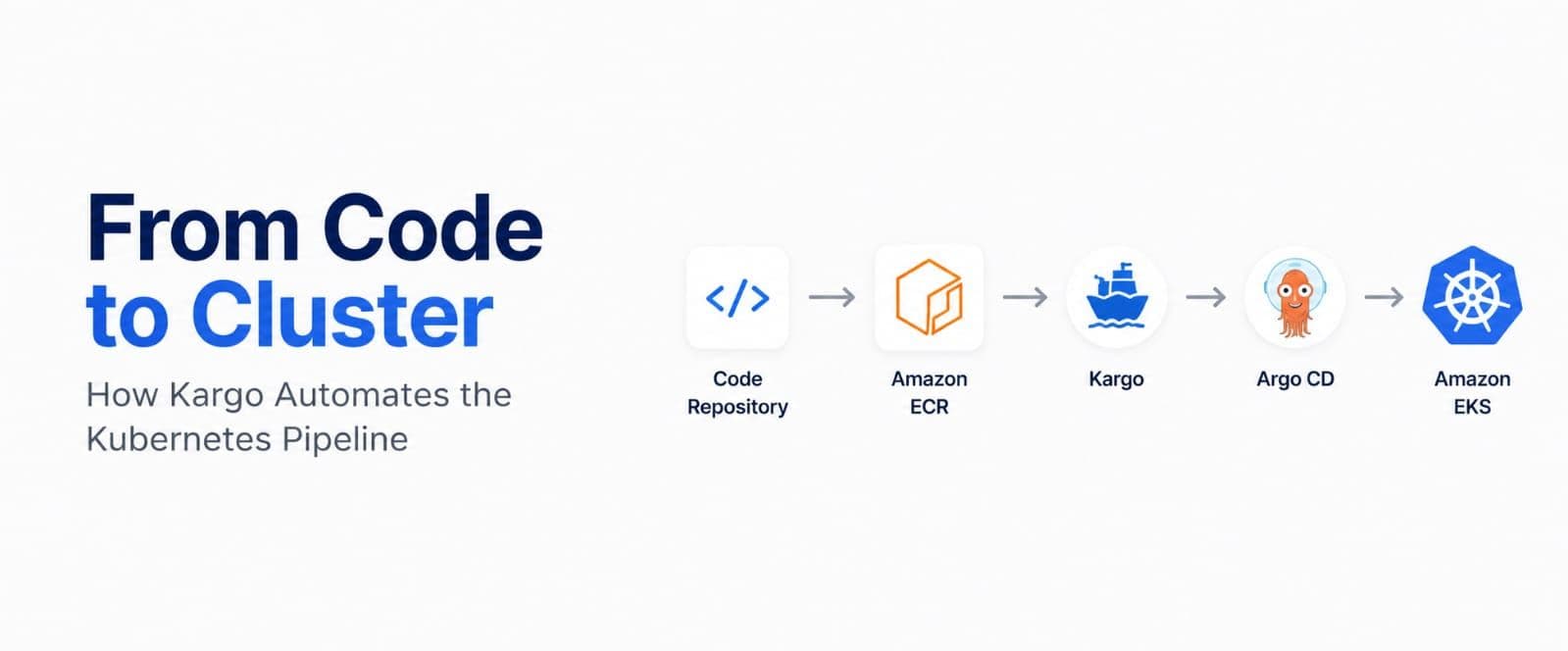
As Kubernetes adoption matures, so do our deployment pipelines. The initial promise of GitOps - managing infrastructure and applications through declarative code in Git - brought tremendous stability and auditability to our systems. But as you scale to multiple environments, the classic GitOps model hit a major friction point: the endless cycle of committing image tag updates to Git repositories just to trigger a deployment.
Enter Kargo (by Akuity), the missing piece in the GitOps puzzle.
In this post, we’ll explore how to build a robust, enterprise-grade GitOps pipeline by combining the CI strength of AWS CodePipeline, the container registry powers of Amazon ECR, the robust infrastructure of Amazon EKS, the delivery automation of Kargo, and the GitOps synchronization of Argo CD.
The Architecture: CI and CD Separated but Connected
Historically, teams bolted deployment steps onto the end of their Continuous Integration (CI) pipelines. This approach is brittle and tightly couples your build process to your target environments. A modern GitOps architecture creates a clean separation of concerns:
1. Continuous Integration (AWS CodePipeline + AWS CodeBuild): Fetches the source code, runs unit tests, builds the Docker image, and pushes it to Amazon ECR.
2. Artifact Registry (Amazon ECR): Acts as the single source of truth for your built container images.
3. Continuous Delivery (Kargo): Discovers the new images in ECR, bundles them into deployable units (Freight), and manages the promotion of those artifacts across environments (Dev → UAT → Prod).
4. GitOps Synchronization (Argo CD): Reconciles the desired state declared in Git (which Kargo just updated) directly with the Amazon EKS cluster.
Let’s dive into how Kargo transforms this workflow.
The End of Manual Git Commits: Kargo's Automated Image Discovery
In a pre-Kargo world, pushing a new image to ECR was only half the battle. You then had to write a script (often inside CodePipeline/CodeBuild or using a tool like Argo CD Image Updater) to clone your Git repository, locate the values.yaml or deployment.yaml, perform a regex replace to update the image tag, commit the change, and push it back to Git.
This process was noisy, prone to merge conflicts, and filled Git histories with meaningless "Update image tag to v1.2.3" messages.
How Kargo Fixes This
Kargo eliminates this friction entirely through two core mechanisms: Automated Image Discovery and Git Repository Updates.
Instead of your CI pipeline pushing changes to Git, Kargo's Project controller actively watches your ECR repositories via an ImageRepository configuration.
1. Discovery: When a new image lands in ECR matching specific criteria (e.g., semantic versioning like v1.x.x or branch tags like feature-*), Kargo detects it.
2. Freight Creation: Kargo bundles this new image (and optionally related Helm charts or Git commit hashes) into an immutable object called Freight.
3. Automated Rendering and Committing: When you promote that Freight to a Stage (like dev), Kargo handles the Git operations for you. It clones the environment's Git repository branch, renders the changes (updating the image tags via Helm values, Kustomize, or raw YAML patching), commits the update with a clean message, and pushes it.
Kargo in Action: Updating Kustomization
When Kargo promotes Freight, it applies the updates directly to your configuration files. For example, if you are using Kustomize, Kargo automatically modifies the kustomization.yaml file to point to the newly built image tag.
Here is an example of what that modified kustomization.yaml looks like in your Git repository after Kargo renders the promotion for your my-app service:
As you can see, Kargo surgically updates the images block and any relevant CI annotations, all without manual intervention.
Handling Monorepos: Updating Multiple Applications
A common GitOps pattern is storing multiple microservices (e.g., my-app-service1, my-app-service2) in different folders within the same Git repository. How does Kargo know which application's image to update without accidentally modifying another?
Kargo controls this entirely via its Promotion Pipeline configuration (specifically the promotionTemplate defined in your Stage). When you define a stage, you write exact instructions telling Kargo exactly which folder path to target for a specific image update.
Here is an example of what that instruction looks like under the hood:
Because Kargo maps the path (e.g., apps/my-app-service1/env/dev) directly to the image payload stored in Freight, it executes updates deterministically. If a new image is built for my-app-service2, its own promotion pipeline triggers and updates solely apps/my-app-service2/env/dev. This prevents any configuration collisions in large GitOps monorepos!

Argo CD then sees the updated Git repository and syncs the changes to EKS.
Getting Started: Installing Kargo and Configuring Access
Before Kargo can orchestrate your promotions, it needs to be installed in your Kubernetes cluster and granted the right permissions.
1. Installing Kargo via Helm
Kargo is easily installed using its official Helm chart:
2. Granting Kargo Access to AWS CodeCommit and Argo CD
Kargo needs access to your Git provider (to push manifests) and Argo CD (to monitor sync status).
- AWS CodeCommit: Kargo uses Kubernetes Secret resources to authenticate with Git repositories. To grant Kargo access to CodeCommit, you can use AWS IAM HTTP Git credentials and store them in a Secret annotated for Kargo's use:
(Note: For enhanced security in production, you can store these credentials in AWS Secrets Manager and use the External Secrets Operator (ESO) to securely fetch the username and password as an external secret reference, creating the native Kubernetes Secret dynamically.)
- Argo CD: Kargo natively integrates with Argo CD. If Kargo is installed in the same cluster as Argo CD, it can automatically read Application health and sync statuses without additional credentials, provided Kargo's controller has the necessary Kubernetes RBAC permissions to read Argo CD resources.
Multi-Environment Deployments with Kargo: Dev, UAT, and Prod
To see the power of Kargo, let’s model a typical three-stage deployment: Dev, UAT, and Production.
In Kargo, you define environments using the Stage Custom Resource Definition (CRD). These stages are connected to specific Argo CD Applications and Git repository paths.
1. The Development Stage (dev)
Your Dev environment is usually chaotic, acting as the integration point for recent code changes.
In Kargo, you configure the dev Stage to automatically promote any new Freight generated from your dev branch images in ECR.
- Kargo detects the new image in ECR.
- It automatically promotes the Freight to the dev Stage.
- Kargo updates the Git repository configuring the Dev cluster.
- Argo CD syncs the Dev EKS cluster.
Developers get immediate feedback without touching YAML.
2. The User Acceptance Testing Stage (uat)
UAT is where QA teams or product owners validate the software. You don't want every Dev build going to UAT.
Instead of configuring uat to watch the dev Stage.
- When a build proves stable in Dev, a developer or release manager triggers a Promotion.
- Kargo takes the exact same Freight (the exact same immutable container image hashes) currently running in dev and promotes it to uat.
- Kargo updates the UAT environment's Git branch/folder.
- Argo CD syncs the UAT EKS cluster.
Kargo guarantees that the exact artifact tested in Dev is the one promoted to UAT.
3. The Production Stage (prod)
Production deployments require strict governance. In Kargo, the prod Stage is configured to only accept Freight that has successfully passed through the uat Stage.
Furthermore, you can integrate Kargo with Kubernetes RBAC so that only specific users or groups (e.g., Release Managers or SREs) have the permission to execute a promotion to the prod Stage.
- When a release is approved, an authorized user clicks "Promote" (or triggers an API call) to move the Freight from uat to prod.
- Kargo updates the Production Git manifests.
- Argo CD deploys to the Production EKS cluster.
Because Kargo understands the DAG (Directed Acyclic Graph) of your environments, it physically prevents a developer from deploying an image directly from Dev to Prod without passing through UAT first.
Tying It All Together on AWS
Building this unified pipeline requires configuring the following workflow:
- Developer pushes code to GitHub/CodeCommit.
- AWS CodePipeline triggers. CodeBuild compiles the application, runs tests, and executes docker push sending the image to Amazon ECR.
- Kargo (running in EKS) detects the new image in ECR using IAM Roles for Service Accounts (IRSA) to authenticate to the private registry.
- Kargo creates a new Freight and, based on your Stage definitions, auto-promotes it to Dev by opening a PR or committing directly to your environment Git repo.
- Argo CD detects the Git change and rolls out the new deployment on the Dev EKS cluster.
- The team manually triggers Kargo promotions to move the tested Freight sequentially to UAT and finally Production EKS clusters.