Running a server is one thing. Keeping it secure, updated, and available around the clock is another.
As businesses grow, server management becomes more demanding. Missed updates, resource issues, or delayed troubleshooting can lead to downtime and security risks.
A professional server management provider can help handle these responsibilities. But choosing the right partner involves more than comparing prices.
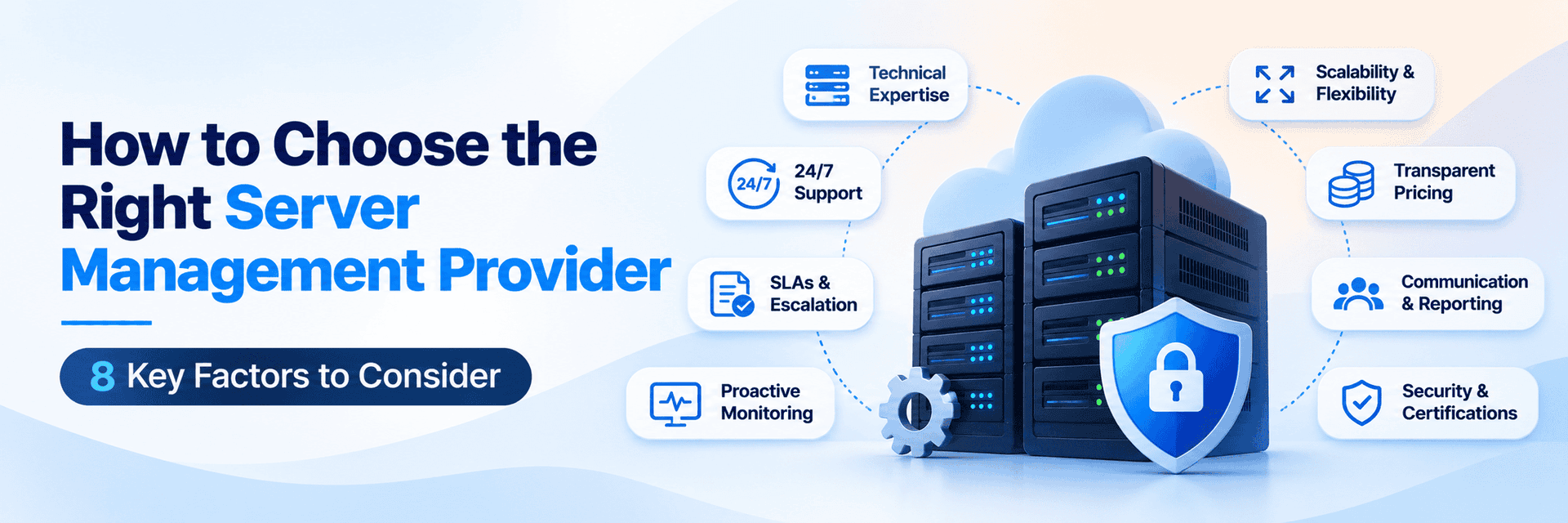
Here are eight important factors to consider.
1. Technical Expertise Across Different Environments
Your provider should have experience with the technologies your business uses. Look for expertise in Linux and Windows server administration, control panels such as cPanel, Plesk, and DirectAdmin, and web servers like Apache, Nginx, and LiteSpeed. Experience with CloudLinux, virtualization platforms, AWS, Azure, Google Cloud, databases, and mail servers is also valuable.
A provider with experience across different environments can handle a wider range of technical issues.
2. 24/7 Server Support and Availability
Server issues can happen at any time. An outage during weekends or outside business hours can affect websites, applications, and customer transactions.
Check whether the provider offers genuine 24/7/365 technical support and whether engineers are available to investigate issues immediately. Having a support channel open around the clock is not enough. Make sure technical assistance is available when you need it.
3. Clear SLAs and Escalation Procedures
A Service Level Agreement (SLA) defines what you can expect from your support provider. Before signing an agreement, understand the initial response time, incident escalation process, resolution targets where applicable, and how critical incidents are handled.
Also, understand the difference between response time and resolution time. A quick response does not necessarily mean the issue will be resolved within the same timeframe.
4. Proactive Monitoring and Security Management
Server management should involve more than fixing problems after they occur. Your provider should monitor CPU usage, memory, disk space, network activity, and service availability.
Ask whether their services also cover security updates, vulnerability patching, firewall management, malware detection, server hardening, and suspicious activity monitoring. Backup verification and recovery support are also worth discussing.
Regular monitoring and maintenance help identify potential issues before they affect your services.
5. Scalability and Flexible Support Options
Your support requirements may change as your infrastructure grows. Look for providers that offer flexible arrangements, including per-server management, on-demand administration, dedicated server administrators, dedicated technical support teams, and cloud or VPS management.
Having different support options makes it easier to expand your services as your business grows.

6. Transparent Pricing and Defined Scope
A lower price does not always mean better value. Providers may charge per server, per hour, through monthly plans, or based on dedicated resources.
Before comparing quotes, check what is included. Does the price cover monitoring, security patching, backups, migrations, server optimization, and emergency support? Also clarify whether L3 troubleshooting and work outside the agreed scope involve additional charges.
7. Communication, Reporting, and Accountability
Your provider should keep your team informed about server activities and incidents. Regular service review meetings, incident reports, technical documentation, and root cause analysis for major incidents can help maintain operational visibility.
It is also useful to understand how you can contact the support team and whether you will have a dedicated point of contact.
8. Security Standards and Industry Certifications
Your provider may have access to critical infrastructure and sensitive business information. Make sure they follow proper security practices, including controlled server access, information security policies, employee training, and appropriate data handling procedures.
Certifications such as ISO 27001 can provide additional confidence in a provider's information security management framework. However, certification should not replace your own security assessment.
Questions to Ask Before Choosing a Server Management Company
Before finalizing a provider, ask about their 24/7/365 coverage, supported operating systems and control panels, critical incident escalation process, and the monitoring and security services included in their plans.
You should also clarify whether backups are included, whether they can work with your existing infrastructure and monitoring tools, how they report service performance, and whether their support can scale as your server count increases.
Why Choose SupportSages for Server Management?
At SupportSages, our TechOps team supports businesses with ongoing server administration, maintenance, and troubleshooting.
Our services cover 24/7/365 technical support, experienced L1, L2, and L3 engineers, and administration of cPanel, Plesk, DirectAdmin, and Linux environments. We also offer proactive server monitoring options, security updates, server hardening, optimization, troubleshooting, and backup and disaster recovery support.
Whether you need ongoing administration or a dedicated support arrangement, we can discuss an approach that fits your infrastructure and operational requirements.
Final Thoughts
Choosing a server management provider is a long-term decision. Look beyond the monthly price and evaluate the provider's technical expertise, support availability, security practices, and ability to handle your infrastructure.
Looking for a dependable server management partner? Talk to SupportSages about a support arrangement that fits your requirements.
Explore our Server Management Services to learn more.