


• DevOps
    Case Study

    How we built a resilient multi-account, multi-cloud solution for a Health Tech service provider!

    READ CASESTUDY
    icon

    24/7 DevOps as a Service

    Round-the-clock DevOps for uninterrupted efficiency.

    icon

    Infrastructure as a Code

    Crafting infrastructure with ingenious code.

    icon

    CI/CD Pipeline

    Automated CI/CD pipeline for seamless deployments.

    icon

    DevSecOps

    Integrated security in continuous DevOps practices.

    icon

    Hire DevOps Engineers

    Level up your team with DevOps visionaries.

    icon

    Consulting Services

    Navigate success with expert DevOps consulting.

  • TechOps
    Case Study

    How we built a scalable Odoo solution for a Travel Tech service provider!

    READ CASESTUDY

    WEB HOSTING SUPPORT

    icon

    HelpDesk Support

    Highly skilled 24/7 HelpDesk Support

    icon

    Product Support

    Boost your product support with our expertise.

    MANAGED SERVICES

    icon

    Server Management

    Don’t let server issues slow you down. Let us manage them for you.

    icon

    Server Monitoring

    Safeguard your server health with our comprehensive monitoring solutions.

    STAFF AUGMENTATION

    icon

    Hire an Admin

    Transform your business operations with our expert administrative support.

    icon

    Hire a Team

    Augment your workforce with highly skilled professionals from our diverse talent pool.

  • CloudOps
    Case Study

    How we helped a Private Deemed University in India, save US $3500/m on hosting charges!

    READ CASESTUDY
    icon

    AWS Well Architected Review

    Round-the-clock for uninterrupted efficiency

    icon

    Optimize

    Efficient CloudOps mastery for seamless cloud management

    icon

    Manage

    Automated CI/CD pipeline for seamless deployments

    icon

    Migrate

    Upgrade the journey, Migrate & Modernize seamlessly

    icon

    Modernize

    Simplify compliance complexities with our dedicated services

    icon

    FinOps as a Service

    FinOps as a Service

  • SecOps
    Case Study

    How we built a scalable Odoo solution for TravelTech service provider!

    READ CASESTUDY
    icon

    VAPT

    Vulnerability Assessment and Penetration Testing

    icon

    Source Code Review

    Ensuring source code security ans safe practices to reduce risks

    icon

    Security Consultation

    On demand services for improving server security

    icon

    System Hardening

    Reduced vulnerability and proactive protection

    icon

    Managed SoC

    Monitors and maintains system security. Quick response on incidents.

    icon

    Compliance as a Service

    Regulatory compliance, reduced risk

  • Insights
    Case Study

    How we helped a Private Deemed University in India, save US $3,500/m on hosting charges!

    READ CASESTUDY
    icon

    Blog

    Explore our latest articles and insights

    icon

    Case Studies

    Read about our client success stories

    icon

    Flipbook

    Explore our latest Flipbook

    icon

    Events

    Join us at upcoming events and conferences

    icon

    Webinars

    Watch our educational webinar series

  • Our Story
  • Contact Us

Interested to collaborate?

Get in touch with us!

Ready to elevate your business with certified cloud expertise? Contact us today to learn how our team can help you leverage cloud technology to drive growth, streamline operations, and enhance security.

  • AWSAWS
  • Azure CloudAzure Cloud
  • Google CloudGoogle Cloud
  • Akamai CloudAkamai Cloud
  • OVHOVH
  • Digital OceanDigital Ocean
  • HetznerHetzner
  • Kubernetes Consultancy Services
  • K8s & Cloud native Solutions
  • 24/7 Infrastructure Monitoring
  • DevOps as a Service
  • Cloud CI/CD Solutions
  • White Labeled MSP Support
  • Our story
  • Life@SupportSages
  • Insights
  • Careers
  • Events
  • Contact Us

Connect with us!


LinkedInFacebookXInstagramYouTube

aws partneraws advanced partner
SupportSages

Copyright © 2008 – 2026 SupportSages Pvt Ltd. All Rights Reserved.
Privacy PolicyLegal TermsData ProtectionCookie Policy

How to enable IPtable modules on a VPS

Faheem P.

  • 3 min read
SupportSages Logo

Generating audio, please wait...

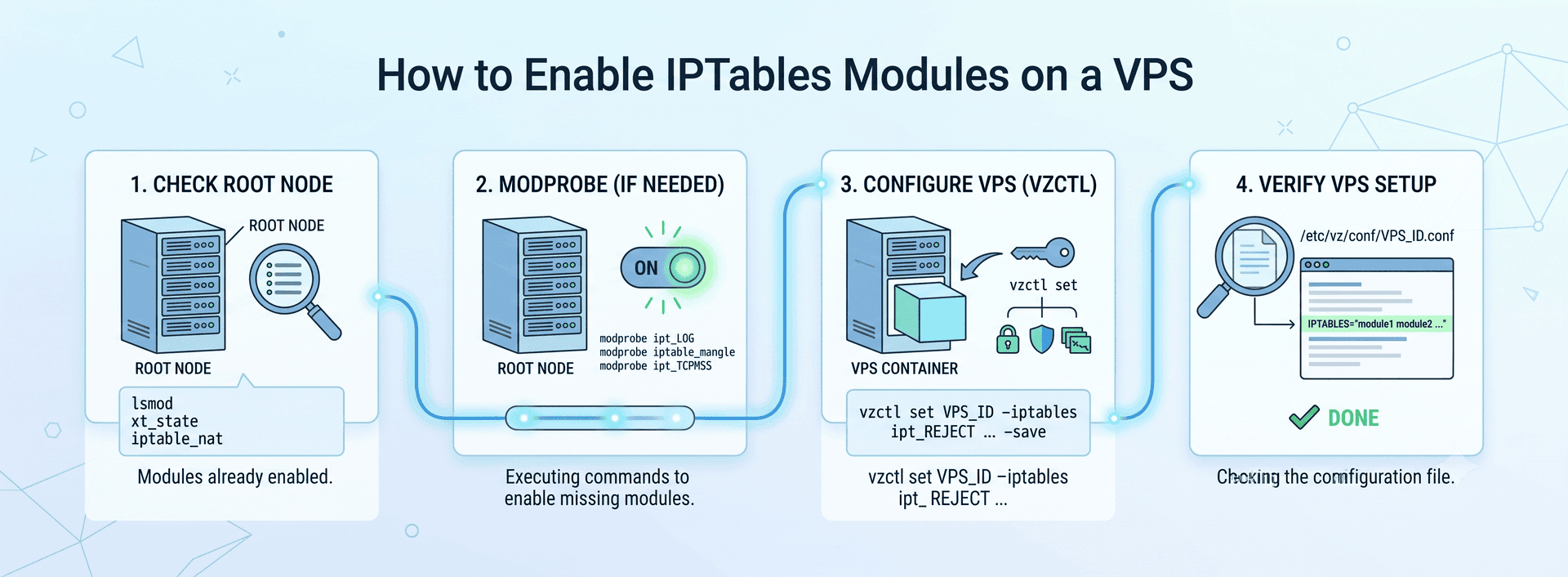
Since we are in the field of VPS hosting technical support we know the importance of firewall in a VPS.So that the blog is intended to provide the steps to enable iptables in a VPS.

Before trying to enable iptable modules on the VPS, make sure that those modules are enabled on the root node server. To check whether the particular iptable modules are enabled or not on the root node, execute the following command.

lsmod

A Sample out put for the lsmod is :

Module                  Size  Used by
xt_helper              35584  0
ip_conntrack_ftp       42320  2
ipt_LOG                39808  0
ipt_owner              34944  0
ipt_REDIRECT           34944  0
ipt_recent             43404  2
xt_state               35200  5
sch_sfq                38912  1
cls_u32                41352  1
sch_cbq                50688  1
ppp_deflate            39168  0
zlib_deflate           52760  1 ppp_deflate
ppp_async              45184  0
ppp_generic            62624  2 ppp_deflate,ppp_async
slhc                   39552  1 ppp_generic
crc_ccitt              35200  1 ppp_async
tun                    47872  0
vzethdev               47264  0
simfs                  38296  36
vzrst                 173096  0
vzcpt                 148792  0
vzdquota               78832  36 [permanent]
xt_tcpudp              36224  21
xt_length              34944  0
ipt_ttl                34816  0
xt_tcpmss              35328  0
ipt_TCPMSS             37248  0
iptable_mangle         37888  36
xt_multiport           36224  0
xt_limit               36352  4
ipt_tos                34560  0
ipt_REJECT             39556  1
iptable_nat            43532  46
ip_nat                 53392  3 ipt_REDIRECT,vzrst,iptable_nat
iptable_filter         37760  42
ip_conntrack          100884  29 xt_helper,ip_conntrack_ftp,xt_state,vzrst,vzcpt,iptable_nat,ip_nat
nfnetlink              40392  2 ip_nat,ip_conntrack
ip_tables              57440  3 iptable_mangle,iptable_nat,iptable_filter
x_tables               52744  17 xt_helper,ipt_LOG,ipt_owner,ipt_REDIRECT,ipt_recent,xt_state,xt_tcpudp,xt_length,ipt_ttl,xt_tcpmss,ipt_TCPMSS,xt_multiport,xt_limit,ipt_tos,ipt_REJECT,iptable_nat,ip_tables
autofs4                57480  2
hidp                   83584  2
rfcomm                105000  0

Here we can see most of the modules are already enabled on the node server. If not enabled, execute the following commands one by one to enable those.

modprobe ipt_helper
modprobe ipt_REDIRECT
modprobe ipt_state
modprobe ipt_TCPMSS
modprobe ipt_LOG
modprobe ipt_TOS
modprobe iptable_nat
modprobe ipt_length
modprobe ipt_tcpmss
modprobe iptable_mangle
modprobe ipt_limit
modprobe ipt_tos
modprobe iptable_filter
modprobe ipt_helper
modprobe ipt_tos
modprobe ipt_ttl
modprobe ipt_REJECT
modprobe ipt_helper
modprobe ipt_owner

Next step is to enable these modules on the VPS.

Promotional banner

Stop the container first :  vzctl stop 960 ( replace 960 with the concerned VPS ID )

Execute the following command :

vzctl set 960 –iptables ipt_REJECT –iptables ipt_tos –iptables ipt_TOS –iptables ipt_LOG –iptables ip_conntrack –iptables ipt_limit –iptables ipt_multiport –iptables iptable_filter –iptables iptable_mangle –iptables ipt_TCPMSS –iptables ipt_tcpmss –iptables ipt_ttl –iptables ipt_length –iptables ipt_state –iptables iptable_nat –iptables ip_nat_ftp –iptables ip_conntrack_ftp –iptables ip_conntrack_irc –iptables ip_nat_irc –iptables ipt_owner –iptables ipt_helper –save

Start the container : vzctl start 960

check whether the modules are enabled from the configuration file cat /etc/vz/conf/960.conf. You are DONE.

Please note that if the command “vzctl set 960 –iptables ipt_ ….” is executed for the second time for the same VPS, it will over write the previous configuration.

For enabling it on all VPSes, please add to /etc/sysconfig/vz all those modules like IPTABLES=”module1 module2 ….etc”

  • Security
  • VPS
Promotional banner
Promotional banner
How to enable IPtable modules on a VPS

‘scp’ permission issue : simple fix!

SupportSages Logo
  • Linux
logo

Buggy wget again causing issues with Fantastico – Tells you installed, but fools you

SupportSages Logo
  • cPanel
  • Linux
logo

Chapter 10 Editing files in Linux.

SupportSages Logo
  • Howtos
  • Linux
  • Training
logo

Chapter 11 Basic Shell Scripting in Linux!

SupportSages Logo
  • Linux
logo

Posts by Faheem P.

Faheem enjoys learning new technologies and loves to implement cutting edge solutions. He is one of the most active member in various technical forums and is a familiar face in various brain storming sessions. He takes great pride in being an explorer and the best thing you can be sure about in his room is the backpack!!
