IP addressing
Each host on internet is assigned with an IP address which is also called as Internet address. Though the hosts are assigned with the number system it won’t be an easy structure for us(humans) to understand or differentiate each system with a number format. Hostname/domainnames are associated to avoid this, and the mapping of these hostnames to the IPs are done by the DNS system.
We would never have thought how these IP addresses are managed and are allocated to each system,host or network. The managing of whole IP address across the whole world is done by a single organisation IANA (Internet Assigned Number Authority). By the entry of ICANN (Internet Corporation for Assigned Names and Numbers) in later 90’s, they takes over the entire control of the IP and domain system and oversees the assignment of IPs by the IANA. IANA assigns the task of allocating the IP to Regional Internet Registries like APNIC,ARIN,LACNIC. These RIR’s maintains/allocates the network portion of the IP.
Now let me explain about the IP’s
IP is a pair of address with the format
IP address = <network address><host address>
This network portion is maintained by Regional Internet Registries (RIR)
American Registry for Internet Numbers (ARIN): This registry is responsible for the administration and registration of Internet Protocol (IP) numbers for North America, South America, the Caribbean, and sub-Saharan Africa.
Reseaux IP Europeans (RIPE): This registry is responsible for the administration and registration of Internet Protocol (IP) numbers for Europe,Middle East, and parts of Africa.
Asia Pacific Network Information Centre (APNIC): This registry is responsible for the administration and registration of Internet Protocol (IP) numbers within the Asia Pacific region.
Latin American and Caribbean Internet Addresses Registry (LACNIC) : This registry is responsible for administration and registration of IPs in Latin American and Caribbean regions.
These RIR’s delegates the job to NIRs (National Internet Registries) and LIRs (Local Internet Registries). ISPs allocate the ISP’s from these registries.
IP address formatting
IP addresses are 32 bit numbers represented in a dotted decimal format. This IP format is actually a binary representation of the decimals.
eg 192.168.1.3 in binary is represented as
192 168 1 3 – 11000000 10101000 00000001 00000011
IP addressing is classified mainly in two manners Class based IP addressing and Classless Inter-Domain Routing.
Class based IP adressing
Class A- IPs range from 1.0.0.0 to 127.255.255.255.
IP assigned with respect to <networkaddress><hostaddress> will be like
N.H.H.H (where N stands for network address and H stands for host address)
Binary format of 10.0.0.0 will be 00001010.00000000.00000000.00000000
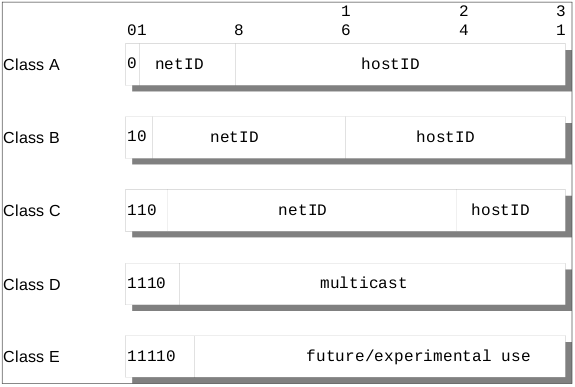
In Class A the first bit is reserved to identify the class. The rest 7 bits is for network portion and the 24 for the host part. This allows for 2^7-2 (126) networks each with 2^24-2 (16777214) hosts—a total of more than 2 billion addresses.
0nnnnnnn.H.H.H
Initial byte: 0 – 127
Also please take note that there are some special reserved IP address which doesn’t come under this range.
Class B- IPs range from 128.0.0.0 to 191.255.255.255
Here the network and host portion will be
N.N.H.H
Binary format of 128.0.0.0 – 01000000.00000000.00000000.00000000
In Class B first two bits serves as significant bits w.r.t to the 1 in Class A. The rest 14 bits identifies the network portion and the 16 bits for host. This allows for 2^14-2 (16382) networks each with 2^16-2 (65534) hosts—a total of more than 1 billion addresses
01nnnnnn.N.H.H
Initial byte: 128 – 191
This Class will be a suitable option if a medium size network and hosts are required.
Class C- IPs range from 192.0.0.0 to 223.255.255.255
Network and host portion format will be
N.N.N.H
Binary format of 192.0.0.0 – 110000000.00000000.00000000.00000000
In Class C the first 3 bits are the significant bits used to identify the class. The rest 21 is for the network and 8 reserved for host. That allows for 2^21-2 (2097150) networks each with 2^8-2 (254) hosts—a total of more than half a billion addresses.
110nnnnn.N.N.H
Initial byte: 192 – 223
This class comes to play where extremely large number of networks is required.
Class D – Ips range from 224.0.0.0-247.255.255.255
These addresses are reserved for multicasting (a sort of broadcasting, but in a limited area, and only to hosts using the same Class D address). Here first 4 bits are reserved as the significant bits to identify the class. The rest is used for multicasting.
Class E – Ips range from 248.0.0.0-255.255.255.255
These addresses are reserved for future or experimental use. First 5 bits are the significant bits.
Reserved IP address
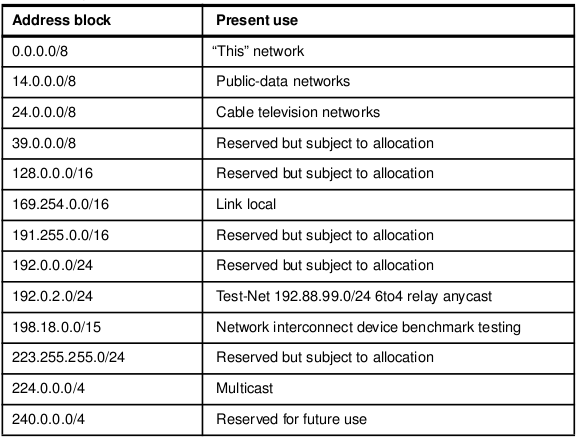
A component of an IP address with a value all bits 0 or all bits 1 has a special meaning:
All bits 0: An address with all bits zero in the host number portion is interpreted as this host (IP address with <host address>=0). All bits zero in the network number portion is this network (IP address with <network address>=0). When a host wants to communicate over a network, but does not yet know the network IP address, it can send packets with <network address>=0. Other hosts in the network interpret the address as meaning this network. Their replies contain the fully qualified network address, which the sender records for future use.
All bits 1: An address with all bits one is interpreted as all networks or all hosts. For example, the following means all hosts on network 128.2 (Class B address): 128.2.255.255 This is called a directed broadcast address because it contains both a valid <network address> and a broadcast <host address>.
Loopback: The Class A network 127.0.0.0 is defined as the loopback network. Addresses from that network are assigned to interfaces that process data within the local system. These loopback interfaces do not access a physical network.
Special use IP addresses
Public and Private IP address
IP addresses can be categorised into Private IP address and Public IP address
Public IP address is the registered IP address passing through the WAN/Internet. They are the IPs assigned by the IANA.
Private IP address is unregistered IP address usually assigned for a LAN. The private IP ranges are assigned for each class by IANA.
Class A- 10.0.0.0 to 10.25.255.255
Class B- 172.16.0.0 to 172.31.255.255
Class C- 192.168.0.0 to 192.168.255.255
IANA ensures the Public address assigned are unique. Only addresses that the IANA has registered are visible on the Internet.