



The time of migration is a very important factor in the traffic loss after migration especially if it is an e-commerce site. There are many things to be considered before migrating a WordPress website and using plugins is not always trustworthy. A well-planned and monitored migration shouldn’t permanently affect your traffic, but we should plan for a temporary dip. For that reason, it’s best to perform the migration during a slow part of the year, assuming that there is some seasonality in your site’s performance. A site migration during or shortly before the holidays is always a bad idea. While the goal should always be to avoid losing any traffic. After the migration, if there will be a URL change the customers will be redirected to the old site address and we will lose them. To prevent this we can use the 301 redirections.
The 301 redirection is basically, the way to inform a web server that the page has been moved and simultaneously indicate its new address. Redirects are one of the most important things to consider when redesigning a website. They send users to the new improved page and tell search engines to rank the new page in the place of the old one.
The redirection can be done in different ways, using cPanel and adding redirection rules to .htaccess
1) Using cPanel
We can make a redirection from the old URL of the site to the new URL. This could be done by login into cPanel then on redirects option, we can redirect the domain.
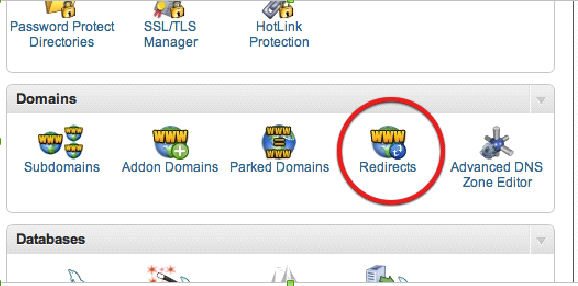
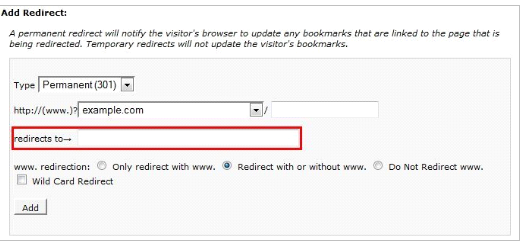
2) Add the rule in the htaccess
The rule has to be added under the htaccess which is under the document root of the website which was migrated. There are different htaccess redirection rules are available for the WordPress sites. Your WordPress .htaccess file will likely already have some information inside, especially if you have enabled permalinks or installed a plugin like W3 Total Cache or iThemes Security.
Following is an example of redirection rule that can be applied in htaccess.
RewriteEngine on
RewriteCond %{HTTP_HOST} ^old.example.com [NC,OR]
RewriteCond %{HTTP_HOST} ^new.example.com [NC]
RewriteRule ^(.*)$ http://example.net/$1 [L,R=301,NC]
Another major cause of traffic lose is the low SEO ranking. Changing web hosts should involve setting up the site at its new location completely, then making DNS changes to point the domain name to the new hosting location and ensuring search engines are properly crawling the website at its new location.
In general, we can ensure the SEO ranking is retained by following steps
-
Pre Migration
Crawl the entire site before you make any changes. This data will show you all of the URLs that currently exist and important information about each, like which have internal links pointing to them. You can save this data to compare to the site after the migration. For example, if you discover that you’ve lost a lot of traffic after the migration you can compare the new site to this previous data and see if any URLs were mistakenly removed.
Find the corresponding URL on the existing website for each new URL that is going to be migrated over. If two pages are similar enough one should be migrated to the other to avoid duplicate content issues.
Identify pages to be eliminated. Any pages that you want to fall completely off the map should return a 404 error, just be sure you aren’t linking to the broken URL elsewhere on the new site. If you have a URL that you don’t want to keep but that URL has links pointing to it, make sure to 301 redirects so you can keep most of that link value.
Identify pages to be created. Create a new page for any content that doesn’t have a corresponding URL. This helps keep the rankings of the site being migrated.
Register Google Search Console. Register the new website’s Google Search Console profile under the existing account. Include both www and non-www and http and https versions of each site.
-
During Migration
Ensure Google Analytics (and any other tracking software) is in place and collecting data. Make sure all new URLs and redirected URLs have the existing Google Analytics code in place and metrics are being tracked. Using the existing Google Analytics account is recommended in order to keep historical data for measuring later.
Annotate the launch of Google Analytics and other analytics programs. This helps to quickly answer any questions in the future and provides context for benchmarking.
Test URL redirects. Make sure each URL is redirecting to the proper new URL based on the redirect map you created. Perform a site lookup (site:www.yoursite.com) to ensure the redirects are properly indexed.
Update XML Sitemap. XML sitemaps inform search engines about the content on a site. Creating a new XML sitemap helps Google rediscover the site’s content in its new location. Submit the updated XML sitemap to Google Search Console and add a link to the sitemap in the robots.txt file. This helps make Google and other search engines aware of all new URLs, including URLs that aren’t included anymore.
Submit a change of address. Google likes to know where the content it indexed is moving to. Submit a change of address ONLY for the migrated website within Google Search Console. This makes it easier for Google to understand where to find the new location of the domain’s content. Do not do this for the domain that isn’t moving.
-
Post Migration
Monitor the error reports in Google Search Console weekly to stay on top of any issues. Pay close attention to 404 and 500-level errors, errors with the sitemap file, crawl rate issues, and HTML problems. Also, monitor important site metrics in Google Analytics (such as organic and referral traffic and conversions) and measure them against the benchmarks you took before the migration.
Check the number of indexed pages. This number might drop for a bit after the migration, but with the 301 redirects the number should climb up to normal or higher if new pages were created. If the number of indexed pages stays low there could be an issue with the redirects. Also, make sure pages that were eliminated aren’t still being indexed.
In addition, checking the above and making sure those 301 redirects are in place, make sure the rest of the site navigation is as it should be and there weren’t any other errors.
