Infrastructure as Code (IaC) has revolutionized the way we manage and provision our infrastructure. By treating infrastructure configurations as code, teams can automate deployments, ensure consistency, and reduce human error. However, with great power comes great responsibility. Misconfigurations in IaC can lead to security vulnerabilities, compliance issues, and operational failures. This is where Checkov, a powerful security scanner, comes into play!
In this blog, I will guide you on how Checkov can help you secure your IaC, why it’s essential, and how to integrate it into your workflow.
What is Checkov?
Checkov is an open-source static analysis tool developed by Bridgecrew (a Palo Alto Networks company). It is designed to detect misconfigurations in Infrastructure as Code frameworks, ensuring compliance with security best practices and industry standards. Checkov supports various IaC formats, including:
- Terraform
- CloudFormation
- Kubernetes manifests
- Helm charts
- Serverless frameworks
- Dockerfiles
Checkov scans your IaC files for security misconfigurations, compliance violations, and best practice deviations, helping you catch issues before deployment.
Why Secure Our IaC with Checkov?
Using an IaC scaning tool like Checkov to scan and validate your Infrastructure as Code (IaC) ensures security, compliance, and best practices from the start. Here’s why it’s essential:
1. Prevent Misconfigurations
Misconfigurations in IaC can lead to security vulnerabilities, such as exposed credentials, open security groups, or unencrypted storage. Checkov automatically scans your IaC files to detect these issues early, reducing the risk of breaches and compliance violations.
2. Compliance Assurance
Checkov validates your IaC against industry compliance standards, including:
CIS (Center for Internet Security)
GDPR (General Data Protection Regulation)
NIST (National Institute of Standards and Technology)
SOC 2 (System and Organization Controls 2)
This helps ensure your cloud infrastructure adheres to regulatory requirements and best practices.
3. Comprehensive and Customizable Security Checks
It provides hundreds of built-in security checks across various cloud providers like AWS, Azure, and Google Cloud. Additionally, it allows you to create custom policies tailored to your organization's security needs.
4. Ease of Use & Versatility
Checkov is lightweight, simple to install, and supports multiple IaC formats, This makes it an excellent choice for teams working across different cloud platforms.
5. Open Source and Free
As an open-source tool developed by Bridgecrew (a Palo Alto Networks company), Checkov is free to use, making it accessible to teams of all sizes without additional costs.
6. Automated & Scalable Security
Whether scanning a single Terraform file or an entire enterprise-level IaC repository, Checkov automates the security scanning process, ensuring that no misconfiguration goes unnoticed.

Getting Started with Checkov for IaC
Prerequisites
Before following this guide, ensure you have the following:
Basic Knowledge of Terraform & IaC – Understanding Infrastructure as Code (IaC) concepts and Terraform syntax will be helpful.
Terraform Installed – Ensure Terraform is installed on your system. You can download it from Terraform's official website.
A Sample Terraform File – Have a basic Terraform configuration ready to test Checkov scans.
Python Installed – Checkov runs on Python, so ensure any python version from Python 3.9 - 3.13 is installed on your system.
Step 1: Install Checkov
Let’s set up Checkov locally on our system to scan IaC files manually. Using a Python virtual environment ensures a clean, isolated installation
# Create and activate a virtual environment
python3 -m venv checkov-env
source checkov-env/bin/activate

# Install Checkov
pip install checkov
You can confirm installation by checking the Checkov version:
checkov --versionStep 2: Scan Your IaC Files
Once installed, you can scan your IaC files with a single command. For example, to scan a Terraform directory:
checkov -d <path-to-your-terraform-directory>The above command will run with all policies as we dont specify any policy or skip any policy in the first place. Checkov will output a detailed report highlighting any misconfigurations or compliance violations.
Step 3: Scanning Specific Policies
You may want to scan for a specific policy or skip one:
Scan only one policy:
checkov -d /path/to/terraform/code --check CKV_AWS_20Skip a policy:
checkov -d /path/to/terraform/code --skip-check CKV_AWS_20Output results in JSON format (useful for automation):
checkov -d /path/to/terraform/code -o json > checkov-results.json
Best Practices for Securing IaC
Use Version Control
Store IaC templates (e.g., Terraform, CloudFormation) in a version control system like Git to track changes, enable collaboration, and roll back if security issues arise.
Implement Least Privilege Access
Define strict IAM policies and roles in IaC to ensure resources and users have only the permissions necessary, minimizing the risk of unauthorized access.
Scan for Vulnerabilities
Regularly scan IaC code with tools like Checkov or Tfsec to detect misconfigurations, hardcoded secrets, or insecure defaults before deployment.
Avoid Hardcoding Sensitive Data
Use secrets management tools (e.g., AWS Secrets Manager, HashiCorp Vault) instead of embedding credentials, API keys, or passwords directly in IaC files.
Automate Security Testing
Integrate security checks into CI/CD pipelines to automatically validate IaC against compliance standards and security policies during development and deployment.
Enforce Peer Reviews
Require code reviews for all IaC changes to catch potential security flaws, ensure consistency, and maintain accountability among team members.
Real-World Example: scan your IaC with checkov
Let’s say you have a Terraform file (main.tf) that defines an AWS S3 bucket and a security group[SG]:
provider "aws" {
  region = "us-east-1"
}

resource "aws_s3_bucket" "example" {
  bucket = "my-example-bucket"
  acl    = "public-read"

}

resource "aws_security_group" "insecure_sg" {
  name        = "open-security-group"
  description = "Allow all inbound traffic"

  ingress {
    from_port   = 22
    to_port     = 22
    protocol    = "tcp"
    cidr_blocks = ["0.0.0.0/0"]
  }
}
However, since this is a example, we want to keep it simple and focus only on two specific policies: CKV_AWS_20 (which checks for public access in S3) and CKV_AWS_24 (which detects insecure security group configurations).
checkov -d . --check CKV_AWS_20,CKV_AWS_24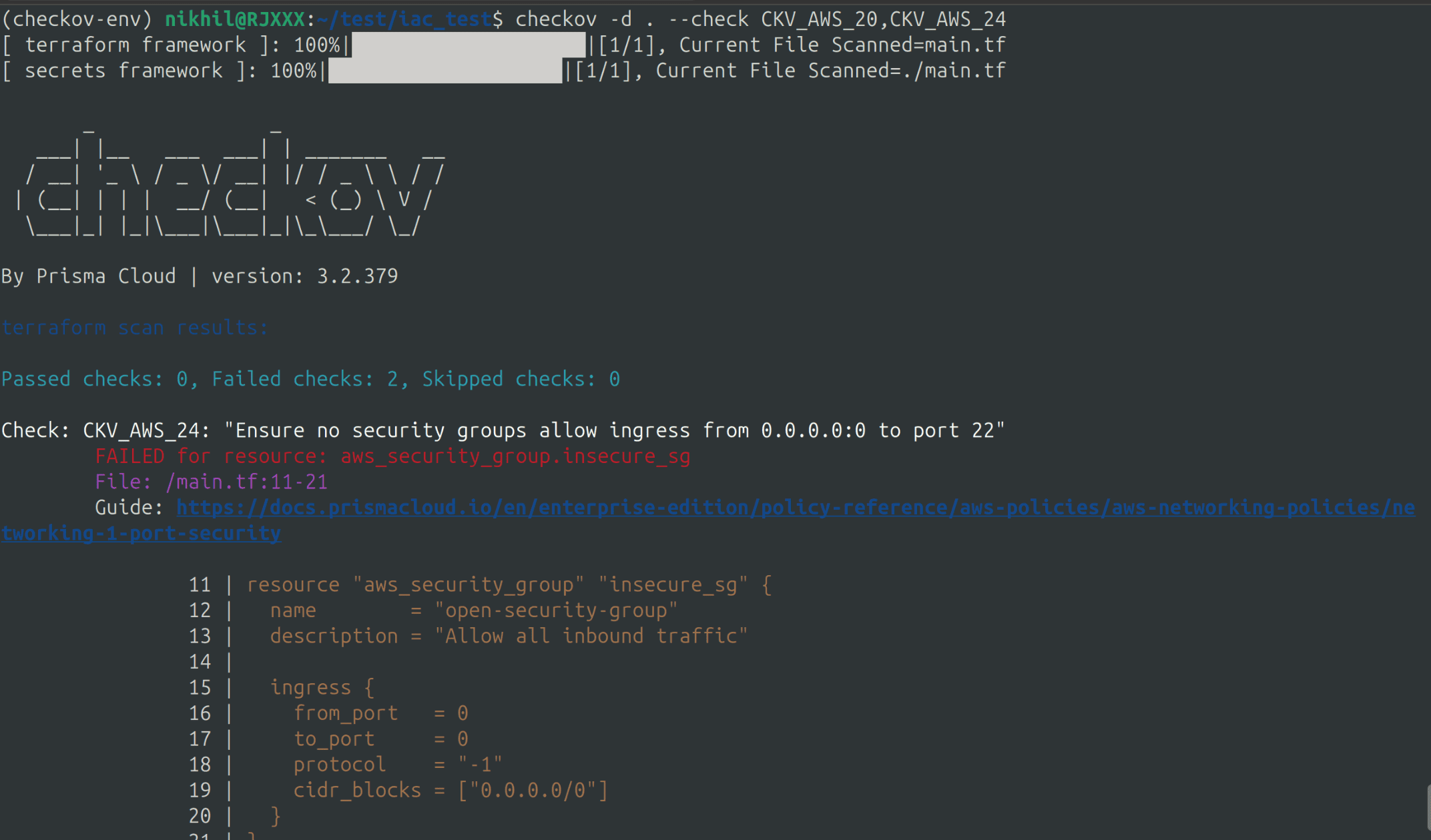
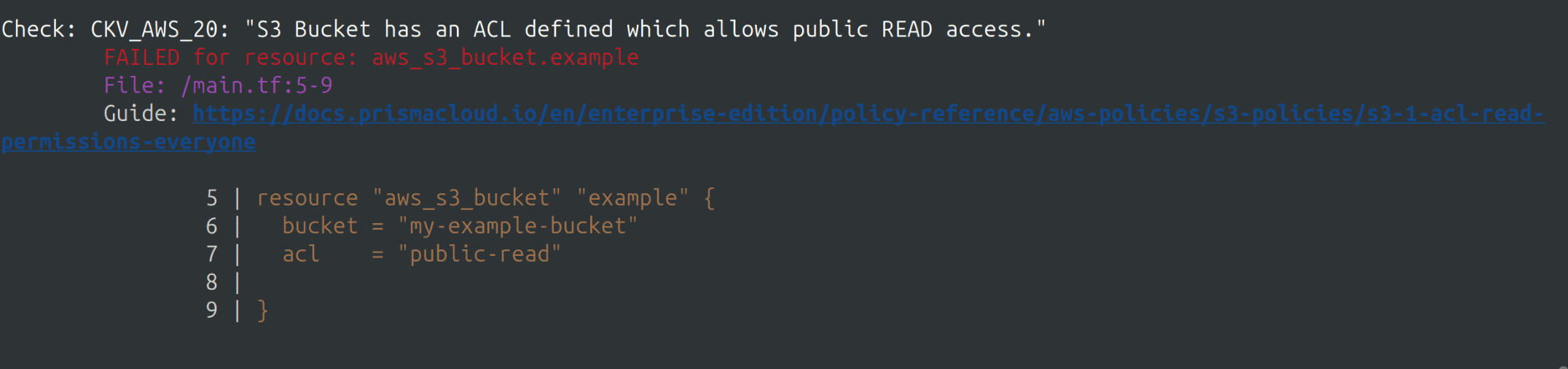
In this example, we used a small Terraform file to demonstrate how Checkov works. While manually reviewing a small file like the above is manageable, but at an organizational level, we often deal with multiple IaC files containing 500+ lines of code. Identifying misconfigurations and ensuring compliance can be challenging.
Using a tool like Checkov simplifies this process, allowing us to efficiently identify and resolve security issues.
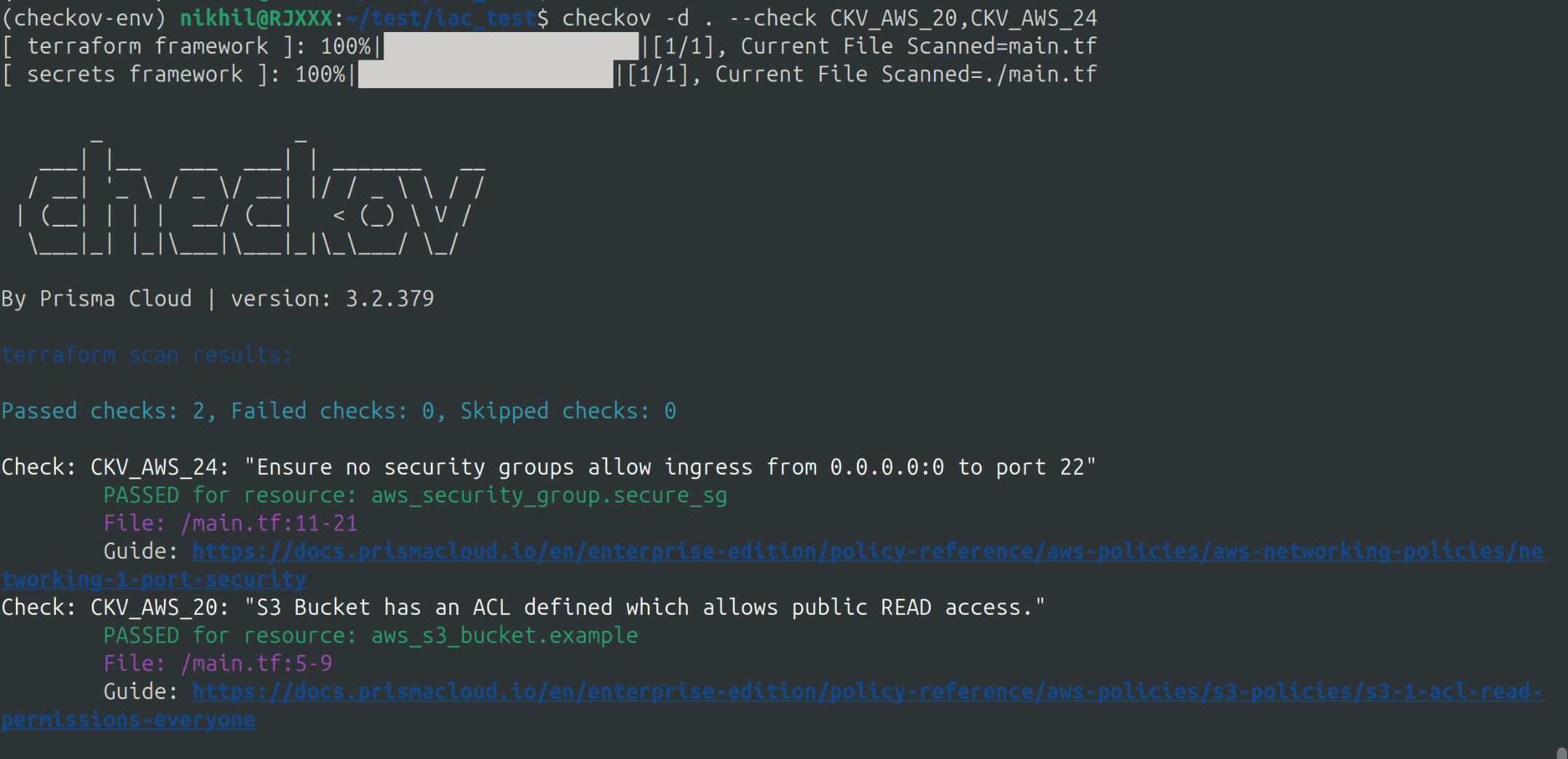
Initially, our first IaC file failed both checks. After analyzing the scan results, we applied the necessary fixes to the below terraform file making the S3 bucket private, preventing public access to the SSH port, and restricting it to a single IP.
provider "aws" {
  region = "us-east-1"
}

resource "aws_s3_bucket" "example" {
  bucket = "my-example-bucket"
  acl    = "private"

}

resource "aws_security_group" "secure_sg" {
  name        = "restricted-security-group"
  description = "Allow only necessary inbound traffic"

  ingress {
    from_port   = 22
    to_port     = 22
    protocol    = "tcp"
    cidr_blocks = ["3.92.157.214/32"]
  }
}
We then re-ran the scan and successfully passed both checks.
Conclusion
Securing Infrastructure as Code (IaC) isn’t optional it’s a must. It’s the key to a strong, compliant infrastructure in a cloud-first world. Using IaC scaning tools like checkov makes it easy to identify and fix security issues in your IaC files, ensuring your infrastructure is secure from the ground up. But Checkov isn’t alone; options like Terrascan and Snyk IaC also scan effectively. Integrating an IaC scaning tool into your workflows shifts security left, slashing risks. This lets you deploy with bold confidence.
Whether you’re using Terraform, Kubernetes, or any other IaC tool, an IaC scaning tool is a must-have in your security toolkit.
Start scanning today and take the first step toward securing your infrastructure as code :)
Take the next step in securing your Infrastructure as Code! SupportSages can help you integrate Checkov into your workflow, ensuring compliance, risk-free deployments, and robust cloud security. Talk to our experts today and strengthen your IaC security!