


Understanding AWS Load Balancers and Auto Scaling
How do an AWS Load Balancer and Auto Scaling work together? This guide explains the difference between traffic distribution and server capacity, and shows how load balancers, target groups, health checks, and EC2 Auto Scaling work as one architecture. It is aimed at developers, DevOps engineers, and AWS users running EC2-based applications that must handle changing traffic without manually adding or removing servers.
Two Services, Two Different Problems
A load balancer manages traffic. Auto Scaling manages capacity.
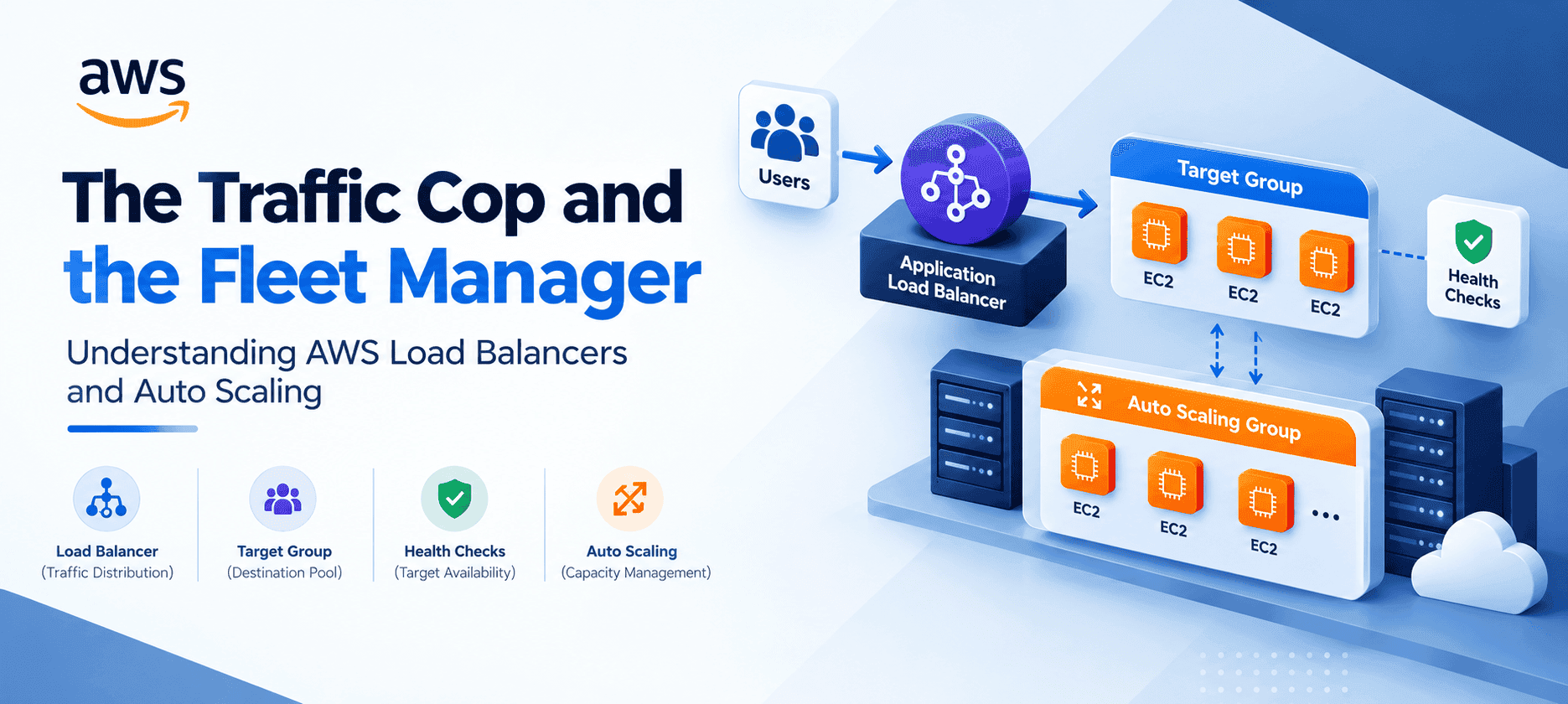
When users access an application, the load balancer receives incoming connections and distributes them across registered targets. Auto Scaling determines how many EC2 instances should be available, based on configured capacity limits and scaling policies. The load balancer does not launch additional EC2 instances when traffic increases; that responsibility belongs to the Auto Scaling Group (ASG). Elastic Load Balancing distributes incoming traffic across registered targets and monitors their health.
How a Load Balancer Helps Your Application
A load balancer gives an application a consistent entry point while distributing requests across multiple backend targets. It helps by:
- Distributing traffic across multiple instances
- Avoiding traffic being sent to unhealthy targets
- Supporting highly available architectures across Availability Zones
- Providing application-aware routing where supported
- Making it easier to add or remove backend instances
Application
|
ALB
|
+-------------+-------------+
| | |
EC2 EC2 EC2
If one target becomes unhealthy, the load balancer stops routing normal traffic to it while the remaining healthy targets continue serving requests. For Application Load Balancers, target groups define registered targets and their health-check configuration.
AWS Load Balancer Types
AWS provides four load balancer types, each intended for different workloads:
- Application Load Balancer (ALB): Operates at Layer 7 for HTTP and HTTPS traffic. It routes requests using hostnames, URL paths, HTTP headers and query strings, making it ideal for websites, APIs and microservices.
- Network Load Balancer (NLB): Operates at Layer 4 for TCP, UDP and TLS traffic. It is built for high-performance network connections and does not normally route on URL paths such as /products.
- Gateway Load Balancer (GWLB): Designed for deploying, scaling and managing virtual network appliances such as firewalls and intrusion detection or prevention systems.
- Classic Load Balancer (CLB): The previous generation of Elastic Load Balancing. AWS recommends migrating existing CLBs to current-generation load balancers where appropriate.
ALB path- and host-based routing example:
example.com/products -> Product Target Group
example.com/checkout -> Checkout Target Group
api.example.com -> API Target Group
For new applications, the choice is generally between ALB, NLB, or GWLB depending on the workload.
Target Groups
A target group defines the destinations to which a load balancer sends traffic. Depending on configuration, targets can include EC2 instances, IP addresses, and other supported target types. Target groups are especially important with ALBs, because listener rules can forward different requests to different target groups (e.g. /products, /orders, /api each going to their own group). Health checks are configured at the target-group level.
Health Checks
Health checks answer one question: can this target currently handle traffic? For an ALB, a health check might request GET /health and the application returns HTTP 200 OK. The target is then considered healthy according to the configured settings. If it repeatedly fails, the load balancer takes it out of service and stops routing normal requests to it.
- Load Balancer asks: "Should I send traffic here?"
- Auto Scaling Group asks: "Should this instance remain part of my fleet?"
When an ASG uses Elastic Load Balancing health checks, unhealthy instances can be identified and replaced.

EC2 Auto Scaling Groups
An EC2 Auto Scaling Group manages a fleet of EC2 instances using three capacity settings:
- Minimum capacity: The lowest number of instances the group should maintain (e.g. 2).
- Desired capacity: The normal number of instances the group runs (e.g. 4).
- Maximum capacity: The highest number of instances the group can launch (e.g. 10).
If demand increases, a scaling policy can raise the desired capacity. If demand decreases, the ASG can reduce the number of instances, subject to its configured limits and policies.
Scaling Strategies
- Target Tracking: Keeps a chosen metric around a target value, for example CPU utilization at 50%. For ALB-backed groups, AWS supports ALBRequestCountPerTarget as a target-tracking metric.
- Step Scaling: Adds different amounts of capacity depending on how severely a CloudWatch alarm is breached; a bigger breach launches more instances.
- Scheduled Scaling: Changes capacity at set times when traffic follows a predictable pattern, for example increasing at 09:00 and reducing at 18:00.
The right strategy depends on the application's traffic pattern and scaling requirements.
How Load Balancing and Auto Scaling Work Together
- Normal traffic: The ALB distributes requests across the available EC2 instances.
- Traffic increases: CloudWatch detects increased load, the scaling policy triggers, and the ASG launches new EC2 instances.
- New instances: The instances pass health checks and are automatically registered with the ALB target group.
- Traffic distribution: The ALB starts sending requests to the new healthy instances.
- Traffic decreases: The ASG scales in by terminating unneeded instances, and the ALB deregisters them automatically.
Responsibilities at a Glance
- ALB: Distributes incoming traffic.
- Target Group: Maintains the pool of available destinations.
- Health Checks: Determine whether each target can receive traffic.
- Auto Scaling Group: Manages how much EC2 capacity exists.
- Scaling Policy: Decides when capacity should increase or decrease.
When Do You Need Both?
You do not automatically need both. A load balancer can work with a fixed number of EC2 instances, and an ASG can manage EC2 instances without a load balancer. For an application that needs both traffic distribution and dynamic EC2 capacity, combining an ALB or NLB with an ASG provides a more automated architecture. Neither replaces the other; they address different parts of the infrastructure.
Choosing the right combination
- Steady, predictable traffic: Use a load balancer; Auto Scaling is optional. A fixed set of instances behind an ALB gives one entry point and failover without scaling logic.
- Queue or batch workers: Auto Scaling only. Workers pull jobs themselves, so there is no inbound traffic to distribute, but capacity should follow the queue.
- Web app with variable traffic: Use both. The ALB spreads the load while the ASG adjusts capacity to demand.
- Single dev or test server: Neither is required, though an ASG of 1 can automatically replace a failed instance.
Tips when combining ALB and Auto Scaling
- Attach the target group to the ASG so new instances are registered and removed ones deregistered automatically.
- Enable ELB health checks on the ASG so instances that fail the load balancer's check are replaced, not just skipped.
- Set a health check grace period long enough for new instances to boot and start the application before they are judged.
- Use a deregistration delay on the target group so in-flight requests finish before an instance is removed during scale-in.
Frequently Asked Questions
Q: Does a load balancer launch EC2 instances?
No. It distributes traffic across registered targets. An Auto Scaling Group manages EC2 capacity.
Q: Can I use a load balancer without Auto Scaling?
Yes. You can distribute traffic across a fixed set of targets.
Q: Can Auto Scaling work without a load balancer?
Yes. An ASG can independently manage an EC2 fleet. A load balancer is only needed when the architecture requires traffic distribution or routing.
Q: What happens when an instance fails a health check?
The load balancer stops routing normal traffic to it. If the ASG uses ELB health checks, the instance can also be replaced.
Q: Which load balancer should I use?
ALB for HTTP/HTTPS with application-aware routing; NLB for TCP, UDP and TLS; GWLB for virtual network appliances. Classic is legacy.
Conclusion
Load balancing and Auto Scaling solve two separate problems. The load balancer manages where traffic goes, with target groups defining destinations and health checks deciding which can receive traffic. The Auto Scaling Group manages how much EC2 capacity exists, with scaling policies growing or shrinking the fleet as demand changes.
Load Balancer = Traffic management
Target Group = Destination pool
Health Check = Target availability
Auto Scaling = Capacity management
Understanding this distinction makes it easier to design EC2 applications that distribute traffic, replace unhealthy capacity, and respond to changing workloads without manually managing every server.