
For improved performance and to speed up your admin panel, you can follow certain steps. Make sure you perform them periodically.
Applying patches
Magento releases security patches regularly and you need to apply them to increase security. To install patches, you can follow the below steps or can contact respective hosting provider after uploading the patch file to your document root.
Disable the compiling of your site from System > Tools > Compilation. Do not forget to re-enable it after the installation.
SSH into your document root after uploading the patch file.
Run the command sh patch_file_name.sh or sh patch_file_name.patch according to the file type.
To verify patch has applied, you can use the command cat app/etc/applied.patches.list
Alternatively, you can create and run a PHP script (patch.php in document root) from your browser (http://www.domain.com/patch.php) with the below content after disabling compilation and uploading the patch file.
<?php print("<PRE>"); passthru("/bin/bash patch_file_name.sh"); print("</PRE>"); echo "Done"; ?>
Clearing logs
Logs are generated when events occur and are helpful and important to track something. Magento logs can grow in size affecting the database performance. Log clearing is a part of database maintenance. You can schedule logs to be cleared automatically using cron jobs. You can refer the below Magento reference for configuration.
https://docs.magento.com/m1/ce/user_guide/system-operations/system-log-cleaning.html
Flushing cache
Magento has different varieties of caches. Cleaning them regularly helps to improve performance. If any recent changes made are not reflected, clearing the cache will help. Go to System > Cache Management to see the different cache clearing options. You can see the status of each cache there and will have the option to refresh it when marked as invalid. For that, select the cache and click submit with a refresh as action.
To clear the Magento product image cache, click the Flush Catalog Images Cache button under Additional Cache Management in the Cache Storage Management page. This will clear the directory media/catalog/product/cache.
Similarly, to clear the JS/CSS cache, click the Flush JavaScript/CSS Cache button under Additional Cache Management in the Cache Storage Management page.
By clicking Flush Magento Cache, the files in var/cache will be cleared. It will remove all the default Magento cache with associated Magento tags.
Flush Cache Storage will remove the cache regardless of Magento tag. This will help when an alternate cache location is used and any cache used by other applications will be removed.
Enable LiteMage cache
It is recommended that you give LiteMage Cache a try when LiteSpeed is used.
You can refer the below links to set it up.
For Magento 1:
https://www.litespeedtech.com/support/wiki/doku.php/litespeed_wiki:cache:litemage:installation
For Magento 2:
Updating extensions and use fewer extensions/modules
Outdated extensions like any other software create vulnerability to a website. You can expect attacks if you don’t update them. You should update old extensions.
There are many Magento extensions/modules which are very inefficient and will result in a serious slowdown to your store. When you are facing any slowdown, try disabling the extensions one by one and you may just find the culprit for your store’s slowdown!
It is usually recommended that you use fewer extensions and make sure your versions of the installation and extensions are all up to date for the most optimal performance. The more extensions, the more HTTP requests.
Magento Re-indexing
In some cases, manual updates are required on every object-store. Indexes are used to speed up MySQL queries. You can see the option to re-index from System > Index management. Alternatively, from the SSH session, you can perform re-indexing by using the below commands from the domain document root.
Magento 1.x
php bin/magento indexer:reindexall
Magento 2.x
php shell/indexer.php --reindexall
Avoid Saving Sessions in Database
It is not recommended saving session files in the database unless absolutely necessary as it will only add unnecessary stress to MySQL. Our servers run on the lightning-fast Solid State Drives (SSD) so saving sessions in your files will not cause slowdown and is considered as the best way to relieve any stress to MySQL. You need to edit the database configuration file, local.xml (Magento 1.x) or env.php (Magento 2.x) in app/etc directory in your domain document root.
If you set session files to be saved in the database, look for the following lines
<session_save><![CDATA[db]]></session_save>
Replace them with:-
<session_save><![CDATA[files]]></session_save>
Enable JavaScript file merging
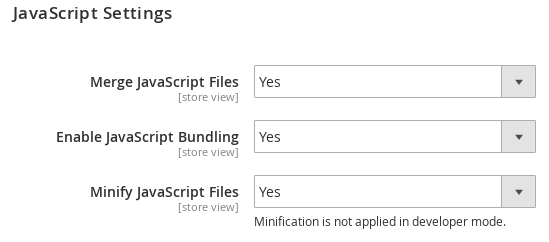
This option combines all JavaScript files into one, reducing the number of HTTP requests that the Magento site makes to the server.
Go to System > Configuration > Developer > JavaScript Settings > Merge JavaScript Files, and select Yes.
Combine CSS files
Combining all JavaScript files into one will reduce the load time, and increase speed. After combining the files, clear the cache.
Go to System > Configuration > Developer > CSS Sttings > Merge CSS Fles, and select Yes.
Flat Catalog module
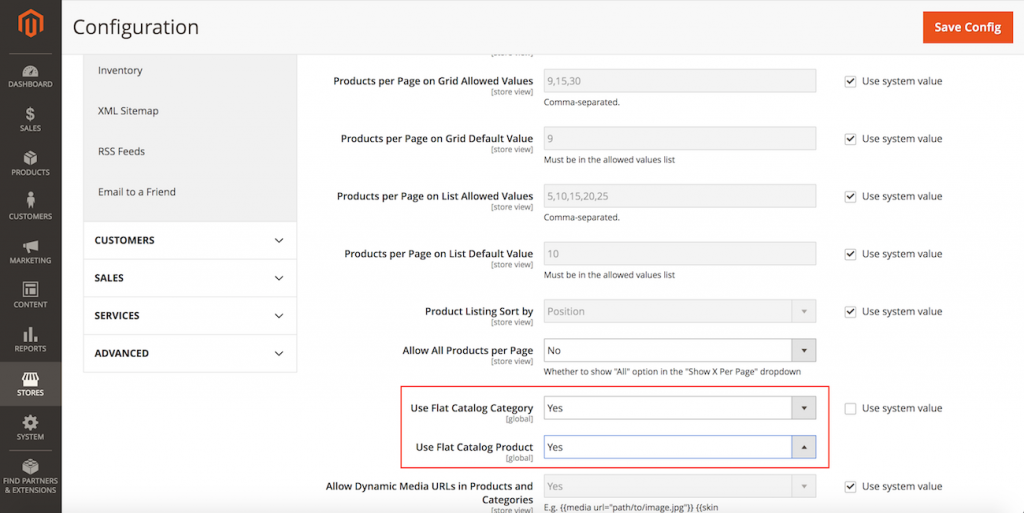
Magento is based on entity attribute value model to store product and customer data. Enabling the Flat Catalog module for products and categories will merge data into one, and improves performance by responding to MySQL queries faster, especially on large catalogs.
Go to System > Configuration > Catalog
Under Storefront, change Use Flat Catalog Category and Use Flat Catalog Product to Yes
After this, Save Config and clear the cache.
Delete unused and outdated products
A clean store is a fast store. We can make the front-end faster by caching and displaying only a limited set of products even if we have more than 10,000 items in the back-end. If the number of products keeps on increasing at the backend, it may get your Magento admin panel slower, so it is best to remove unused products because every product would require some resources to slow Magento admin panel. Clean up Outdated, Unused, or Hidden Products and Categories. A lean database will be faster in reading and searching operations.
These steps will improve the Magento Admin and store performance.