Essential AWS Cloud Security Hardening Best Practices Guide
In modern cloud environments, security is not a one-time setup, it’s a continuous process. Misconfigured IAM roles, unencrypted storage, or overly permissive network rules can expose critical infrastructure.
This guide expands on a practical AWS security hardening checklist, transforming it into a deep-dive troubleshooting and implementation blog. You can use this as a reference alongside your internal notebooks or automation tools.
1. Exposed View (Finding Excess Permissions)
Why it matters
Over-permissioned IAM roles are one of the top causes of cloud breaches. The principle of least privilege ensures users/services only have the access they need.
Key Checks
Identify public S3 buckets with public access.
The below command will show the public access configuration of each bucket in your AWS account.
for bucket in $(aws s3api list-buckets --query "Buckets[].Name" --output text); do
  echo "Checking: $bucket"
  aws s3api get-public-access-block --bucket "$bucket" \
    --query "PublicAccessBlockConfiguration" \
    --output json 2>/dev/null
done
What to look for
If any of these are false, bucket may be public:
- BlockPublicAcls
- IgnorePublicAcls
- BlockPublicPolicy
- RestrictPublicBuckets
If you need a tabular view run the below command in the terminal and wait for a minute. This command is actually checking the bucket policy, bucket ACL and public access block(PAB) configuration and deciding whether S3 bucket is open to the public or blocked.
printf "%-30s %-10s %-10s %-10s\n" "BUCKET" "POLICY" "ACL" "PAB"

for bucket in $(aws s3api list-buckets --query "Buckets[].Name" --output text); do

  # Check Policy
  policy=$(aws s3api get-bucket-policy --bucket "$bucket" --query Policy --output text 2>/dev/null | grep -q '"Principal": "*"' && echo "PUBLIC" || echo "PRIVATE")

  # Check ACL
  acl=$(aws s3api get-bucket-acl --bucket "$bucket" --query "Grants[].Grantee.URI" --output text 2>/dev/null | grep -Eq "AllUsers|AuthenticatedUsers" && echo "PUBLIC" || echo "PRIVATE")

  # Check Public Access Block
  pab=$(aws s3api get-public-access-block --bucket "$bucket" --query "PublicAccessBlockConfiguration.BlockPublicPolicy" --output text 2>/dev/null)
  pab_status=$([ "$pab" == "True" ] && echo "BLOCKED" || echo "OPEN")

  printf "%-30s %-10s %-10s %-10s\n" "$bucket" "$policy" "$acl" "$pab_status"

done
Result:

List IAM users with Console access but no MFA
aws iam generate-credential-report && sleep 5 && \
aws iam get-credential-report --query 'Content' --output text | \
base64 --decode | \
awk -F',' 'NR>1 && $4=="true" && $8=="false" {print $1, "| Password: "$4, "| MFA: "$8}'
Detect access key usage
printf "%-20s %-22s %-25s %-10s\n" "USERNAME" "ACCESS_KEY_ID" "LAST_USED" "DAYS_UNUSED"

THRESHOLD=30
NOW=$(date +%s)

for user in $(aws iam list-users --query "Users[].UserName" --output text); do
  for key in $(aws iam list-access-keys --user-name "$user" --query "AccessKeyMetadata[].AccessKeyId" --output text); do

    last_used=$(aws iam get-access-key-last-used \
      --access-key-id "$key" \
      --query "AccessKeyLastUsed.LastUsedDate" \
      --output text)

    if [ "$last_used" == "None" ]; then
      days_unused="NEVER"
      flag=1
    else
      last_used_epoch=$(date -d "$last_used" +%s 2>/dev/null)
      days_unused=$(( (NOW - last_used_epoch) / 86400 ))

      if [ $days_unused -gt $THRESHOLD ]; then
        flag=1
      else
        flag=0
      fi
    fi

    if [ "$flag" == "1" ]; then
      printf "%-20s %-22s %-25s %-10s\n" "$user" "$key" "$last_used" "$days_unused"
    fi

  done
done
Troubleshooting Tips
- If a user has AdministratorAccess, review if it’s really needed.
- Rotate access keys older than 90 days and remove inactive keys.
Replace IAM users with IAM roles wherever possible.
2. Network Defense (Restricting Exposure)
Why it matters
Security groups are your first line of defense. Misconfigured rules can expose your infrastructure to the internet.
Key Checks
Identify overly permissive rules
Look for:
Especially on ports:
- 22 (SSH)
- 3389 (RDP)
aws ec2 describe-security-groups --query "SecurityGroups[?IpPermissions[? (ToPort==\`22\` ||
ToPort==\`3389\`) && IpRanges[?CidrIp=='0.0.0.0/0'] ]].{ID:GroupId,Name:GroupName}" --output table
Troubleshooting Tips
- Replace 0.0.0.0/0 with:
- Office IP
- VPN CIDR
- Use bastion hosts instead of direct SSH access
Implement AWS WAF for public apps.

3. Incident Response (Detecting Compromised Roles)
Why it matters
If an IAM role is compromised, attackers can move laterally quickly.
Key Checks
Immediately revote active sessions
aws iam put-role-policy --role-name <ROLE_NAME> --policy-name DenyAll --policy-document file://deny-all.jsondeny-all.json
{
  "Version": "2012-10-17",
  "Statement": [
    {
      "Effect": "Deny",
      "Action": "*",
      "Resource": "*"
    }
  ]
}
Unencrypted storage can lead to data leaks and compliance violations.
4. EBS encryption
Key Checks
Command to check whether EBS encryption is enabled by default in the account/region
aws ec2 get-ebs-encryption-by-defaultCommand to list unencrypted volumes:
aws ec2 describe-volumes \
  --query "Volumes[?Encrypted==\`false\`].[
    VolumeId,
    Size,
    State,
    Attachments[0].InstanceId
  ]" \
  --output text | while read vol size state instance; do

    name=$(aws ec2 describe-instances \
      --instance-ids $instance \
      --query "Reservations[].Instances[].Tags[?Key=='Name'].Value" \
      --output text 2>/dev/null)

    echo "$vol,$size,$state,$instance,$name"

done
Verify if your RDS instane have storage encrypted
aws rds describe-db-instances --query 'DBInstances[*].[DBInstanceIdentifier,StorageEncrypted]'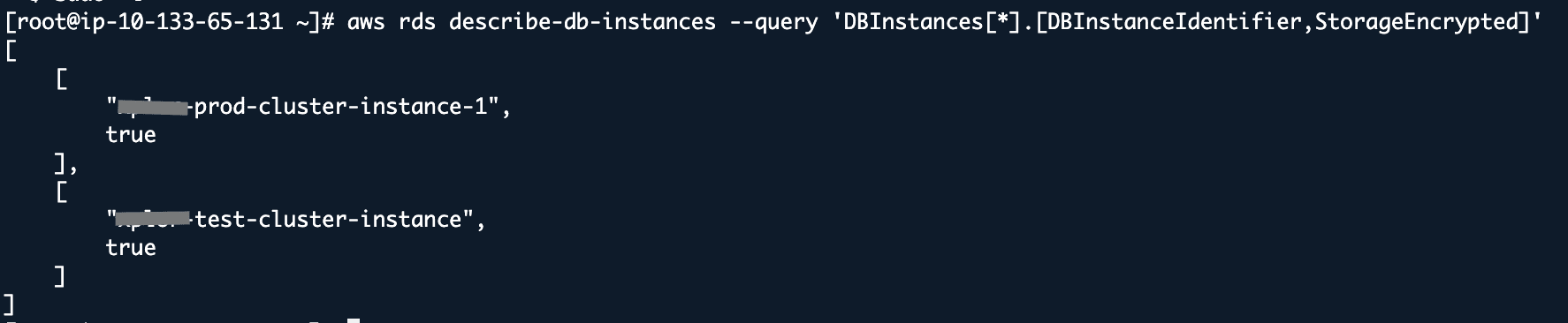
5. Log Analysis (Detecting Suspicious Activity)
Why it matters
Logs are your only source of truth during incidents.
Key Checks
Query CloudTrail logs
aws cloudtrail lookup-events \
  --lookup-attributes AttributeKey=ReadOnly,AttributeValue="false" \
  --query "Events[?ErrorCode=='AccessDenied'].{User:Username,Time:EventTime,Event:EventName}" \
  --output table
Cloud security is a shared responsibility, and small misconfigurations can have large impacts. By continuously auditing IAM, network, encryption, and logs, you can significantly reduce your attack surface.