• DevOps
    Case Study

    How we built a resilient multi-account, multi-cloud solution for a Health Tech service provider!

    READ CASESTUDY
    icon

    24/7 DevOps as a Service

    Round-the-clock DevOps for uninterrupted efficiency.

    icon

    Infrastructure as a Code

    Crafting infrastructure with ingenious code.

    icon

    CI/CD Pipeline

    Automated CI/CD pipeline for seamless deployments.

    icon

    DevSecOps

    Integrated security in continuous DevOps practices.

    icon

    Hire DevOps Engineers

    Level up your team with DevOps visionaries.

    icon

    Consulting Services

    Navigate success with expert DevOps consulting.

  • TechOps
    Case Study

    How we built a scalable Odoo solution for a Travel Tech service provider!

    READ CASESTUDY

    WEB HOSTING SUPPORT

    icon

    HelpDesk Support

    Highly skilled 24/7 HelpDesk Support

    icon

    Product Support

    Boost your product support with our expertise.

    MANAGED SERVICES

    icon

    Server Management

    Don’t let server issues slow you down. Let us manage them for you.

    icon

    Server Monitoring

    Safeguard your server health with our comprehensive monitoring solutions.

    STAFF AUGMENTATION

    icon

    Hire an Admin

    Transform your business operations with our expert administrative support.

    icon

    Hire a Team

    Augment your workforce with highly skilled professionals from our diverse talent pool.

  • CloudOps
    Case Study

    How we helped a Private Deemed University in India, save US $3500/m on hosting charges!

    READ CASESTUDY
    icon

    AWS Well Architected Review

    Round-the-clock for uninterrupted efficiency

    icon

    Optimize

    Efficient CloudOps mastery for seamless cloud management

    icon

    Manage

    Automated CI/CD pipeline for seamless deployments

    icon

    Migrate

    Upgrade the journey, Migrate & Modernize seamlessly

    icon

    Modernize

    Simplify compliance complexities with our dedicated services

    icon

    FinOps as a Service

    FinOps as a Service

  • SecOps
    Case Study

    How we built a scalable Odoo solution for TravelTech service provider!

    READ CASESTUDY
    icon

    VAPT

    Vulnerability Assessment and Penetration Testing

    icon

    Source Code Review

    Ensuring source code security ans safe practices to reduce risks

    icon

    Security Consultation

    On demand services for improving server security

    icon

    System Hardening

    Reduced vulnerability and proactive protection

    icon

    Managed SoC

    Monitors and maintains system security. Quick response on incidents.

    icon

    Compliance as a Service

    Regulatory compliance, reduced risk

  • Insights
    Case Study

    How we helped a Private Deemed University in India, save US $3,500/m on hosting charges!

    READ CASESTUDY
    icon

    Blog

    Explore our latest articles and insights

    icon

    Case Studies

    Read about our client success stories

    icon

    Flipbook

    Explore our latest Flipbook

    icon

    Events

    Join us at upcoming events and conferences

    icon

    Webinars

    Watch our educational webinar series

  • Our Story
  • Contact Us

Interested to collaborate?

Get in touch with us!

Ready to elevate your business with certified cloud expertise? Contact us today to learn how our team can help you leverage cloud technology to drive growth, streamline operations, and enhance security.

  • AWSAWS
  • Azure CloudAzure Cloud
  • Google CloudGoogle Cloud
  • Akamai CloudAkamai Cloud
  • OVHOVH
  • Digital OceanDigital Ocean
  • HetznerHetzner
  • Kubernetes Consultancy Services
  • K8s & Cloud native Solutions
  • 24/7 Infrastructure Monitoring
  • DevOps as a Service
  • Cloud CI/CD Solutions
  • White Labeled MSP Support
  • Our story
  • Life@SupportSages
  • Insights
  • Careers
  • Events
  • Contact Us

Connect with us!


LinkedInFacebookXInstagramYouTube

aws partneraws advanced partner
SupportSages

Copyright © 2008 – 2026 SupportSages Pvt Ltd. All Rights Reserved.
Privacy PolicyLegal TermsData ProtectionCookie Policy
Migration from cPanel to Virtualmin

Migration from cPanel to Virtualmin

Hariram JR

  • 4 min read
Migration from cPanel to Virtualmin

Generating audio, please wait...

The cPanel to Virtualmin migration is some what complex process when compared to usual cPanel to cPanel migration. Here, I’m going to provide the necessary steps for migration.

Backing up of data from cPanel:

Consider you have only the cPanel access for the account.

Login to cPanel>> Files >> Backups >> Download a Full website Backup

By default, the backup file will reside in /home directory of the account.

Move the backup file to document root of the account ie  /home/<user>/public_html/ and change the permission of the file to 644. This will make the file publicly accessible for downloading. Though this a security concern, I am using it as it is more convenient and doesn’t require the root password for transferring the file.

Once the task is completed the file must be removed from the document root to ensure data security.

Migrating the account to Virtualmin:

The first step in any migration is moving the backup file from the source ( here cPanel) server to the destination server ( Virtualmin) server. Let us see how it can be done through command line

Step1: Login to the Virtualmin server using SSH.
Step2: Change the location of present working directory to /home.

Download the backup file to the server.


wget http://userdomain.com/backupfile.tar.gz

Make sure to replace the value userdomain.com with the source cPanel domain name and backupfile.tar.gz with the backup file generated and moved to the document root.

Note:

Once downloaded, login to the source server and remove the backup file back to the /home directory. We can use it in case of an incomplete transfer, without going for another backup generation step. Keeping the backup file in the user’s home directory too is an option, but it may create disk space issues for the user.

Account Restoration

Login to Virtualmin control panel interface as a root user.

Navigate to Add servers >> Migrate Virtual Servers

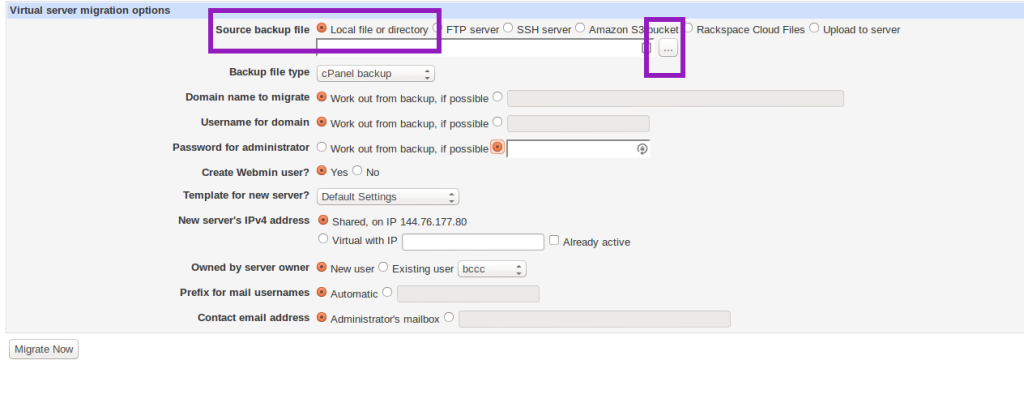
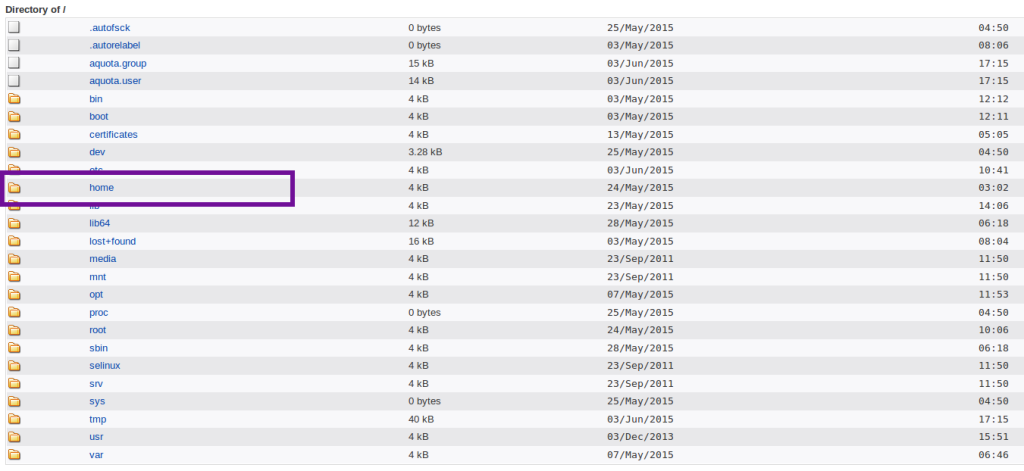
Then “Virtual Server Migrate Options screen” will appear.  Then specify the backup source file  through the tab, Source Backup file.  In our case, the backup file is already moved to the server and is available in the Local directory itself.

Then select the Local files or directory radio button in the Source Backup file.
kb2
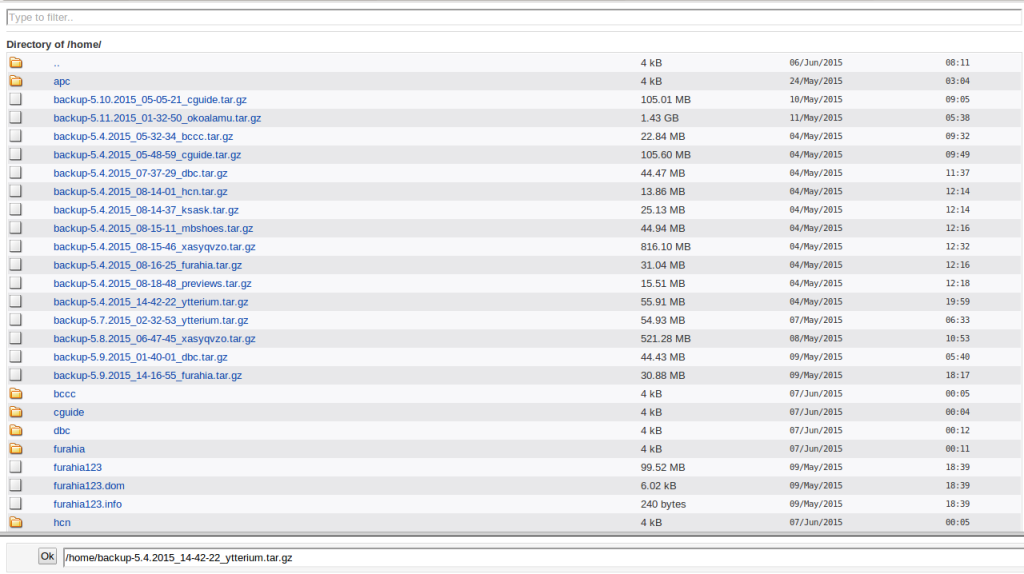
Provide the path where the backup file is present using folder selection box.
kb3

kb4

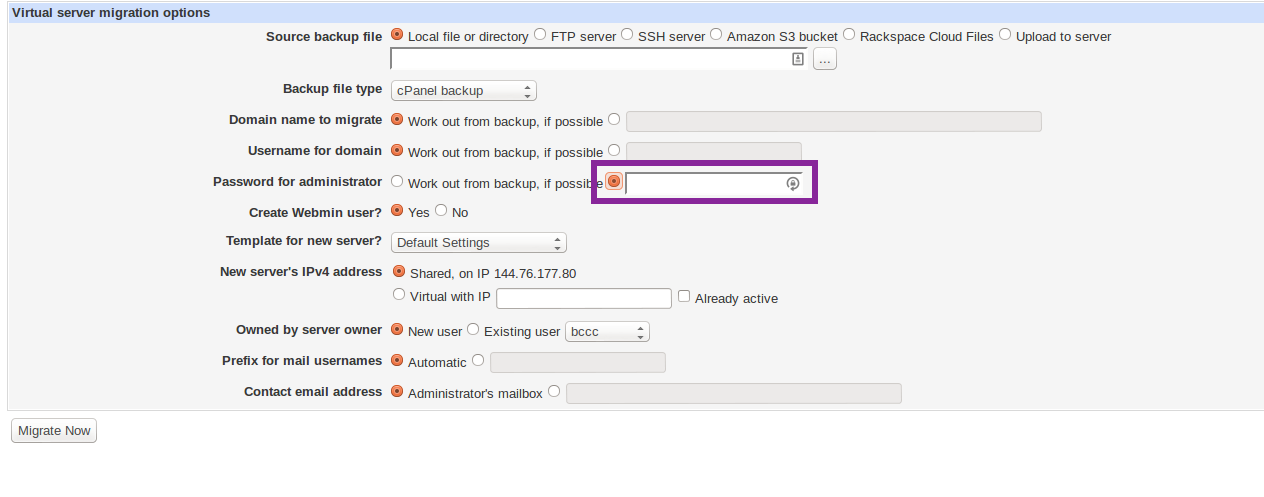
2. Ensure the “Backp file type” is selected as “cPanel backup“.

3. It is mandatory to provide the Password of the cPanel account that is to be migrated. So select the if possible radio button in the Password for administrator selection.

Note: If the password of the cPanel account is not provided it will threw error as “authentication failed”.
kb5

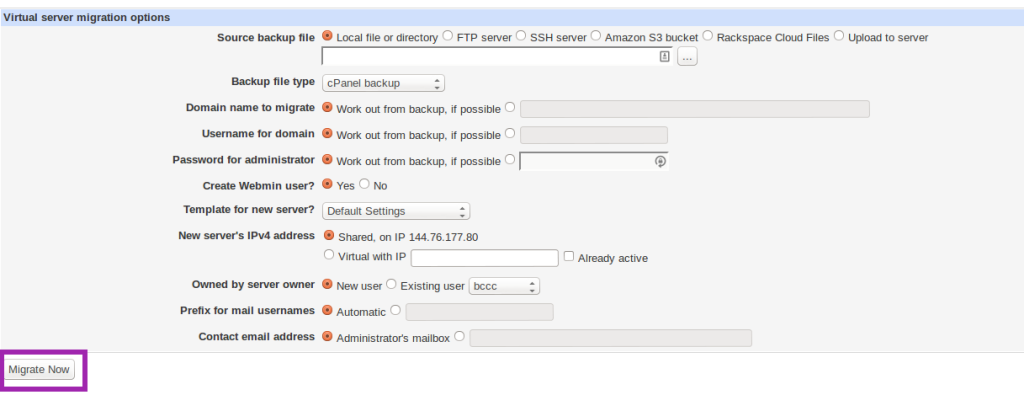
4. Then select “Migrate now” button to proceed with migration.
kb6

It imports all mailboxes, databases and webdata from a cPanel account. This can make the migration process much faster and easier then restoring the account manually.

Once migrated, perform the routine post migration checks and confirm that everything is working properly.


Get 24/7 expert server management

  • cPanel
  • Howtos
  • Linux

How to add swap space on live server

How to add swap space on live server
  • Howtos
  • Linux
  • VPS
logo

WordPress- Admin interface access permission issues

WordPress- Admin interface access permission issues
  • Linux
  • Troubleshooting
  • WordPress
logo

Posts by Hariram JR

System Engineer with two years of experience in deploying and managing hundreds of Linux servers. Currently working in Cloud technologies, especially with AWS platform. His work includes installing application server, scaling and configuring it for high availability and fault tolerance.