Kubernetes has transformed how we deploy and manage applications, but one challenge persists: how do you scale applications precisely based on actual traffic patterns?
Kubernetes' native Horizontal Pod Autoscaler (HPA) can scale workloads based on CPU, memory, and even custom metrics. However, configuring HPA to scale from event sources such as HTTP request rates, message queues, or external systems often requires additional components and custom metric adapters, increasing operational complexity. Additionally, native HPA cannot scale deployments down to zero replicas, which limits cost efficiency during idle periods.
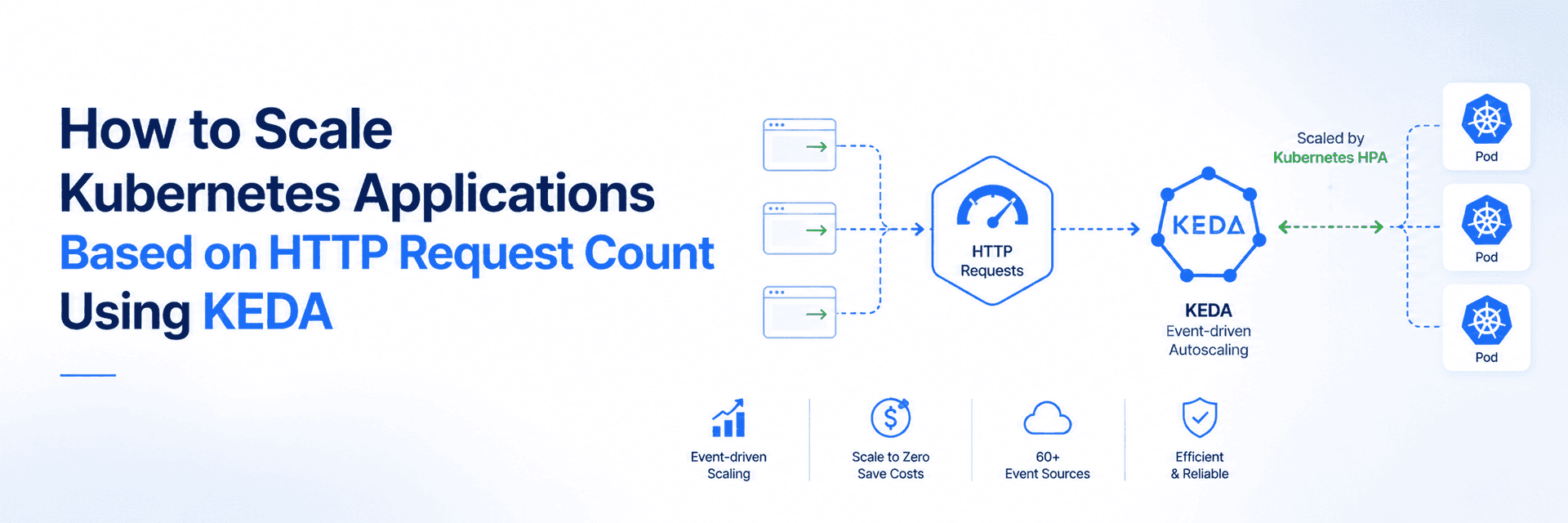
This is where KEDA (Kubernetes Event-Driven Autoscaling) comes in. KEDA simplifies event-driven autoscaling by integrating directly with external event sources and automatically feeding those metrics into HPA — while also enabling scale-to-zero, something native HPA cannot do. In this blog, we'll explore how KEDA works and demonstrate how to configure HTTP request-based autoscaling on a real Kubernetes cluster.
Why Traditional Kubernetes Autoscaling Is Not Always Enough
The Kubernetes Horizontal Pod Autoscaler (HPA) automatically adjusts the number of pod replicas based on resource metrics such as CPU and memory utilization. For compute-intensive applications, this approach works well because increased workload generally results in higher resource consumption.
However, many modern cloud-native applications do not exhibit this behavior.
Consider an API service that primarily waits for responses from a database or communicates with external services. Even while handling thousands of concurrent requests, CPU utilization may remain relatively low because the application spends most of its time waiting for I/O operations rather than performing computation.
As a result, the HPA may not detect the increasing workload quickly enough, leading to:
Increased request latency
Higher response times
Request timeouts
Poor end-user experience
In these situations, resource utilization becomes an indirect and often delayed indicator of application demand.
Why Choose KEDA?
KEDA complements the Kubernetes HPA by introducing event-driven autoscaling capabilities. Instead of relying exclusively on CPU or memory utilization, KEDA evaluates external workload signals and automatically adjusts the number of running replicas.
This approach is particularly valuable for applications that experience:
Highly variable traffic patterns
Event-driven processing
Queue-based workloads
Scheduled workloads
HTTP-based services
Cost optimization through scale-to-zero
What Is KEDA?
Kubernetes Event-Driven Autoscaling (KEDA) is an open-source autoscaling framework that extends Kubernetes with event-driven scaling capabilities.
Originally developed through collaboration between Microsoft and Red Hat, KEDA has since become a CNCF Graduated Project, reflecting its maturity, stability, and widespread production adoption.
KEDA continuously monitors external event sources and automatically scales Kubernetes workloads according to real-time demand.
Key Features
KEDA provides several capabilities beyond native Kubernetes autoscaling:
Event-driven autoscaling using external metrics
Scale-to-zero for cost-efficient workloads
Integration with more than 60 event sources
Lightweight architecture with minimal cluster overhead
Native integration with Kubernetes Horizontal Pod Autoscaler
Declarative configuration through Kubernetes Custom Resources
How HTTP Request-Based Scaling Works
For HTTP workloads, KEDA provides an HTTP add-on with three components:
| Component | Purpose |
|---|---|
| Interceptor | Acts as a lightweight proxy that receives incoming HTTP requests, forwards them to the application, and simultaneously tracks request counts. |
| External Scaler | Collects request metrics from the Interceptor and converts them into a format that KEDA's HPA integration can consume for scaling decisions. |
| HTTPScaledObject | A Kubernetes Custom Resource that defines the scaling configuration, including the target workload, request thresholds, hosts, path prefixes, and minimum/maximum replica counts. |
Demo: Let's Scaling an HTTP Application with KEDA
Let's put KEDA into action! In this hands-on demo, we'll deploy a sample application, configure HTTP request-based autoscaling, and watch KEDA automatically scale the application up and down based on real traffic.
Prerequisites
Before proceeding, ensure you have:
A Kubernetes cluster (v1.16 or later)
kubectl configured to communicate with your cluster
Helm v3 installed
Basic familiarity with Kubernetes Deployments and Services
Step 1: Install KEDA
Add the KEDA Helm repository and install:
helm repo add kedacore https://kedacore.github.io/charts
helm repo update
kubectl create namespace keda
helm install keda kedacore/keda --namespace keda
Verify that the KEDA pods are running:
kubectl get pods -n keda
Step 2: Install the HTTP Add-on
helm install http-add-on kedacore/keda-add-ons-http --namespace keda
Confirm the installation:
kubectl get pods -n keda | grep http

Verify the available configuration fields for your version:
kubectl explain httpscaledobject.spec --recursive
This command displays all supported fields, helping you avoid schema validation errors.
Step 3: Deploy a Sample Application
Create a Deployment and Service for a simple web application:
# deployment.yaml
apiVersion: apps/v1
kind: Deployment
metadata:
  name: sample-app
  namespace: default
spec:
  replicas: 1
  selector:
    matchLabels:
      app: sample-app
  template:
    metadata:
      labels:
        app: sample-app
    spec:
      containers:
      - name: app
        image: nginx:alpine
        ports:
        - containerPort: 80
        resources:
          requests:
            cpu: 100m
            memory: 128Mi
          limits:
            cpu: 200m
            memory: 256Mi
        readinessProbe:
          httpGet:
            path: /
            port: 80
          initialDelaySeconds: 3
          periodSeconds: 5
---
apiVersion: v1
kind: Service
metadata:
  name: sample-app-service
  namespace: default
spec:
  selector:
    app: sample-app
  ports:
  - port: 80
    targetPort: 80
Apply the configuration:
kubectl apply -f deployment.yaml
Step 4: Create the HTTPScaledObject
This Custom Resource defines how KEDA should scale the application:
# httpscaledobject.yaml
apiVersion: http.keda.sh/v1alpha1
kind: HTTPScaledObject
metadata:
  name: sample-app-scaler
  namespace: default
spec:
  hosts:
  - sample-app.example.com
  pathPrefixes:
  - /
  scaleTargetRef:
    name: sample-app
    service: sample-app-service
    port: 80
  replicas:
    min: 0
    max: 10
  scaledownPeriod: 300
  scalingMetric:
    requestRate:
      targetValue: 100
      window: "1m"
Field descriptions:
| Field | Purpose |
|---|---|
hosts | Hostname(s) the interceptor monitors |
pathPrefixes | URL paths to include in metrics |
scaleTargetRef.name | Target Deployment name |
scaleTargetRef.service | Service routing to the pods |
replicas.min | Minimum replicas (0 enables scale-to-zero) |
replicas.max | Maximum replicas |
scaledownPeriod | Seconds to wait before scaling down |
scalingMetric.requestRate.targetValue | Target requests/second per pod |
scalingMetric.requestRate.window | Time window for rate averaging |
This configuration instructs KEDA to maintain one pod for every 100 requests per second, up to a maximum of 10 pods, and wait 5 minutes after traffic subsides before scaling down.
Apply:
kubectl apply -f httpscaledobject.yaml
Verify creation:
kubectl get httpscaledobject

Step 5: Test Autoscaling Behavior
Since this is a local demonstration, use port forwarding to route traffic through the interceptor:
kubectl port-forward -n keda svc/keda-add-ons-http-interceptor-proxy 8080:8080

Generate load For this demonstration, we'll use Hey, a lightweight HTTP load testing tool. It generates concurrent HTTP requests to simulate user traffic, allowing us to observe how KEDA automatically scales the application in response to increasing request rates. If you don't already have it installed, you need to install it.
hey -n 10000 -c 50 -host "sample-app.example.com" http://localhost:8080/

Observe scaling in a separate terminal:
kubectl get pods -l app=sample-app -w
You will see KEDA create additional pods as the request rate exceeds the threshold, then scale them down after the cooldown period once load stops.

Step 6: Verify Metrics
Check the HPA that KEDA automatically creates:
kubectl get hpa
Inspect the scaler status:
kubectl describe httpscaledobject sample-app-scaler


Production Best Practices
When deploying to production, follow these recommendations:
1. Set Resource Requests and Limits
Always define resource boundaries to ensure predictable scheduling:
resources:
  requests:
    cpu: 100m
    memory: 128Mi
  limits:
    cpu: 500m
    memory: 512Mi
2. Configure Readiness Probes
Prevent traffic from reaching pods that aren't ready:
readinessProbe:
  httpGet:
    path: /healthz
    port: 80
  initialDelaySeconds: 5
  periodSeconds: 5
  failureThreshold: 3
3. Adjust Scaling Thresholds
Match thresholds to your application's capacity through load testing:
scalingMetric:
  requestRate:
    targetValue: 100    # Adjust based on actual pod capacity
    window: "1m"        # Longer windows smooth out spikes
4. Use Appropriate Cooldown Periods
Prevent rapid scaling oscillations:
scaledownPeriod: 300 # Wait 5 minutes before removing pods
5. Validate Schema Before Applying
Always check the correct field names for your KEDA version:
kubectl explain httpscaledobject.spec --recursive
6. Monitor KEDA Health
Regularly check KEDA component logs and metrics:
kubectl logs -n keda -l app=keda-operator
kubectl logs -n keda -l app=keda-add-ons-http-interceptor
Summary
KEDA is not a replacement for the Kubernetes Horizontal Pod Autoscaler — it's an extension of it. Where the HPA reacts to resource utilization, KEDA reacts to the real-world signals that actually drive demand: HTTP request rates, message queue depths, scheduled events, and more. For modern cloud-native applications, this distinction matters.
In this guide, we deployed the KEDA HTTP Add-on and configured an application to scale automatically based on incoming request traffic — going from zero replicas under no load to multiple pods under sustained traffic, and back to zero once demand subsided. No application code changes were required.
The result is an autoscaling setup that is both cost-efficient and responsive: you only run what you need, when you need it.
KEDA's 60+ built-in scalers mean this same pattern works beyond HTTP as well. Whether you're consuming messages from Kafka, processing an SQS queue, or reacting to custom metrics, KEDA handles it the same way — monitor the signal, scale to meet demand, scale back when it's done. If your application workload is better described by events than by CPU usage, KEDA is worth adding to your stack.