


• DevOps
    Case Study

    How we built a resilient multi-account, multi-cloud solution for a Health Tech service provider!

    READ CASESTUDY
    icon

    24/7 DevOps as a Service

    Round-the-clock DevOps for uninterrupted efficiency.

    icon

    Infrastructure as a Code

    Crafting infrastructure with ingenious code.

    icon

    CI/CD Pipeline

    Automated CI/CD pipeline for seamless deployments.

    icon

    DevSecOps

    Integrated security in continuous DevOps practices.

    icon

    Hire DevOps Engineers

    Level up your team with DevOps visionaries.

    icon

    Consulting Services

    Navigate success with expert DevOps consulting.

  • TechOps
    Case Study

    How we built a scalable Odoo solution for a Travel Tech service provider!

    READ CASESTUDY

    WEB HOSTING SUPPORT

    icon

    HelpDesk Support

    Highly skilled 24/7 HelpDesk Support

    icon

    Product Support

    Boost your product support with our expertise.

    MANAGED SERVICES

    icon

    Server Management

    Don’t let server issues slow you down. Let us manage them for you.

    icon

    Server Monitoring

    Safeguard your server health with our comprehensive monitoring solutions.

    STAFF AUGMENTATION

    icon

    Hire an Admin

    Transform your business operations with our expert administrative support.

    icon

    Hire a Team

    Augment your workforce with highly skilled professionals from our diverse talent pool.

  • CloudOps
    Case Study

    How we helped a Private Deemed University in India, save US $3500/m on hosting charges!

    READ CASESTUDY
    icon

    AWS Well Architected Review

    Round-the-clock for uninterrupted efficiency

    icon

    Optimize

    Efficient CloudOps mastery for seamless cloud management

    icon

    Manage

    Automated CI/CD pipeline for seamless deployments

    icon

    Migrate

    Upgrade the journey, Migrate & Modernize seamlessly

    icon

    Modernize

    Simplify compliance complexities with our dedicated services

    icon

    FinOps as a Service

    FinOps as a Service

  • SecOps
    Case Study

    How we built a scalable Odoo solution for TravelTech service provider!

    READ CASESTUDY
    icon

    VAPT

    Vulnerability Assessment and Penetration Testing

    icon

    Source Code Review

    Ensuring source code security ans safe practices to reduce risks

    icon

    Security Consultation

    On demand services for improving server security

    icon

    System Hardening

    Reduced vulnerability and proactive protection

    icon

    Managed SoC

    Monitors and maintains system security. Quick response on incidents.

    icon

    Compliance as a Service

    Regulatory compliance, reduced risk

  • Insights
    Case Study

    How we helped a Private Deemed University in India, save US $3,500/m on hosting charges!

    READ CASESTUDY
    icon

    Blog

    Explore our latest articles and insights

    icon

    Case Studies

    Read about our client success stories

    icon

    Flipbook

    Explore our latest Flipbook

    icon

    Events

    Join us at upcoming events and conferences

    icon

    Webinars

    Watch our educational webinar series

  • Our Story
  • Contact Us

Interested to collaborate?

Get in touch with us!

Ready to elevate your business with certified cloud expertise? Contact us today to learn how our team can help you leverage cloud technology to drive growth, streamline operations, and enhance security.

  • AWSAWS
  • Azure CloudAzure Cloud
  • Google CloudGoogle Cloud
  • Akamai CloudAkamai Cloud
  • OVHOVH
  • Digital OceanDigital Ocean
  • HetznerHetzner
  • Kubernetes Consultancy Services
  • K8s & Cloud native Solutions
  • 24/7 Infrastructure Monitoring
  • DevOps as a Service
  • Cloud CI/CD Solutions
  • White Labeled MSP Support
  • Our story
  • Life@SupportSages
  • Insights
  • Careers
  • Events
  • Contact Us

Connect with us!


LinkedInFacebookXInstagramYouTube

aws partneraws advanced partner
SupportSages

Copyright © 2008 – 2026 SupportSages Pvt Ltd. All Rights Reserved.
Privacy PolicyLegal TermsData ProtectionCookie Policy

Installing Automatic SSL In Webuzo End User Panel

Fathima Shereef

  • 3 min read
Installing Automatic SSL In Webuzo End User Panel

Generating audio, please wait...

SSL stands for Secure Socket Layer,  which is a protocol that provides encryption and authentication for data transmitted over the internet. Installing an SSL certificate for a domain in Webuzo, or any web hosting control panel, serves the purpose of securing the communication between the website visitors web browsers and the web server hosting the website. SSL certificates provide encryption and authentication, which are crucial for protecting sensitive information transmitted over the internet and building trust with website visitors.

Here's how you can install an SSL certificate automatically in Webuzo end user panel:

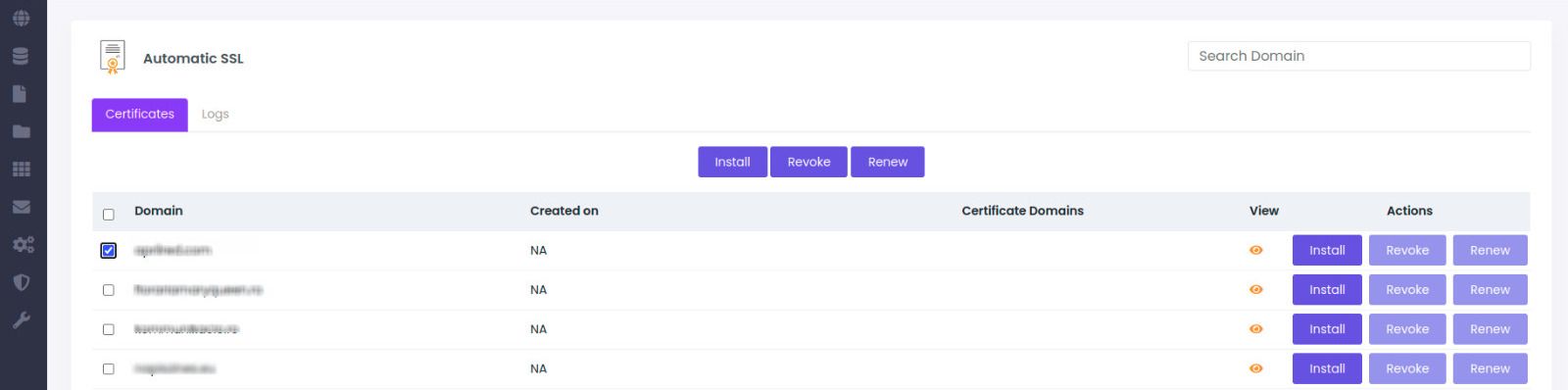
Step 1 : Go to Webuzo end user panel >> SSL >> Automatic SSL.

Installing Automatic SSL In Webuzo End User Panel.png

Step 2 : Select the domain for which you need to issue/manage certificate.

Step 3 : Click on one of the buttons as per the action required for e.g install, revoke etc.
Installing Automatic SSL In Webuzo End User Panel-2.jpeg

Step 4 : You can click on "LOGS" to check the process running in the background ie the SSL installation status.

Wait for a few minutes for the process to complete in the background and you are done.

You can use the following commands to install, revoke and renew SSL certificate in command line.

Install Certificate :
webuzo --lets_encrypt --action=install --domain=domain_name


Revoke Certificate :
webuzo --lets_encrypt --action=revoke --domain=domain_name


Renew Certificate :
webuzo --lets_encrypt --action=renew–domain=domain_name

Promotional banner

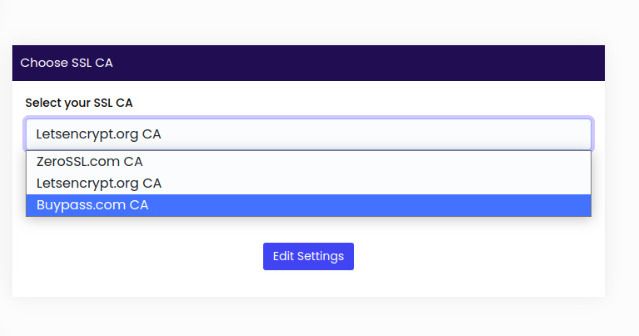
To change the CA from Zero SSL to Let's encrypt please follow the below steps :

Step 1 : Log in to your Webuzo Control Panel.

Step 2 : Navigate to the " Settings" section and click on general.

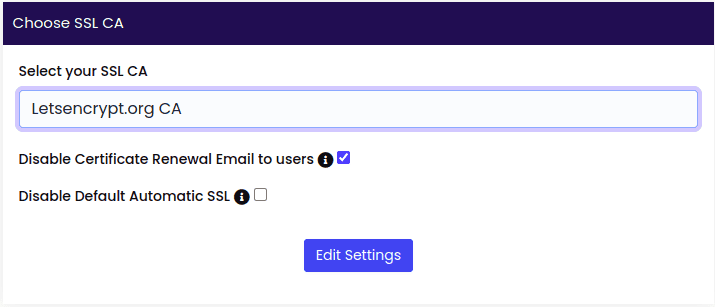
Step 3 : Look for the "Choose SSL CA" option.
Installing Automatic SSL In Webuzo End User Panel-3.png

Step 4 : Under the "Select SSL CA" section, you should see an option to select the Certificate Authority (CA). Choose as per your requirement from the available options.
Installing Automatic SSL In Webuzo End User Panel-4.jpeg

Step 5 : Save the changes by clicking on the "Edit Settings" button.


Conclusion 

SSL certificates encrypt the data exchanged between the server and the client, ensuring that sensitive information, such as login credentials and personal data, is protected from blocking and interference. By following the proper steps for SSL installation in Webuzo, you can enable HTTPS and establish a secure connection for your domain. This helps to build trust with your website visitors and customers, as they can see the SSL padlock icon in their web browser, indicating a secure connection. By securing your website with SSL certificates in Webuzo, you can protect sensitive data, enhance website security, and provide a safe browsing experience for your visitors.

 

  • Web Hosting
  • Security
  • Server Management
Promotional banner
Promotional banner
Installing Automatic SSL In Webuzo End User Panel

Posts by Fathima Shereef