• DevOps
    Case Study

    How we built a resilient multi-account, multi-cloud solution for a Health Tech service provider!

    READ CASESTUDY
    icon

    24/7 DevOps as a Service

    Round-the-clock DevOps for uninterrupted efficiency.

    icon

    Infrastructure as a Code

    Crafting infrastructure with ingenious code.

    icon

    CI/CD Pipeline

    Automated CI/CD pipeline for seamless deployments.

    icon

    DevSecOps

    Integrated security in continuous DevOps practices.

    icon

    Hire DevOps Engineers

    Level up your team with DevOps visionaries.

    icon

    Consulting Services

    Navigate success with expert DevOps consulting.

  • TechOps
    Case Study

    How we built a scalable Odoo solution for a Travel Tech service provider!

    READ CASESTUDY

    WEB HOSTING SUPPORT

    icon

    HelpDesk Support

    Highly skilled 24/7 HelpDesk Support

    icon

    Product Support

    Boost your product support with our expertise.

    MANAGED SERVICES

    icon

    Server Management

    Don’t let server issues slow you down. Let us manage them for you.

    icon

    Server Monitoring

    Safeguard your server health with our comprehensive monitoring solutions.

    STAFF AUGMENTATION

    icon

    Hire an Admin

    Transform your business operations with our expert administrative support.

    icon

    Hire a Team

    Augment your workforce with highly skilled professionals from our diverse talent pool.

  • CloudOps
    Case Study

    How we helped a Private Deemed University in India, save US $3500/m on hosting charges!

    READ CASESTUDY
    icon

    AWS Well Architected Review

    Round-the-clock for uninterrupted efficiency

    icon

    Optimize

    Efficient CloudOps mastery for seamless cloud management

    icon

    Manage

    Automated CI/CD pipeline for seamless deployments

    icon

    Migrate

    Upgrade the journey, Migrate & Modernize seamlessly

    icon

    Modernize

    Simplify compliance complexities with our dedicated services

    icon

    FinOps as a Service

    FinOps as a Service

  • SecOps
    Case Study

    How we built a scalable Odoo solution for TravelTech service provider!

    READ CASESTUDY
    icon

    VAPT

    Vulnerability Assessment and Penetration Testing

    icon

    Source Code Review

    Ensuring source code security ans safe practices to reduce risks

    icon

    Security Consultation

    On demand services for improving server security

    icon

    System Hardening

    Reduced vulnerability and proactive protection

    icon

    Managed SoC

    Monitors and maintains system security. Quick response on incidents.

    icon

    Compliance as a Service

    Regulatory compliance, reduced risk

  • Insights
    Case Study

    How we helped a Private Deemed University in India, save US $3,500/m on hosting charges!

    READ CASESTUDY
    icon

    Blog

    Explore our latest articles and insights

    icon

    Case Studies

    Read about our client success stories

    icon

    Flipbook

    Explore our latest Flipbook

    icon

    Events

    Join us at upcoming events and conferences

    icon

    Webinars

    Watch our educational webinar series

  • Our Story
  • Contact Us

Interested to collaborate?

Get in touch with us!

Ready to elevate your business with certified cloud expertise? Contact us today to learn how our team can help you leverage cloud technology to drive growth, streamline operations, and enhance security.

  • AWSAWS
  • Azure CloudAzure Cloud
  • Google CloudGoogle Cloud
  • Akamai CloudAkamai Cloud
  • OVHOVH
  • Digital OceanDigital Ocean
  • HetznerHetzner
  • Kubernetes Consultancy Services
  • K8s & Cloud native Solutions
  • 24/7 Infrastructure Monitoring
  • DevOps as a Service
  • Cloud CI/CD Solutions
  • White Labeled MSP Support
  • Our story
  • Life@SupportSages
  • Insights
  • Careers
  • Events
  • Contact Us

Connect with us!


LinkedInFacebookXInstagramYouTube

aws partneraws advanced partner
SupportSages

Copyright © 2008 – 2026 SupportSages Pvt Ltd. All Rights Reserved.
Privacy PolicyLegal TermsData ProtectionCookie Policy

How to update Awstats automatically

Ankita V Kurup

  • 4 min read
How to update Awstats  automatically

Generating audio, please wait...

AWStats is short for Advanced Web Statistics. AWStats is powerful log analyzer which creates advanced web, ftp, mail and streaming server statistics reports based on the rich data contained in server logs. It updates regularily, typically on daily basis, and provides an excellent graphical representation for easy understanding. More details about the tool are available from the documentation.

AWStats is widely employed in cPanel servers. To access AWstats from cPanel, please login to cPanel and then navigate then cPanel >> Metrics >> AWStats. But you may get into instances where AWStats fails to update itself on the web UI (cPanel >> AWStats). There are a lot of reasons as of why the stats are not being updated which can include incorrect file permissions or configuration changes.

I am pointing the common reasons why the stats can fail to update and will add more reasons when I come across them.

How to update AWStats manually

If Awstats not updating automatically then obviously you will have to update it manually. This can be done from cPanel or command line and the option to choose depends on your choice/preference. You need root access to the server for updating AWStats manually.

From Command Line

To update Awstats for a user alone via command line, run the command below after logging to the server as ‘root’ user.


/scripts/runweblogs $user-name 

Of course, you will have to replace $user-name with the username of the cPanel account.

Example:

root # /scripts/runweblogs <user_name>
Log checker loaded ok..
==> cPanel Log Daemon version 26.0
——

[2016-04-17 01:15:57 -0400] Reading history file… webalizer.hist
[2016-04-17 01:15:57 -0400] Reading previous run data.. webalizer.current
[2016-04-17 01:15:57 -0400] Saving current run data… [04/17/2016 01:12:09]
[2016-04-17 01:15:57 -0400] Generating report for April 2016
[2016-04-17 01:15:57 -0400] Saving history information…
[2016-04-17 01:15:57 -0400] Generating summary report
[2016-04-17 01:15:57 -0400] 252 records in 1 seconds, 252/sec
[2016-04-17 01:15:58 -0400] Complete

WHM

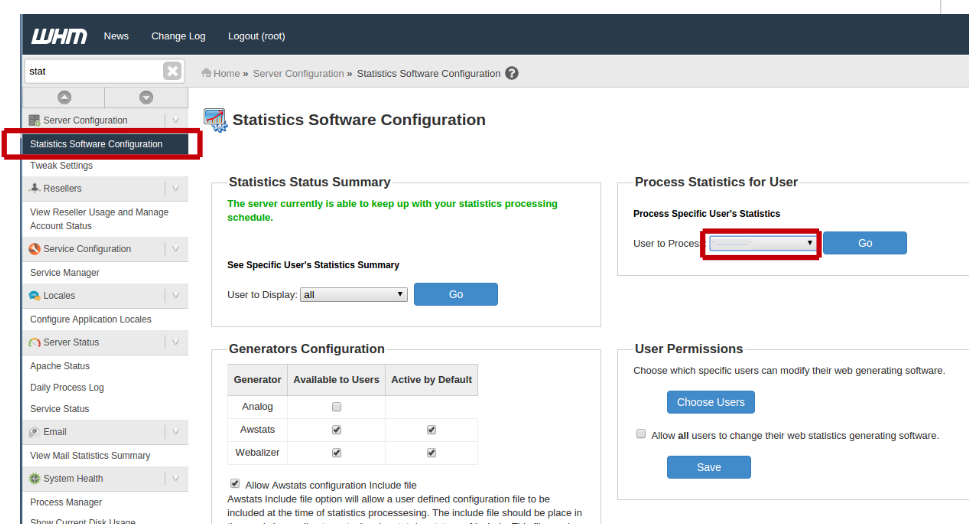
If you are choosing to update Awstats manually via WHM, you can do it by navigating to WHM

Home »Server Configuration »Statistics Software Configuration

and then select the user to update stats from the drop down and fire the statistics to be processed by hitting the ‘Go’ button.
stati


If it still fails, then the issue is something deeper and we need to investigate further.

Reasons why AWStats fails to update automatically

There are many reasons as of why even a manual stats update can fail. As mentioned earlier, various statistics shown here are derived from various log files. For eg: it uses the entries in the domlogs file for web traffic calculation. Same is the case with other services like IMAP, POP etc.  Awststs can stop working if there is any issues with permissions or ownership of the log files, binary file or with the cPanel specific configurations for stats update.

Let us check the issue further through the steps given below

1. SSH to server as root user.

2. Change the directory to:

cd /home/username/tmp/awstats

Where username is the cPanel username of the account in question. The configuration files for domains under that particular cPanel account are located here.

The directive “AllowToUpdateStatsFromBrowser” is to be set to 1 for Awstat to be updated from the cPanel interface.

Fire the below command to list the conf files present.

#ll *.conf

root@server [/home/user/tmp/awstats]# ll *.conf
-rw-r--r-- 1user user 23753 Apr 17 01:15 awstats.domain.com.conf

We have identified the stats configuration file for the domain under evaluation. For the purpose of anonymity I am using “domain.com” here, it should be replaced with the actual domain name being investigated.

# grep AllowToUpdateStatsFromBrowser awstats.domain.com.conf
# Warning: If you want to be able to use the "AllowToUpdateStatsFromBrowser"
AllowToUpdateStatsFromBrowser=1

Also please check the permission of “/usr/local/cpanel/3rdparty/bin/awstats.pl” file. It must be 775.

# ll /usr/local/cpanel/3rdparty/bin/awstats.pl

-rwxrwxr-x. 1 root root 679172 Aug 23 2009 /usr/local/cpanel/3rdparty/bin/awstats.pl*

WHM Panel;

Home » Server Configuration » Statistics Software Configuration

Check if Awstats is enabled in the options ‘Generators Configuration” there.

Once the stats are processed again, check the same via Awstats panel and confirm everything is working as it should be


Get 24/7 expert server management

  • cPanel
  • Linux
How to update Awstats automatically

How to renew cPanel License

How to renew cPanel License
  • cPanel
  • Linux
logo

Steps to install Softaculous on cPanel server

Steps to install Softaculous on cPanel server
  • cPanel
  • Howtos
  • Linux
  • Softaculous
logo

Technical Support Outsourcing – How to choose the right provider for your business? 

Technical Support Outsourcing – How to choose the right provider for your business? 
  • Customer Care
  • outsourcing
logo

Tips and tricks to Defend Your Website from the hacker

Tips and tricks to Defend Your Website from the hacker
  • Linux
logo

Posts by Ankita V Kurup

Ankita started her career in the field of Linux System Administration since 2016. She has the ability to build productive relationships, resolve complex issues and win customer loyalty. She loves reading and travelling.