• DevOps
    Case Study

    How we built a resilient multi-account, multi-cloud solution for a Health Tech service provider!

    READ CASESTUDY
    icon

    24/7 DevOps as a Service

    Round-the-clock DevOps for uninterrupted efficiency.

    icon

    Infrastructure as a Code

    Crafting infrastructure with ingenious code.

    icon

    CI/CD Pipeline

    Automated CI/CD pipeline for seamless deployments.

    icon

    DevSecOps

    Integrated security in continuous DevOps practices.

    icon

    Hire DevOps Engineers

    Level up your team with DevOps visionaries.

    icon

    Consulting Services

    Navigate success with expert DevOps consulting.

  • TechOps
    Case Study

    How we built a scalable Odoo solution for a Travel Tech service provider!

    READ CASESTUDY

    WEB HOSTING SUPPORT

    icon

    HelpDesk Support

    Highly skilled 24/7 HelpDesk Support

    icon

    Product Support

    Boost your product support with our expertise.

    MANAGED SERVICES

    icon

    Server Management

    Don’t let server issues slow you down. Let us manage them for you.

    icon

    Server Monitoring

    Safeguard your server health with our comprehensive monitoring solutions.

    STAFF AUGMENTATION

    icon

    Hire an Admin

    Transform your business operations with our expert administrative support.

    icon

    Hire a Team

    Augment your workforce with highly skilled professionals from our diverse talent pool.

  • CloudOps
    Case Study

    How we helped a Private Deemed University in India, save US $3500/m on hosting charges!

    READ CASESTUDY
    icon

    AWS Well Architected Review

    Round-the-clock for uninterrupted efficiency

    icon

    Optimize

    Efficient CloudOps mastery for seamless cloud management

    icon

    Manage

    Automated CI/CD pipeline for seamless deployments

    icon

    Migrate

    Upgrade the journey, Migrate & Modernize seamlessly

    icon

    Modernize

    Simplify compliance complexities with our dedicated services

    icon

    FinOps as a Service

    FinOps as a Service

  • SecOps
    Case Study

    How we built a scalable Odoo solution for TravelTech service provider!

    READ CASESTUDY
    icon

    VAPT

    Vulnerability Assessment and Penetration Testing

    icon

    Source Code Review

    Ensuring source code security ans safe practices to reduce risks

    icon

    Security Consultation

    On demand services for improving server security

    icon

    System Hardening

    Reduced vulnerability and proactive protection

    icon

    Managed SoC

    Monitors and maintains system security. Quick response on incidents.

    icon

    Compliance as a Service

    Regulatory compliance, reduced risk

  • Insights
    Case Study

    How we helped a Private Deemed University in India, save US $3,500/m on hosting charges!

    READ CASESTUDY
    icon

    Blog

    Explore our latest articles and insights

    icon

    Case Studies

    Read about our client success stories

    icon

    Flipbook

    Explore our latest Flipbook

    icon

    Events

    Join us at upcoming events and conferences

    icon

    Webinars

    Watch our educational webinar series

  • Our Story
  • Contact Us

Interested to collaborate?

Get in touch with us!

Ready to elevate your business with certified cloud expertise? Contact us today to learn how our team can help you leverage cloud technology to drive growth, streamline operations, and enhance security.

  • AWSAWS
  • Azure CloudAzure Cloud
  • Google CloudGoogle Cloud
  • Akamai CloudAkamai Cloud
  • OVHOVH
  • Digital OceanDigital Ocean
  • HetznerHetzner
  • Kubernetes Consultancy Services
  • K8s & Cloud native Solutions
  • 24/7 Infrastructure Monitoring
  • DevOps as a Service
  • Cloud CI/CD Solutions
  • White Labeled MSP Support
  • Our story
  • Life@SupportSages
  • Insights
  • Careers
  • Events
  • Contact Us

Connect with us!


LinkedInFacebookXInstagramYouTube

aws partneraws advanced partner
SupportSages

Copyright © 2008 – 2026 SupportSages Pvt Ltd. All Rights Reserved.
Privacy PolicyLegal TermsData ProtectionCookie Policy

How to Fix a Mixed Content Error in WordPress?

Abin Raaj

  • 4 min read
How to Fix a Mixed Content Error in WordPress?

Generating audio, please wait...

The Mixed Content Error occurs when initial HTML is loaded over a secure HTTPS connection, but other resources (such as images, videos, stylesheets, scripts) are loaded over an insecure HTTP connection.

What is Mixed Content Error in WordPress?

WordPress is a free and open-source content management system (CMS) written in PHP and paired with a MySQL or MariaDB database. A mixed content warning appears in a user’s browser when the WordPress site they’re trying to visit is loading HTTPS and HTTP scripts or content at the same time. This can cause problems since HTTP and HTTPS are completely separate protocols. A common example of mixed content would be when an image is loaded as insecure(http://mydomain.com/image.jpg), but the page was requested with SSL (https://mydomain.com). This can have one of two effects on your site:

  1. The secured padlock symbol does not appear or is broken
  2. The secured padlock symbol does appear, but an image or resource does not

You can confirm if your site is being affected by mixed content errors by checking the Inspect Element console. You will see yellow warnings if the insecure content is causing the padlock to not show, and red warnings if the content has been blocked from displaying because it is insecure.

  • In most browsers right-click anywhere on your page and choose Inspect
  • Click on the Console tab. If your browser has flagged anything as insecure it will show here (an example is shown in the image)

What Causes Mixed Content Warnings?

Most commonly, mixed content warnings appear right after someone migrates their WordPress site from HTTP to HTTPS. Some HTTP links simply get carried over, and this causes mixed content warnings​. The other causes of this warning can be:

  1. Developers sometimes use absolute paths (http://yourdomain.com/style.css) in their plugins or themes to link to CSS and JavaScript, instead of using relative paths(/style.css)
  2. Images have hardcoded URLs (such as http://yourdomain.com/image.png) that run over HTTP. These could be within posts, pages, or even a widget
  3. Linking to HTTP versions of external scripts such as Hosted jQuery, Font Awesome, etc.
  4. Having embedded video scripts that use HTTP instead of HTTPS

Now let us see how to fix Mixed Content Error in WordPress.

  1. Make sure that you have activated SSL for your domain
  2. You can use the WordPress plugin “SSL Insecure Content Fixer” which is recommended by WordPress to fix the Mixed content error
  3. Upon activation, you need to visit the “Settings » SSL Insecure Content” page to configure the plugin settings
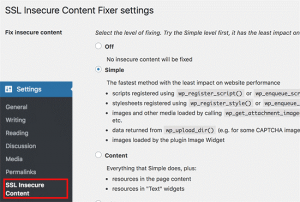
4. This plugin provides different levels of fixes to the mixed content error. They are: Simple, Content, Widgets,                Capture, and Capture all.

5. After selecting a content fix level, you need to scroll down to the HTTPS detection section. This is where you                can choose how to detect the HTTPs content on your website.
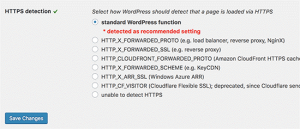
6. Click on the save changes button to store your settings

7. Make sure to clear your WordPress cache before checking your website. If the mixed content error in WordPress         is not fixed, then revisit the plugin’s settings page and modify the fix levels to the next level.


The Mixed Content Error should now be fixed!
  • WordPress
How to Fix a Mixed Content Error in WordPress?

How to Create a VM in Proxmox and rebuild it with another OS

How to Create a VM in Proxmox and rebuild it with another OS
  • Linux
logo

How to Disable Binary Logging in MySQL on Bitnami servers?

How to Disable Binary Logging in MySQL on Bitnami servers?
  • Linux
logo

How to Fix the Mixed Content Error in WordPress?

How to Fix the Mixed Content Error in WordPress?
  • WordPress
logo

How to use Cyberduck to transfer files via FTP?

How to use Cyberduck to transfer files via FTP?
  • Linux
logo

Posts by Abin Raaj

Abin Raaj is currently working as System Engineer at SupportSages. He is well-versed in Linux and server management and interested in new technologies. The dedication and work-ethic he shows in the workplace combined with his ability to build good relationships and decision-making skill has earned him the role of Team Leader. He is proficient in WordPress and loves working with WordPress websites. In his free time, Abin enjoys playing football, badminton, and discovering new music.