• DevOps
    Case Study

    How we built a resilient multi-account, multi-cloud solution for a Health Tech service provider!

    READ CASESTUDY
    icon

    24/7 DevOps as a Service

    Round-the-clock DevOps for uninterrupted efficiency.

    icon

    Infrastructure as a Code

    Crafting infrastructure with ingenious code.

    icon

    CI/CD Pipeline

    Automated CI/CD pipeline for seamless deployments.

    icon

    DevSecOps

    Integrated security in continuous DevOps practices.

    icon

    Hire DevOps Engineers

    Level up your team with DevOps visionaries.

    icon

    Consulting Services

    Navigate success with expert DevOps consulting.

  • TechOps
    Case Study

    How we built a scalable Odoo solution for a Travel Tech service provider!

    READ CASESTUDY

    WEB HOSTING SUPPORT

    icon

    HelpDesk Support

    Highly skilled 24/7 HelpDesk Support

    icon

    Product Support

    Boost your product support with our expertise.

    MANAGED SERVICES

    icon

    Server Management

    Don’t let server issues slow you down. Let us manage them for you.

    icon

    Server Monitoring

    Safeguard your server health with our comprehensive monitoring solutions.

    STAFF AUGMENTATION

    icon

    Hire an Admin

    Transform your business operations with our expert administrative support.

    icon

    Hire a Team

    Augment your workforce with highly skilled professionals from our diverse talent pool.

  • CloudOps
    Case Study

    How we helped a Private Deemed University in India, save US $3500/m on hosting charges!

    READ CASESTUDY
    icon

    AWS Well Architected Review

    Round-the-clock for uninterrupted efficiency

    icon

    Optimize

    Efficient CloudOps mastery for seamless cloud management

    icon

    Manage

    Automated CI/CD pipeline for seamless deployments

    icon

    Migrate

    Upgrade the journey, Migrate & Modernize seamlessly

    icon

    Modernize

    Simplify compliance complexities with our dedicated services

    icon

    FinOps as a Service

    FinOps as a Service

  • SecOps
    Case Study

    How we built a scalable Odoo solution for TravelTech service provider!

    READ CASESTUDY
    icon

    VAPT

    Vulnerability Assessment and Penetration Testing

    icon

    Source Code Review

    Ensuring source code security ans safe practices to reduce risks

    icon

    Security Consultation

    On demand services for improving server security

    icon

    System Hardening

    Reduced vulnerability and proactive protection

    icon

    Managed SoC

    Monitors and maintains system security. Quick response on incidents.

    icon

    Compliance as a Service

    Regulatory compliance, reduced risk

  • Insights
    Case Study

    How we helped a Private Deemed University in India, save US $3,500/m on hosting charges!

    READ CASESTUDY
    icon

    Blog

    Explore our latest articles and insights

    icon

    Case Studies

    Read about our client success stories

    icon

    Flipbook

    Explore our latest Flipbook

    icon

    Events

    Join us at upcoming events and conferences

    icon

    Webinars

    Watch our educational webinar series

  • Our Story
  • Contact Us

Interested to collaborate?

Get in touch with us!

Ready to elevate your business with certified cloud expertise? Contact us today to learn how our team can help you leverage cloud technology to drive growth, streamline operations, and enhance security.

  • AWSAWS
  • Azure CloudAzure Cloud
  • Google CloudGoogle Cloud
  • Akamai CloudAkamai Cloud
  • OVHOVH
  • Digital OceanDigital Ocean
  • HetznerHetzner
  • Kubernetes Consultancy Services
  • K8s & Cloud native Solutions
  • 24/7 Infrastructure Monitoring
  • DevOps as a Service
  • Cloud CI/CD Solutions
  • White Labeled MSP Support
  • Our story
  • Life@SupportSages
  • Insights
  • Careers
  • Events
  • Contact Us

Connect with us!


LinkedInFacebookXInstagramYouTube

aws partneraws advanced partner
SupportSages

Copyright © 2008 – 2026 SupportSages Pvt Ltd. All Rights Reserved.
Privacy PolicyLegal TermsData ProtectionCookie Policy

SSL Certificate Installation in Microsoft IIS 7

Anitta Jose

  • 5 min read
SSL Certificate Installation in Microsoft IIS 7

Generating audio, please wait...

What is IIS?

IIS stands for Internet Information Services. It was formerly known as Internet Information Server. Actually IIS is an extensible web server created by Microsoft for use with Windows NT family. It supports HTTP, HTTPS, FTP, FTPS, SMTP, etc. Let us see how the SSL certificate installation can be done in Microsoft IIS 7.

How to Generate CSR in IIS?

Follow the steps mentioned below to generate CSR through IIS:

Step 1:

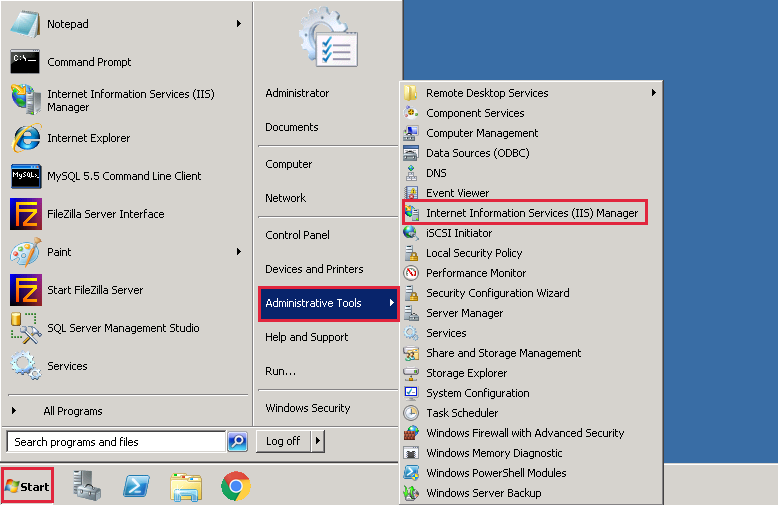
Click start , then Administrative Tools, then Internet Information Services (IIS) Manager.
ssl1


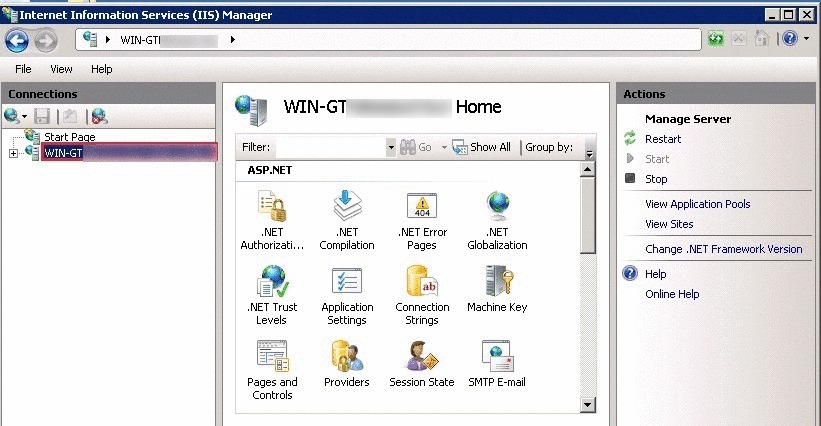
Step 2:

In Internet Information Services (IIS) Manager, Under Connections, select our server’s Hostname.
2


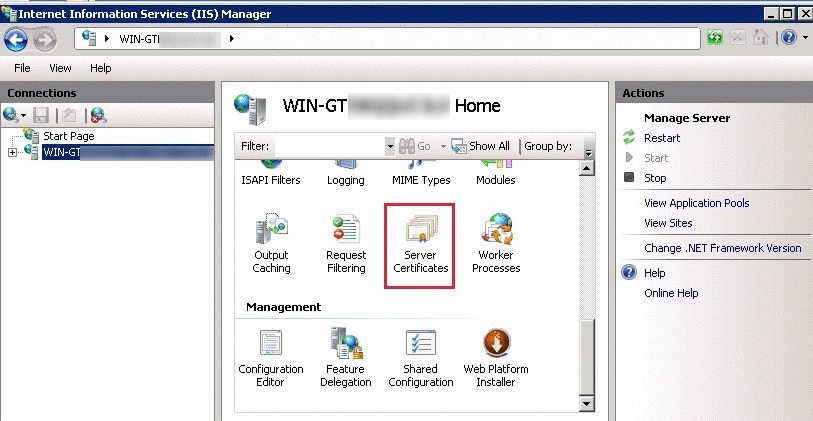
Step 3:

From the center menu, double-click the Server Certificates button in the Security section.
3


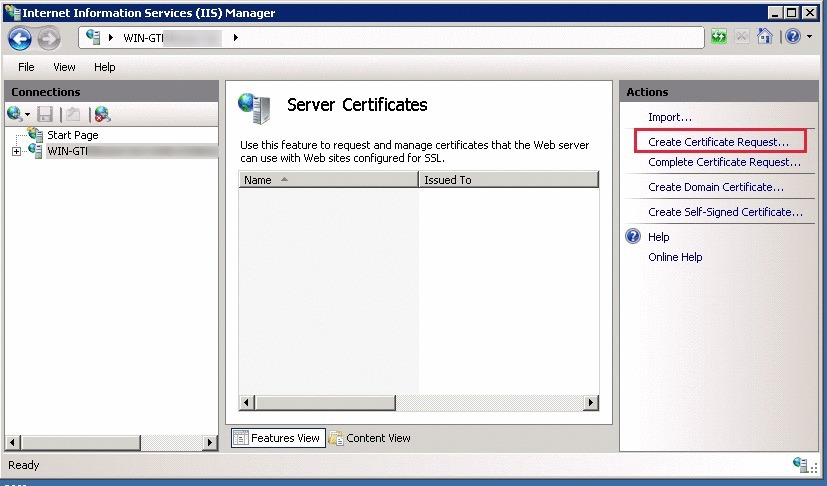
Step 4:

Next, from the Actions menu on the right, click on Create Certificate Request. It will open the Request Certificate Wizard.
4


Step 5:

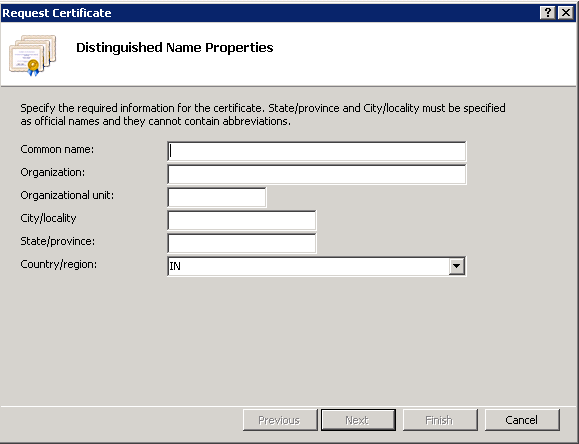
In the Distinguished Name Properties window, enter the following information:

(a) Common Name – Enter a fully qualified domain name.

(b) Organization – Legally registered name of the organization/company.

(c) Organizational Unit – Specify department name within organization. It is an optional field.

(d) City/Locality – City in which organization is located.

(e) State/Province – State in which organization is located.

(f) Country/Region – Select the country from the drop down box.
csr1


Step 6:

Click Next.

Step 7:

Now it shows Cryptographic Service Provider Properties window, enter the bit length and then click Next.

Step 8:

Enter a file name for CSR file and click Finish.

Now you’re ready with CSR, go ahead and purchase SSL certificate.

How to install SSL in IIS?

Follow the steps mentioned below to install SSL certificate on a particular domain:

Step 1:

Click start , then Administrative Tools, then Internet Information Services (IIS) Manager.

ssl1


Step 2:

In Internet Information Services (IIS) Manager, Under Connections, select our server’s Hostname.
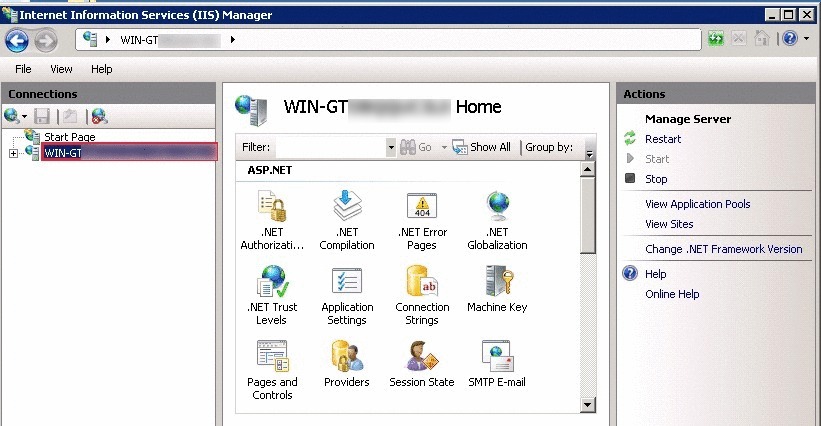
install2


Step 3:

From the center menu, double-click the Server Certificates button in the Security section.
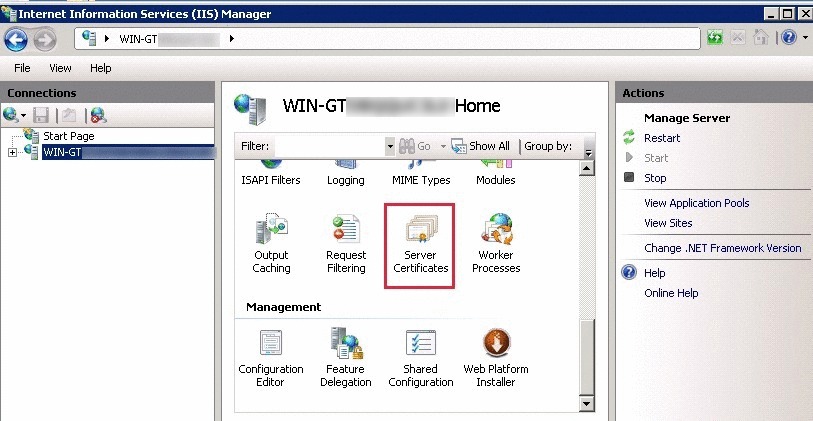
install3


Step 4:

In the Actions menu, click Complete Certificate Request to open the Complete Request Certificate wizard.
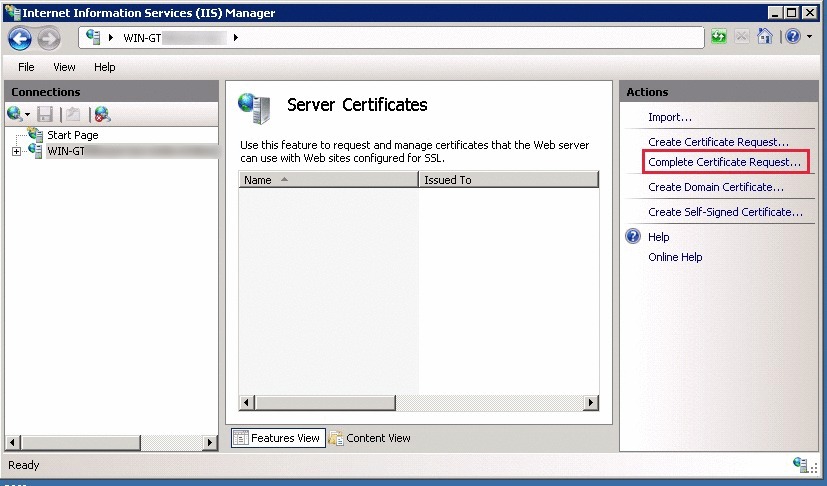
install4


Step 5:

In the Complete Certificate Request wizard, on the Specify Certificate Authority Response page, under File name containing the certification authority’s response, browse the required certificate file.
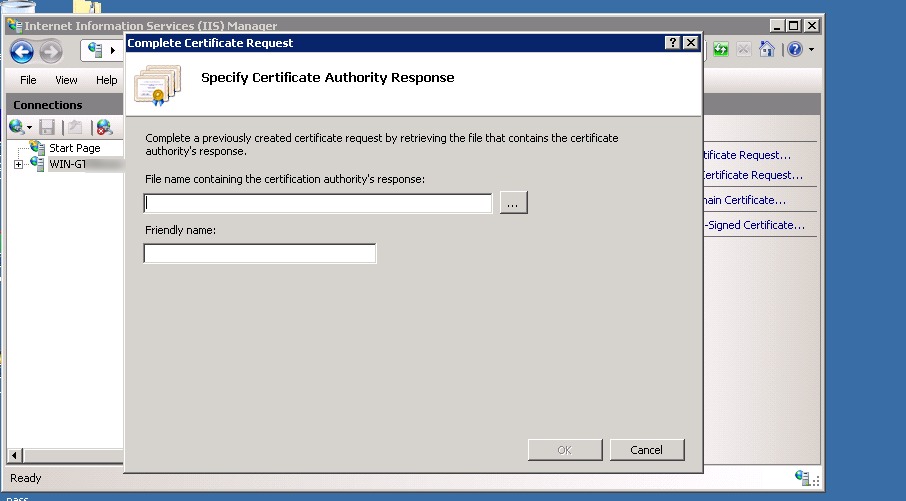
install5

Now in the box to enter Friendly name, enter a name to identify the certificate.

[otw_shortcode_info_box border_type=”bordered” border_style=”bordered” background_color=”#10a5e0″]Friendly name is not part of the certificate, it is just used to identify the certificate file. [/otw_shortcode_info_box]


Step 6:

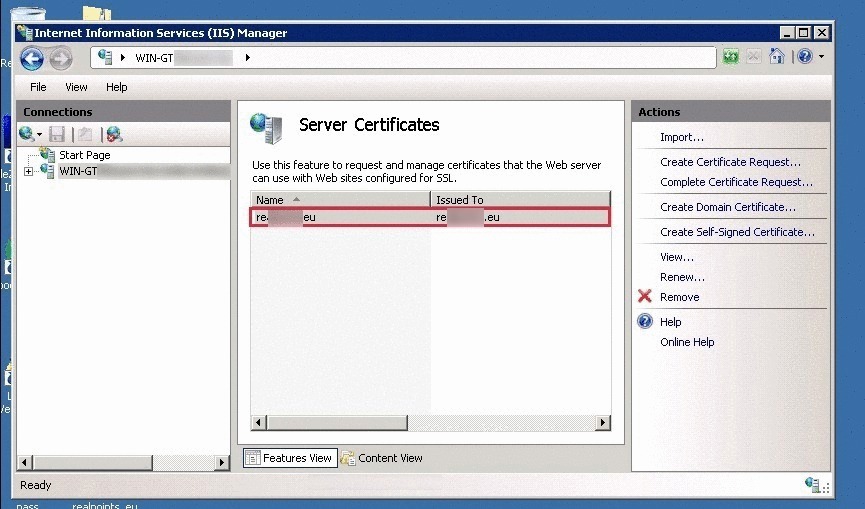
To install the SSL Certificate to the server, click OK. Now the installed certificate will be shown under Server Certificates.
install6


How to Assign/Bind the certificate to the website ?

Step 1:
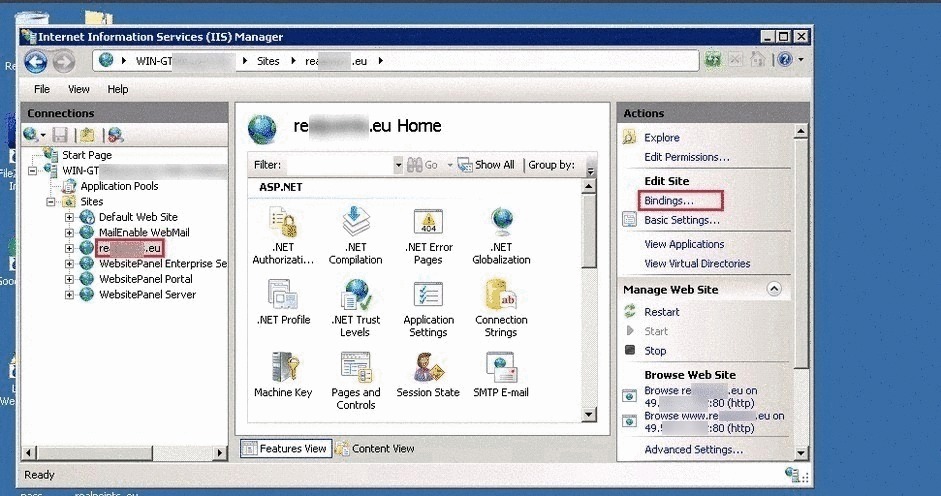
In Internet Information Services (IIS) Manager, under Connections, expand our server’s name, expand Sites, and then, select the site that we want to secure with our SSL Certificate.
assign1


Step 2:

In the Actions menu, under Edit Site, click Bindings.

Step 3:

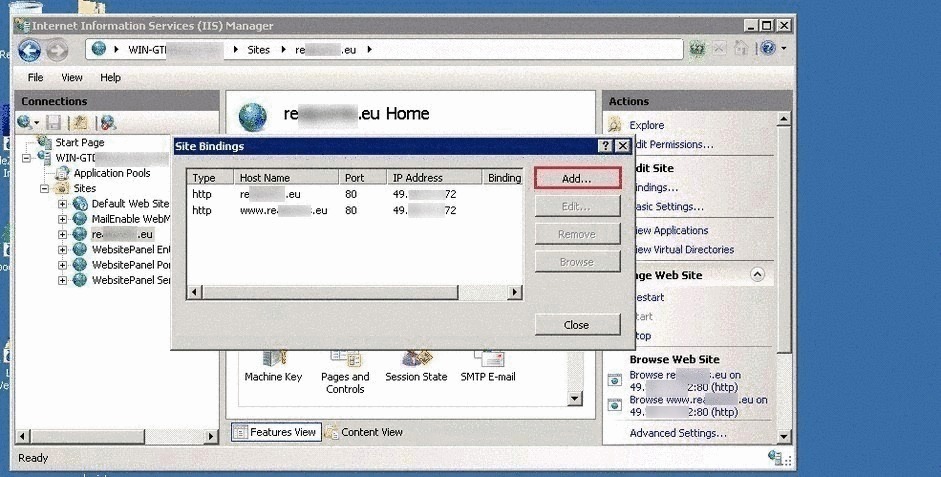
In the Site Binding window, click Add.
assign3


Step 4:

In the Add Site Bindings window, enter the following information and then, click OK:

(a) Type – In the drop-down list, select https.

(b) IP Address – Select the IP address to which the website points to.

(c) Port – Enter 443 unless it use some custom port for SSL.

(d) SSL certificate: From the drop-down list, select the friendly name of the SSL certificate we just installed.

Step 5:

The SSL certificate installation is now completed, and our website is configured to accept secure connections. 🙂

Get 24/7 expert server management

  • General
  • IIS
SSL Certificate Installation in Microsoft IIS 7

“SED” Options and its usage

“SED”  Options and its usage
  • Howtos
  • Linux
logo

An Introduction to AWK

An Introduction to AWK
  • Linux
  • Training
logo

Configure Disk Quota on Ubuntu Server

Configure Disk Quota on Ubuntu Server
  • Linux
logo

How to check whether UDP connection is open or not?

How to check whether UDP connection is open or not?
  • Linux
logo

Posts by Anitta Jose

Anitta is systems engineer since 2015 and holds broad experience in Linux, WordPress, and cPanel systems administration. Her interest lies more in Cloud technologies (AWS). From 2016, she writes blogs to share her experiences with wider audience.