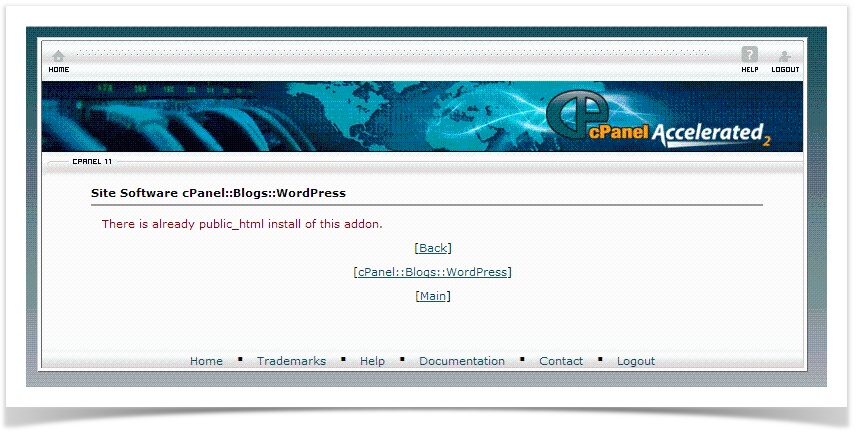
An error is thrown while trying to run cpanel wordpress auto install through cPanel â WordPress Auto Installer (Site Software addon available for WHM/cPanel servers)
“There is already public_html install of this addon”
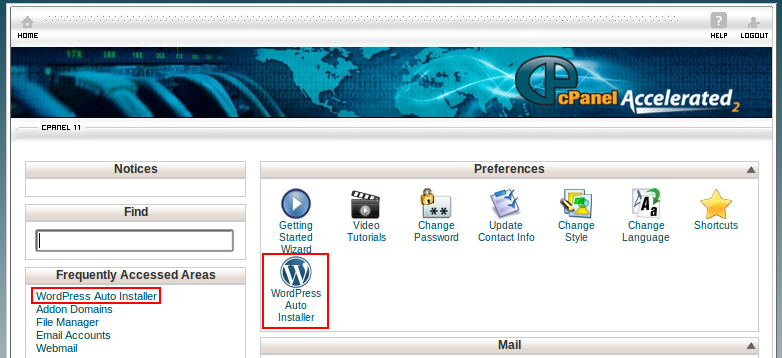
WordPress Auto Installer
This is a cPanel packaged module for installing and managing WordPress installations. The advantage of installing such scripts through Auto installers are that, they can be managed or upgraded (when latest versions are available) or removed with a click. Users need not be aware of the back-end operations while doing all this. Other popular script install applications with cPanel are Softaculous and Fantastico De Luxe. Hundreds of applications can be managed through this.
Pre-Requisite Information
The user was trying to install WordPress on his main domain (mydomains.com). He has already installed WordPress on one of his addon domains (mdomain.com) using the Auto Installer.
Initial checksÂ
There should be no WordPress installation in the main domain’s document root, which is public_html.Â
Additional Information
Any Script installers like Site Software cPanel, Softaculous, Fantastico De Luxe uses certain files for storing the information on installing scripts. By referring this file, it determines whether a domain or its document root contains a script which is already installed. Following are the information on such files :Â
| Script Installer | Path of the script information file |
| Softaculous | /home/user/.softaculous/installations.php |
| Fantastico De Luxe | /home/user/.fantasticodata/installed_in_root.php |
| cPanel Site Software Addon | /home/user/.cpaddons/filename.yaml * |
*Â Actual filename varies based on applications,
Tracking down the Issue
There were no WordPress files in this user’s public_html directory so its not the case anyway.
Next thing to be checked is the File where Site Software Addon stores information on the scripts installed.
Unlike Softaculous or Fantasctio De Luxe, Site Software Addon (WordPress Auto Installer here) leaves a dedicated YAML file for each script.
There was only a file in /home/user/.cpaddons directory, it was labeled as cPanel::Blogs::WordPress.0.yaml which was related with the WordPress install on the addon domain brazilianjiujitsu.lv. However its
worth to check this file :
—
_default_charset_latin1: DEFAULT CHARSET=latin1
_self: /cpsess9127974817/frontend/x3/addoncgi/cpaddons.html
addon: cPanel::Blogs::WordPress
addon_path: cPanel/Blogs/WordPress
adminarea_name: ~
auth_key: yxUJcchPG68HXVdeaE3JUbkU7rETZMKhyFOuJ9x56RdMBkq6glbFaNQWbQidPhQZ
auth_salt: 474BnPtYCkfwNw3voborJt3vx2ppz1bjwtgBhnKusiNaScXxLAZDLz59Afmk3wtR
autoupdate: 0
domain: mydomains.com
email:[email protected]
gmt_hour_offset: ‘3’
homedir: /home/mdomain
hostname: server.xxxx.com
installdir: /home/mdomain/public_html/sdadsfs/
installed_3.4.2: ‘1355758577’
installed_on_domain: mydomains.com
installpath: ./
lang: english-utf8
logged_in_key: PXtjhH4rY1bUMh3fp12MBgE_WTg43T_XNDQPBtJJtvmMU6wLxLgiULd3BcTaNDi3
logged_in_salt: cMQZeXMLRPwAAlcu7YDfRjCXqhGg2pQ9bCy7fEjDnozMfaHjvKs8OPVWa45Baef4
mysql:
wp:
_post: wp1
mysql-version: ‘5.0’
sqldb: baltezer_wp1
sqlhost: localhost
sqlpass: FSjKG9Y_wV
sqluser: baltezer_wp1
mysql.wp._post: wp1
mysql.wp.mysql-version: ‘5.0’
mysql.wp.sqldb: ssdsd_wp1
mysql.wp.sqlhost: localhost
mysql.wp.sqlpass: FSjKG9Y_wV
mysql.wp.sqluser: xssdsd_wp1
mysql_pass: Fdd_wV
mysql_user: sdsdsd_wp1
mysql_user_post: wp1
mysql_version: ‘5.0’
no_protocol_url_to_install: mdomain.lv/
no_protocol_url_to_install_without_trailing_slash: brazilianjiujitsu.lv
nonce_key: E91E9NqeFzvglcs_x6SWinPhPRsSfCVXmlxVhW4mFfX1tTObApDO4yUfGt3RNfA3
nonce_salt: 5S9FnogzTEIbQdNTeQqcEegoLWq0TisagFEgEXdyR06CdQwUnDO22T0TcfnPL8OE
password: 0moplata2012
password_base64: “MG1vcGxhdGEyMDEy\n”
password_crypt: Arf.5Id8yKqmQ
password_md5_base64: 9zFUk4JSzORMb/1H/No3nQ
password_md5_hex: f73154938252cce44c6ffd47fcda379d
phpsuexec: 0
postgre: {}postgre_version: ”
public_html: /home/mdomain/public_html/sdadsfs
registry: cPanel::Blogs::WordPress.0.yaml
salt: Arseny
secret_key: E4UL0S7KXyvv8njKOF5L7umT7m2ApkUC5AcW9HnNcKyhCQVM_4pmV79fC4IQpKMG
secret_salt: uRYfG5ZcrFnLU_uJOemoGvvOaoYql53uCxHl624ee70im6BrvM1S4E7ImVGzPuld
suexec: 1
table_prefix: jj
unix_time: ‘1355758574’
url_to_install: http://mydomains.com/
url_to_install_admin: ~
url_to_install_without_trailing_slash: http://mydomains.com
user: mdomain
username: Arseny
version: 3.4.2
version_key:
public_html_install_files:– index.php
– license.txt
– readme.html
– wp-activate.php
– wp-admin/upload.php
– wp-admin/edit-tags.php. . . .
Parameters to watch
homedir: /home/mdomain
installdir: /home/mdomain/public_html/sdadsfs/
public_html: /home/mdomain/public_html/sdadsfs
Its confirmed that this file is not conflicting the WordPress installation on the main domain mydomains.com. As mentioned before there were no WordPress files in that addon domain.
So what would be causing it ?
Resolution
The reason looked super silly when I came to know what caused it. But it costed me around 1 hour to realize that Â
Those YAML files are bound with a hierarchy, which means the existing file name cPanel::Blogs::WordPress.0.yaml should belong to the script information of the main domain maindomain.com, whereas it actually stored the information for its addon domain mdomains.com.In general, *.0.yaml belongs to the main domain and the rest for addon domains in the order of the scripts installed.
I’ve renamed the existing file cPanel::Blogs::WordPress.0.yaml to cPanel::Blogs::WordPress.1.yaml. After this I’ve installed WordPress in the main domain without any issues. A new file cPanel::Blogs::WordPress.0.yaml was created with the information on the main domain.
Huh ð