• DevOps
    Case Study

    How we built a resilient multi-account, multi-cloud solution for a Health Tech service provider!

    READ CASESTUDY
    icon

    24/7 DevOps as a Service

    Round-the-clock DevOps for uninterrupted efficiency.

    icon

    Infrastructure as a Code

    Crafting infrastructure with ingenious code.

    icon

    CI/CD Pipeline

    Automated CI/CD pipeline for seamless deployments.

    icon

    DevSecOps

    Integrated security in continuous DevOps practices.

    icon

    Hire DevOps Engineers

    Level up your team with DevOps visionaries.

    icon

    Consulting Services

    Navigate success with expert DevOps consulting.

  • TechOps
    Case Study

    How we built a scalable Odoo solution for a Travel Tech service provider!

    READ CASESTUDY

    WEB HOSTING SUPPORT

    icon

    HelpDesk Support

    Highly skilled 24/7 HelpDesk Support

    icon

    Product Support

    Boost your product support with our expertise.

    MANAGED SERVICES

    icon

    Server Management

    Don’t let server issues slow you down. Let us manage them for you.

    icon

    Server Monitoring

    Safeguard your server health with our comprehensive monitoring solutions.

    STAFF AUGMENTATION

    icon

    Hire an Admin

    Transform your business operations with our expert administrative support.

    icon

    Hire a Team

    Augment your workforce with highly skilled professionals from our diverse talent pool.

  • CloudOps
    Case Study

    How we helped a Private Deemed University in India, save US $3500/m on hosting charges!

    READ CASESTUDY
    icon

    AWS Well Architected Review

    Round-the-clock for uninterrupted efficiency

    icon

    Optimize

    Efficient CloudOps mastery for seamless cloud management

    icon

    Manage

    Automated CI/CD pipeline for seamless deployments

    icon

    Migrate

    Upgrade the journey, Migrate & Modernize seamlessly

    icon

    Modernize

    Simplify compliance complexities with our dedicated services

    icon

    FinOps as a Service

    FinOps as a Service

  • SecOps
    Case Study

    How we built a scalable Odoo solution for TravelTech service provider!

    READ CASESTUDY
    icon

    VAPT

    Vulnerability Assessment and Penetration Testing

    icon

    Source Code Review

    Ensuring source code security ans safe practices to reduce risks

    icon

    Security Consultation

    On demand services for improving server security

    icon

    System Hardening

    Reduced vulnerability and proactive protection

    icon

    Managed SoC

    Monitors and maintains system security. Quick response on incidents.

    icon

    Compliance as a Service

    Regulatory compliance, reduced risk

  • Insights
    Case Study

    How we helped a Private Deemed University in India, save US $3,500/m on hosting charges!

    READ CASESTUDY
    icon

    Blog

    Explore our latest articles and insights

    icon

    Case Studies

    Read about our client success stories

    icon

    Flipbook

    Explore our latest Flipbook

    icon

    Events

    Join us at upcoming events and conferences

    icon

    Webinars

    Watch our educational webinar series

  • Our Story
  • Contact Us

Interested to collaborate?

Get in touch with us!

Ready to elevate your business with certified cloud expertise? Contact us today to learn how our team can help you leverage cloud technology to drive growth, streamline operations, and enhance security.

  • AWSAWS
  • Azure CloudAzure Cloud
  • Google CloudGoogle Cloud
  • Akamai CloudAkamai Cloud
  • OVHOVH
  • Digital OceanDigital Ocean
  • HetznerHetzner
  • Kubernetes Consultancy Services
  • K8s & Cloud native Solutions
  • 24/7 Infrastructure Monitoring
  • DevOps as a Service
  • Cloud CI/CD Solutions
  • White Labeled MSP Support
  • Our story
  • Life@SupportSages
  • Insights
  • Careers
  • Events
  • Contact Us

Connect with us!


LinkedInFacebookXInstagramYouTube

aws partneraws advanced partner
SupportSages

Copyright © 2008 – 2026 SupportSages Pvt Ltd. All Rights Reserved.
Privacy PolicyLegal TermsData ProtectionCookie Policy
OpenNebula on Ubuntu – Part 4 – VM Administration

OpenNebula on Ubuntu – Part 4 – VM Administration

Scott S

  • 6 min read
OpenNebula on Ubuntu – Part 4 – VM Administration

Generating audio, please wait...

In this tutorial we will see how to perform OpenNebula VM administration using Sunstone GUI. There are many ways we can make sure that the data in the VM is intact while migrating from one host to another or duplicating the VM’s.

Image Cloning

Cloning a VM image means making an exact replica of the disk image used by a VM.

Goto the “Images” option under the “Virtual Resources” tab of Sunstone GUI. Then select the image you want to clone and then click the “Clone” option as shown in the screenshot below.
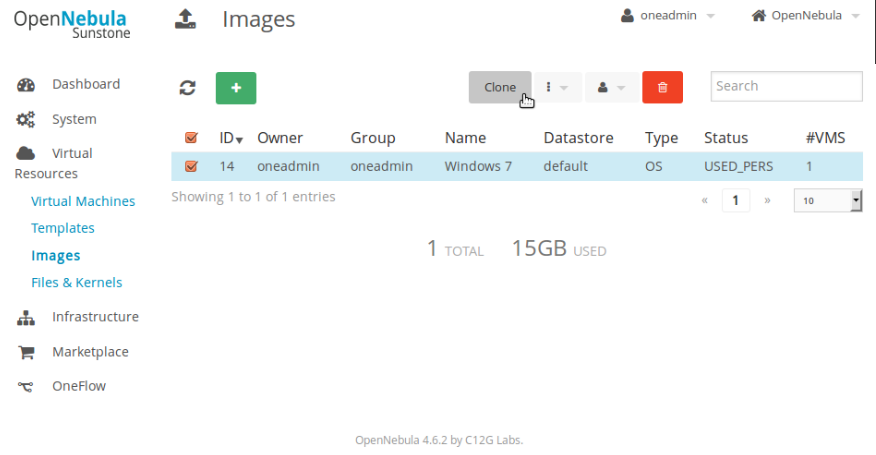
 

Screenshot - Tuesday 16 February 2016 - 04:48:05 IST

This will pop up a menu to input  the name of the new image as shown below.
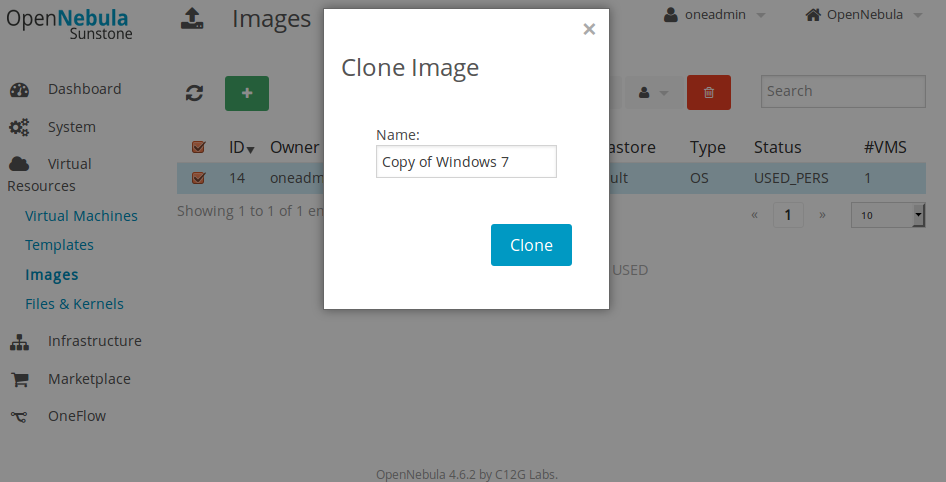
 

Screenshot - Tuesday 16 February 2016 - 04:49:23 IST

Enter the name and then click the Clone button to get the image cloned. Once done, you can see the new cloned image in the Image list.

You can now use the new cloned image to deploy VM’s.

Template Cloning

Template cloning is the process of duplicating the currently available templates in OpenNebula.

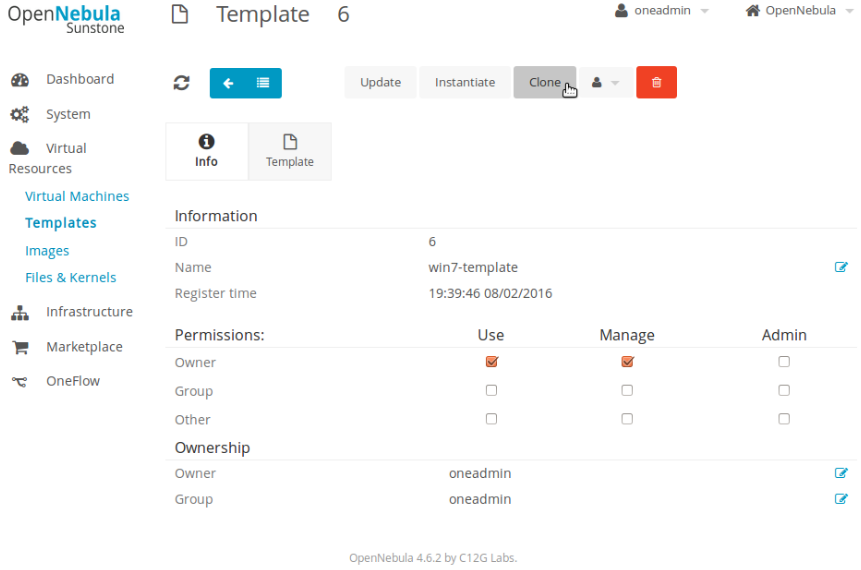
Goto “Templates” option under the “Virtual Resources” tab of Sunstone. Select the desired Template whose clone should be taken and click “Clone” option as shown in the screenshot below
 

Screenshot - Wednesday 17 February 2016 - 11:43:22 IST

This will pop up another window that asks for the Cloned Image name, Enter a desired name and then click the Clone button. Once done, you can see the cloned template in the template list.

VM Cloning

Cloning a VM means to copy the disk of the VM in the current state. Then that cloned image can be used to deploy another VM having same contents.

There are two ways we can take the backup of the disk that a VM is using.

Deferred Backup

In deferred method, the data is written into the disk backup only after terminating the VM which is using it. So in general, if we take a deferred backup of a VM, that VM is destroyed. Then using that disk image, we can deploy new VM’s.

To take the snapshot of a disk in Deferred mode, follow the steps mentioned below.

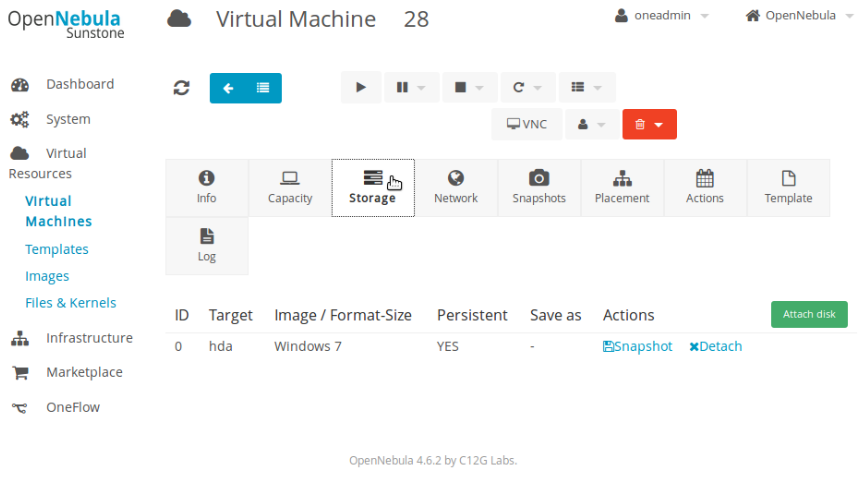
Goto the “Virtual Machines” option under the “Virtual Resources” tab in the Sunstone GUI. This will list the available VM’s. Select the VM whose backup needs to be taken and click the “Storage” tab as shown in the screenshot below.
 

Screenshot - Wednesday 17 February 2016 - 12:09:15 IST

Then select the “Snapshot” option, which will open up a pop up as shown in the screenshot below.

Screenshot - Wednesday 17 February 2016 - 12:15:38 IST

Enter the desired name of the Image, then select “Deferred” as the Snapshot Type and click “Take Snapshot” button.

Once done, goto the “Virtual Machines” option under the “Virtual Resources” tab in the Sunstone GUI homepage. Then poweroff the VM. Once the VM is powered off the backup snapshot Image gets its state as Ready. Once the image status is ready, you can use it to deploy new VM’s.

You can list the backed up snapshot in the images list of Sunstone.

Hot Backup

In Hot mode of backup, the data of the VM is copied even when the VM state is running. This is an on the go backup method. Here there is no need to terminate the VM to take its data backup.

To take the snapshot of a disk in Hot mode, follow the steps mentioned below.

Goto the “Virtual Machines” option under the “Virtual Resources” tab in the Sunstone GUI. This will list the available VM’s. Select the VM whose backup needs to be taken and click the “Storage” tab as shown in the screenshot below.


Screenshot - Wednesday 17 February 2016 - 12:09:15 IST

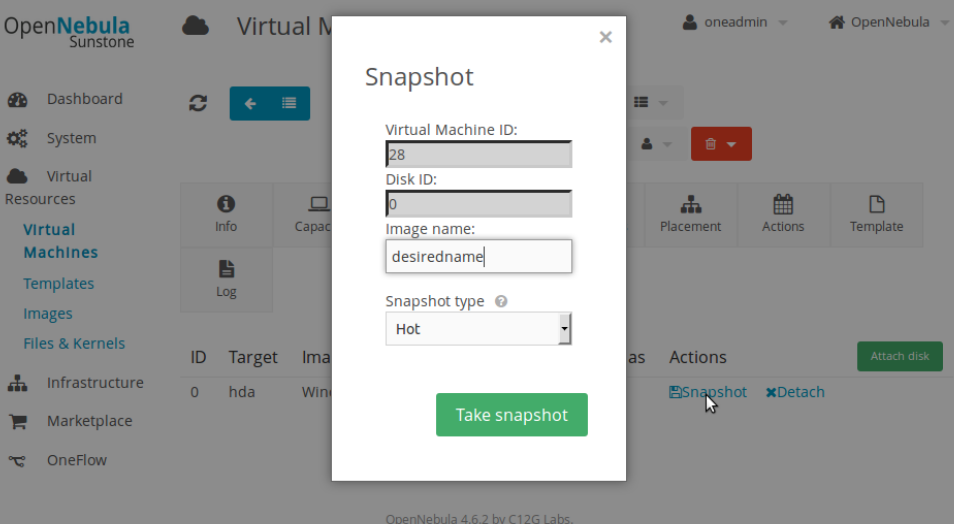
Then select the “Snapshot” option, which will open up a pop up as shown in the screenshot below.
 

Screenshot - Wednesday 17 February 2016 - 12:25:03 IST

Enter the desired name of the Image, then select “Hot” as the Snapshot Type and click “Take Snapshot” button.

Once done, the image status gets ready in a few minutes depending on the size of the disk.  You can list the backed up snapshot in the images list of Sunstone.

As compared to deferred method, hot method doesn’t want the VM to be destroyed for the image to be in ready state.

UPDATE TEMPLATE

Updating a template means to change the properties or values of a template that is already created.

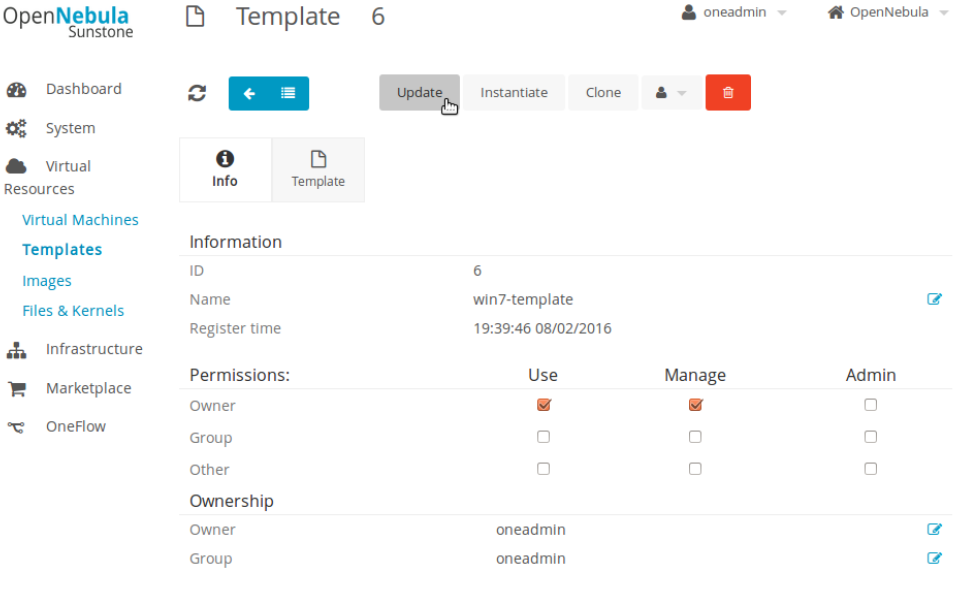
To do this Select the template whose properties needs to be edited. Then click the “Update” Button as shown in the screenshot.
 

Screenshot - Wednesday 17 February 2016 - 12:27:58 IST

You will get a pop up window as shown in the screenshot below.
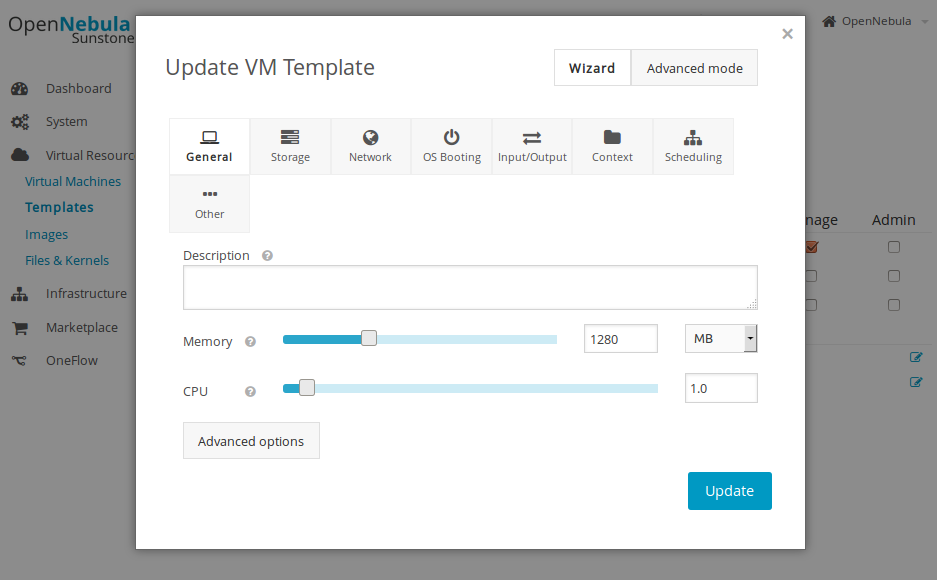
 

Screenshot - Wednesday 17 February 2016 - 12:28:37 IST

Then change/modify the options to the desired ones and click the “Update” button for the changes to take effect. Once done you can use the template to create new VM’s with properties defined in the updated template.

Get 24/7 expert server management

Recommended Readings

OpenNebula IaaS Cloud Installation on Ubuntu – Part 1

OpenNebula on Ubuntu – Part 2 – VM Creation and Management

OpenNebula on Ubuntu – Part 3 – Windows VM Creation
 

  • Linux

All you want to know about Asterisk – Asterisk PBX – Part 3

All you want to know about Asterisk – Asterisk PBX – Part 3
  • Linux
logo

All you want to know about Asterisk – VoIP system architecture – Part 2

All you want to know about Asterisk – VoIP system architecture – Part 2
  • Howtos
  • Linux
logo

All you want to know about Asterisk – VoIP Fundamentals – Part 1

All you want to know about Asterisk – VoIP Fundamentals – Part 1
  • Howtos
  • Linux
logo

Asterisk Setup – Frequently Asked Questions and Answers

Asterisk Setup – Frequently Asked Questions and Answers
  • Linux
logo

Posts by Scott S

Scott follows his heart and enjoys design and implementation of advanced, sophisticated enterprise solutions. His never ending passion towards technological advancements, unyielding affinity to perfection and excitement in exploration of new areas, helps him to be on the top of everything he is involved with. This amateur bike stunting expert probably loves cars and bikes much more than his family. He currently spearheads the Enterprise Solutions and Infrastructure Consultancy wing of SupportSages.