• DevOps
    Case Study

    How we built a resilient multi-account, multi-cloud solution for a Health Tech service provider!

    READ CASESTUDY
    icon

    24/7 DevOps as a Service

    Round-the-clock DevOps for uninterrupted efficiency.

    icon

    Infrastructure as a Code

    Crafting infrastructure with ingenious code.

    icon

    CI/CD Pipeline

    Automated CI/CD pipeline for seamless deployments.

    icon

    DevSecOps

    Integrated security in continuous DevOps practices.

    icon

    Hire DevOps Engineers

    Level up your team with DevOps visionaries.

    icon

    Consulting Services

    Navigate success with expert DevOps consulting.

  • TechOps
    Case Study

    How we built a scalable Odoo solution for a Travel Tech service provider!

    READ CASESTUDY

    WEB HOSTING SUPPORT

    icon

    HelpDesk Support

    Highly skilled 24/7 HelpDesk Support

    icon

    Product Support

    Boost your product support with our expertise.

    MANAGED SERVICES

    icon

    Server Management

    Don’t let server issues slow you down. Let us manage them for you.

    icon

    Server Monitoring

    Safeguard your server health with our comprehensive monitoring solutions.

    STAFF AUGMENTATION

    icon

    Hire an Admin

    Transform your business operations with our expert administrative support.

    icon

    Hire a Team

    Augment your workforce with highly skilled professionals from our diverse talent pool.

  • CloudOps
    Case Study

    How we helped a Private Deemed University in India, save US $3500/m on hosting charges!

    READ CASESTUDY
    icon

    AWS Well Architected Review

    Round-the-clock for uninterrupted efficiency

    icon

    Optimize

    Efficient CloudOps mastery for seamless cloud management

    icon

    Manage

    Automated CI/CD pipeline for seamless deployments

    icon

    Migrate

    Upgrade the journey, Migrate & Modernize seamlessly

    icon

    Modernize

    Simplify compliance complexities with our dedicated services

    icon

    FinOps as a Service

    FinOps as a Service

  • SecOps
    Case Study

    How we built a scalable Odoo solution for TravelTech service provider!

    READ CASESTUDY
    icon

    VAPT

    Vulnerability Assessment and Penetration Testing

    icon

    Source Code Review

    Ensuring source code security ans safe practices to reduce risks

    icon

    Security Consultation

    On demand services for improving server security

    icon

    System Hardening

    Reduced vulnerability and proactive protection

    icon

    Managed SoC

    Monitors and maintains system security. Quick response on incidents.

    icon

    Compliance as a Service

    Regulatory compliance, reduced risk

  • Insights
    Case Study

    How we helped a Private Deemed University in India, save US $3,500/m on hosting charges!

    READ CASESTUDY
    icon

    Blog

    Explore our latest articles and insights

    icon

    Case Studies

    Read about our client success stories

    icon

    Flipbook

    Explore our latest Flipbook

    icon

    Events

    Join us at upcoming events and conferences

    icon

    Webinars

    Watch our educational webinar series

  • Our Story
  • Contact Us

Interested to collaborate?

Get in touch with us!

Ready to elevate your business with certified cloud expertise? Contact us today to learn how our team can help you leverage cloud technology to drive growth, streamline operations, and enhance security.

  • AWSAWS
  • Azure CloudAzure Cloud
  • Google CloudGoogle Cloud
  • Akamai CloudAkamai Cloud
  • OVHOVH
  • Digital OceanDigital Ocean
  • HetznerHetzner
  • Kubernetes Consultancy Services
  • K8s & Cloud native Solutions
  • 24/7 Infrastructure Monitoring
  • DevOps as a Service
  • Cloud CI/CD Solutions
  • White Labeled MSP Support
  • Our story
  • Life@SupportSages
  • Insights
  • Careers
  • Events
  • Contact Us

Connect with us!


LinkedInFacebookXInstagramYouTube

aws partneraws advanced partner
SupportSages

Copyright © 2008 – 2026 SupportSages Pvt Ltd. All Rights Reserved.
Privacy PolicyLegal TermsData ProtectionCookie Policy
Setting up vulnerability mail alert from Security Hub

Setting up vulnerability mail alert from Security Hub

Rohit S

  • 3 min read
Setting up vulnerability mail alert from Security Hub

Generating audio, please wait...

AWS Security Hub is a comprehensive security service provided by Amazon Web Services (AWS) that helps you centralise and automate security monitoring and compliance checks for your AWS resources.

But we won’t be able to monitor security hub on a daily basis or sometimes we can’t keep track of the vulnerabilities or when we create a new resource, we may forget to check if it is created without vulnerabilities.

So, today we are going to go through on how to setup alert if any vulnerability is found from security hub.

First we need to setup a SNS topic
Creating SNS topic

  1. Sign in to AWS Console.
  2. Open the SNS Console.
  3. Create a New SNS Topic.
  4. Configure Topic Details: You will be prompted to provide some details for your SNS topic:
  • Name: Choose a name for your topic.
  • Display Name: This is an optional field and can be used to provide a more descriptive name for your topic.
  • Type: Standard

   5. Press Create Topic.

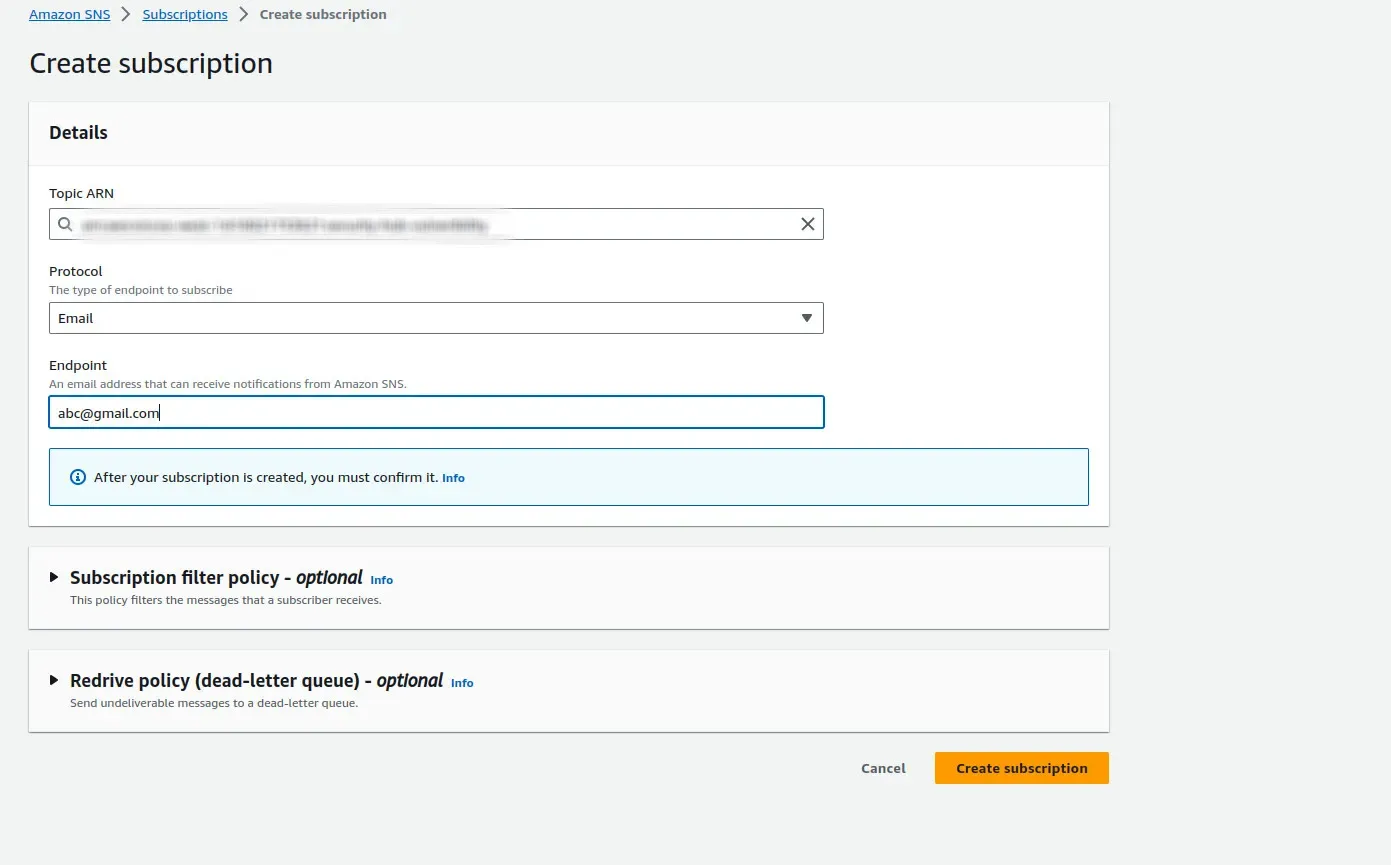
   6. Create a subscription

   7. Protocol: Email

   8. Endpoint: Your_email_ID
1_k7SISbA4eg60-WtKUWfY3A.webp

Creating EventBridge Rule

  1. Go to AWS Console
  2. Go to Eventbridge
  3. Go to rules in Eventbridge
  4. Click create Rule
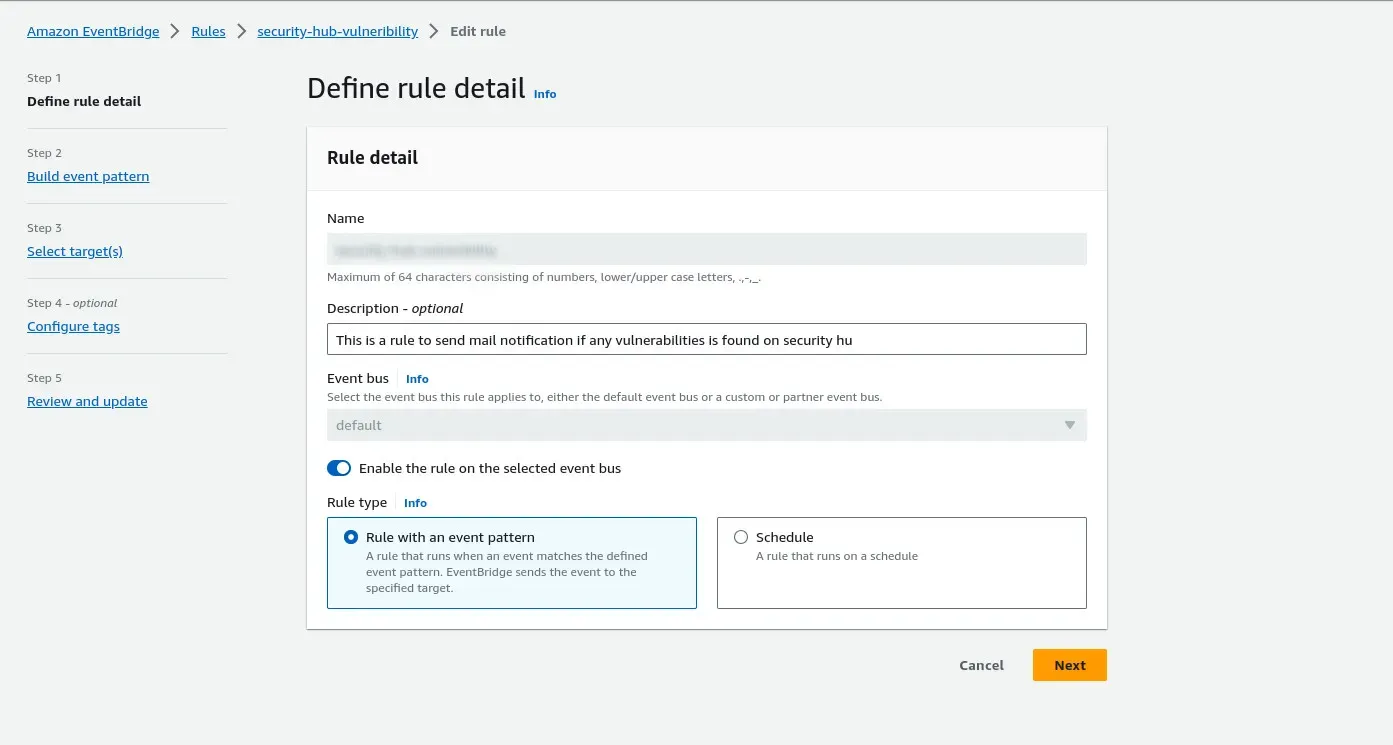
  5. Give your rule a name and description(Optional)
1_2s4n8cLWuD-_eymGDpwMVQ.webp

6. Click Next

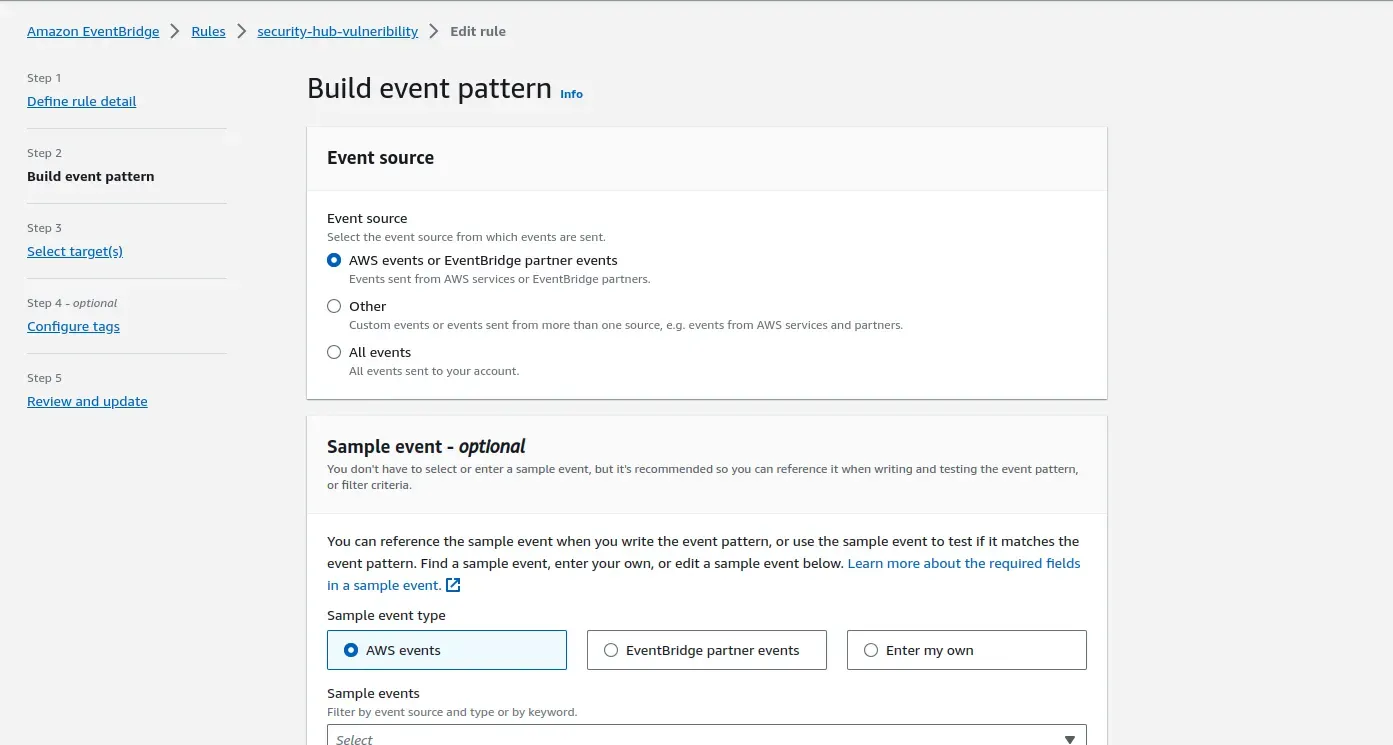
7. Give AWS Events as Event Source
1_tkmtxJDP7Ox9tkZwQ24EIQ.webp

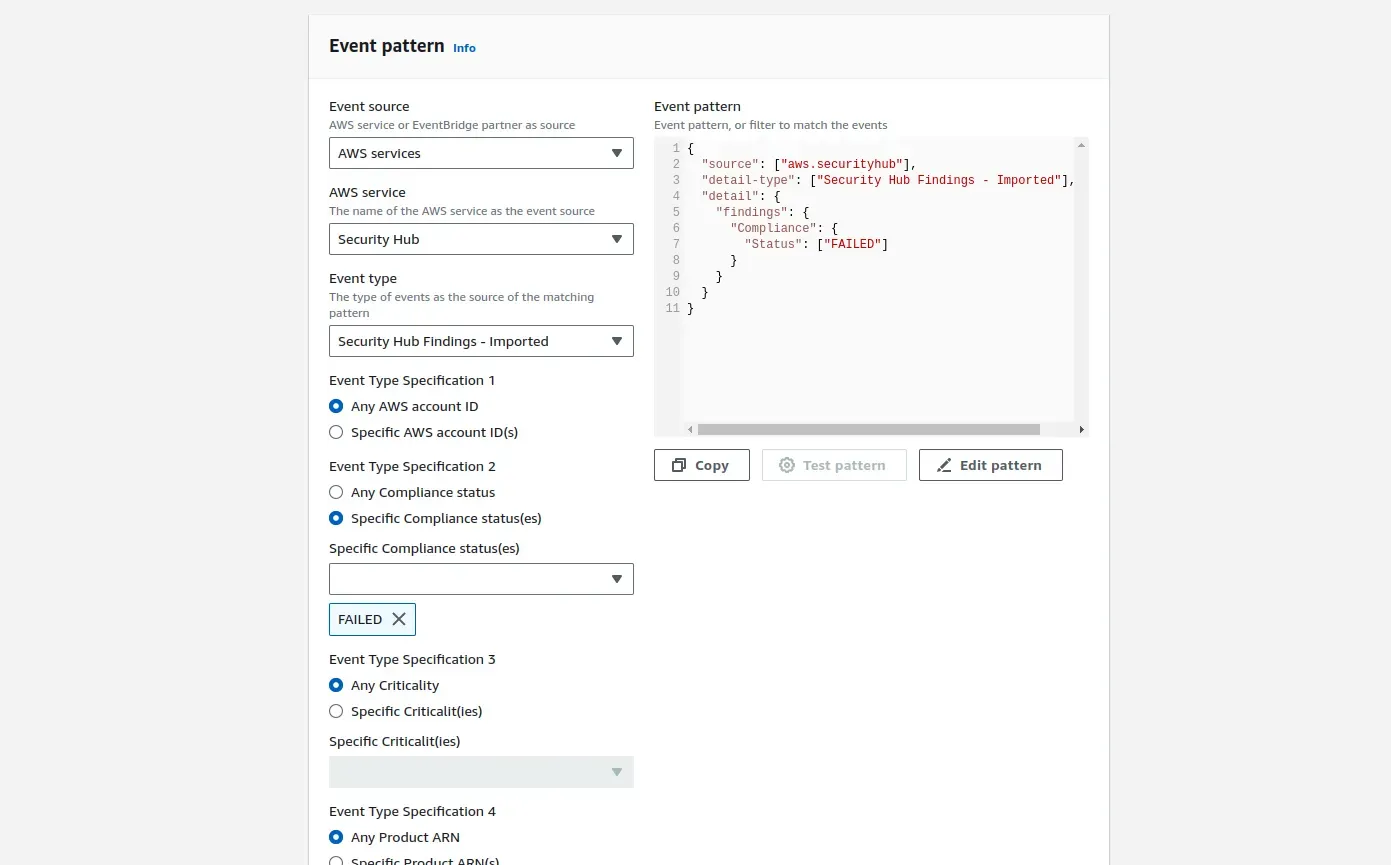
8. Go down to Event pattern

9. Event source: AWS Service

AWS Service: Security Hub

Event type: Security Findings - Imported

Specific compliance status: Failed
1_Ot5W8tizKVWcBtF2BNaWDg.webp

Example Json:

{
"source": ["aws.securityhub"],
"detail-type": ["Security Hub Findings - Imported"],
"detail": {
"findings": {
"Compliance": {
"Status": ["FAILED"]
}
}
}
}

10. Click Next

11. We are going to use a lambda function to prettify our mail output, so we can choose the target as that lambda function or as we are going to set this eventbridge rule as the lambda’s trigger it will be updated as target automatically.

Creating a Lambda function

  1. Go to AWS Console
  2. Go to Lambda
  3. Create a new lambda function
  4. Give the lambda function an appropriate name and choose python 3.8 for now
  5. Copy the below python code
import json
import boto3

def send_sns_notification(message):
sns_topic_arn = "arn:of:your:sns:topic" # Replace with your SNS topic ARN

sns_client = boto3.client('sns')
response = sns_client.publish(
TopicArn=sns_topic_arn,
Message=message,
Subject="AWS Security Hub Finding Alert"
)

def lambda_handler(event, context):
try:
# Extract compliance status and finding ARN
findings = event['detail']['findings']
for finding in findings:
compliance_status = finding['Compliance']['Status']
finding_arn = finding['Id']
standard = finding['Compliance']['AssociatedStandards']
print(f"Compliance Status: {compliance_status}")
print(f"Finding ARN: {finding_arn}")
print(f"StandardID: {standard}")

if compliance_status == "FAILED":
message = f"AWS Security Hub Finding Alert: Compliance Status FAILED\nFinding ARN: {finding_arn}\nStandardID: {standard}"
send_sns_notification(message)

return {
"statusCode": 200,
"body": json.dumps("Compliance status and finding ARN extracted successfully.")
}
except Exception as e:
print(f"Error: {str(e)}")
return {
"statusCode": 500,
"body": json.dumps("Error processing the event.")
}

Note: You have to add “arn of your SNS Topic” in the code
6. As mentioned before choose the trigger of the lambda as the Eventbridge rule that we have previously created.

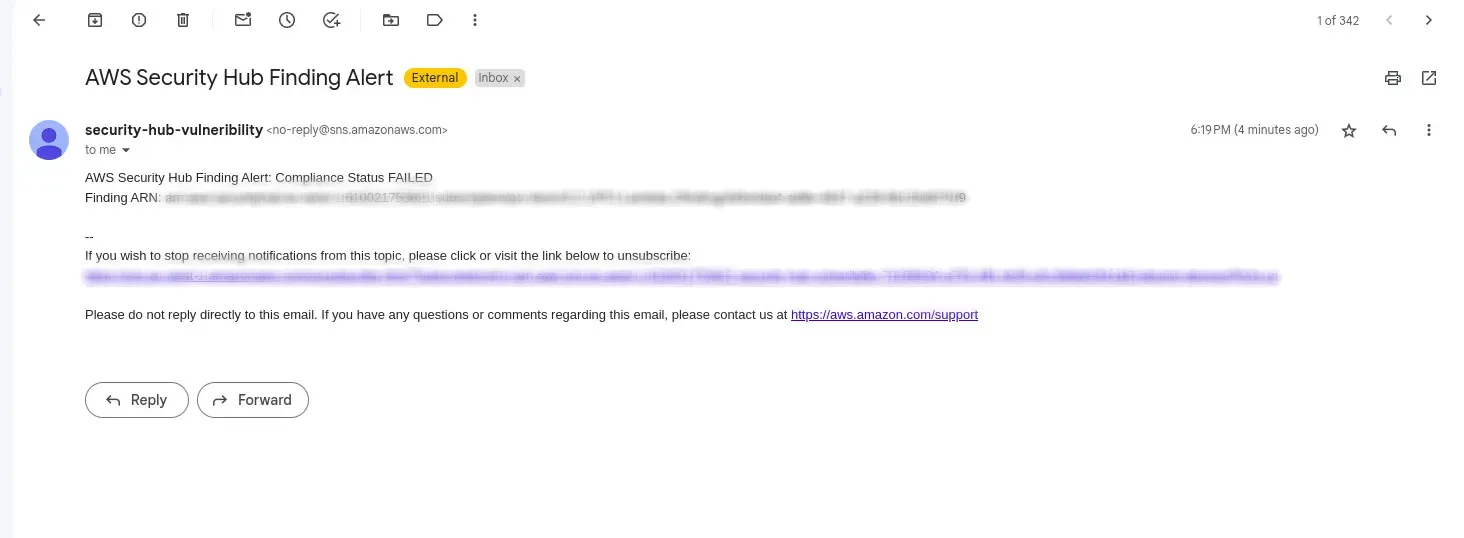
Wola! That’s it. You have created a vulnerability mail alert from Security Hub
1_Ry37rb86rIN5L_HuYVaIoA.webp

Enhance your AWS security seamlessly! Automate vulnerability alerts through AWS Security Hub. Need assistance? Connect with SupportSages for expert guidance. Explore more about securing your AWS environment.
Click here to learn about AWS

  • AWS
  • DevOps

Continue Your Journey With…

DevOps as a Service

DevOps as a Service

Let us do the heavy lifting for you

Promotional banner
Promotional banner

A quick Guide on Wazuh installation in CentOS

A quick Guide on Wazuh installation in CentOS
  • DevOps
logo

Adding multiple target group to a single AWS ECS Service

Adding multiple target group to a single AWS ECS Service
  • AWS
  • DevOps
logo

AWS Cloudtrail Logs to Wazuh

AWS Cloudtrail Logs to Wazuh
  • AWS
  • DevOps
logo

Cloudwatch logs to Wazuh

Cloudwatch logs to Wazuh
  • AWS
  • DevOps
logo

Posts by Rohit S